December 12, 2018
Solved

Does quickbooks payroll e-verify the new applicant?

  • December 12, 2018
  • 2 replies
  • 0 views
Original commenter did not share additional details

Best answer by MichaelDL

Good morning, @tdrumm.


I have some insight on this matter that I'm sure you'll find helpful. QuickBooks Online does in fact have a streamlined enrollment and application process for electronically paying and filing taxes. I'll be more than happy to help you get started with this, just use the steps below:


Enroll to electronically pay and file taxes
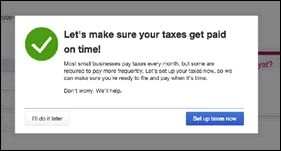
  1. The enrollment process is best completed after you've finished setting up your employees. On the final screen of the Employee Setup module, you'll be given the option to Set up taxes now. If so, skip to Step 3.
  2. Otherwise, begin the process by clicking the Gear icon (⚙) > Payroll Settings > Electronic Services > Set up E-file and E-Pay.
  3. Follow the on-screen instructions to get enrolled. This will require entering some additional business/employee details and federal/state tax information. Once given the option, be sure to select E-pay and E-file.
  4. Now you need only to allow 2-3 business weeks (depending on your state) for the application to be processed. If you'd like to set up your tax payment bank account now, select Get Started.
  5. Enter your bank's name in the search bar, select it, and follow the on-screen instructions to finish the setup.
  6. Lastly, if you choose to sign your authorization forms electronically (E-sign), you'll be asked a few questions to verify your identity.

This information is also available from our detailed guide on the enrollment process, as well as our extensive video tutorial below. If you'd like, skip through to the enrollment process beginning at the 24 minute mark:


With these steps, you'll be enabled and ready to start filing just in time for the new year. Please don't hesitate to get in touch with me here for all of your QuickBooks questions. Thanks for coming to the Community, cheers to a safe and productive day.

2 replies

MichaelDL
MichaelDLAnswer
December 12, 2018

Good morning, @tdrumm.


I have some insight on this matter that I'm sure you'll find helpful. QuickBooks Online does in fact have a streamlined enrollment and application process for electronically paying and filing taxes. I'll be more than happy to help you get started with this, just use the steps below:


Enroll to electronically pay and file taxes
  1. The enrollment process is best completed after you've finished setting up your employees. On the final screen of the Employee Setup module, you'll be given the option to Set up taxes now. If so, skip to Step 3.
  2. Otherwise, begin the process by clicking the Gear icon (⚙) > Payroll Settings > Electronic Services > Set up E-file and E-Pay.
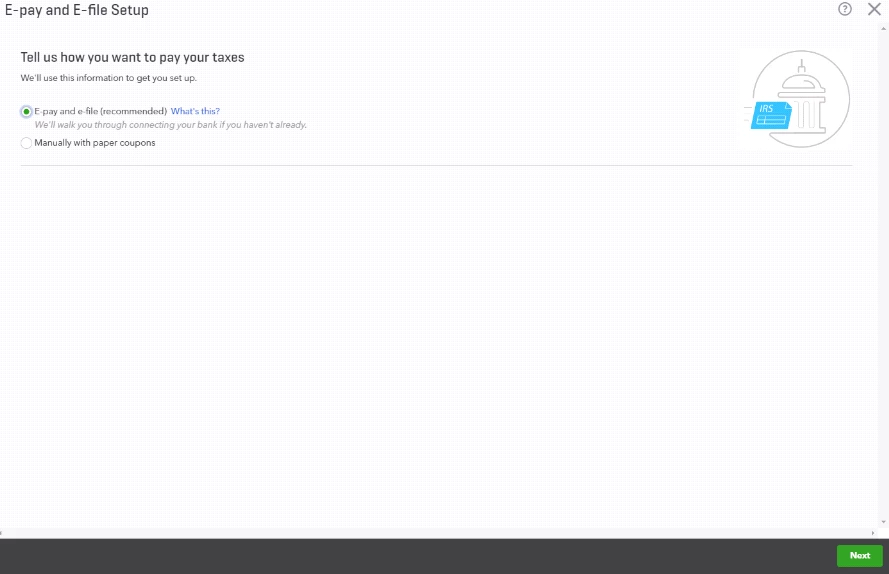
  3. Follow the on-screen instructions to get enrolled. This will require entering some additional business/employee details and federal/state tax information. Once given the option, be sure to select E-pay and E-file.
  4. Now you need only to allow 2-3 business weeks (depending on your state) for the application to be processed. If you'd like to set up your tax payment bank account now, select Get Started.
  5. Enter your bank's name in the search bar, select it, and follow the on-screen instructions to finish the setup.
  6. Lastly, if you choose to sign your authorization forms electronically (E-sign), you'll be asked a few questions to verify your identity.

This information is also available from our detailed guide on the enrollment process, as well as our extensive video tutorial below. If you'd like, skip through to the enrollment process beginning at the 24 minute mark:


With these steps, you'll be enabled and ready to start filing just in time for the new year. Please don't hesitate to get in touch with me here for all of your QuickBooks questions. Thanks for coming to the Community, cheers to a safe and productive day.

February 4, 2020

I have the same question but the answers provided are not related to E-Verify at all.  E-Verify.gov is different than just linking your payroll and e-payment to federal agencies.   Can anyone else confirm if QB connects to the E-Verify system?


JasroV
February 4, 2020

Hi there, @ronnielee.


QuickBooks Online (QBO), does not connect with E-Verify. However, we do have E-File and E-Pay that lets you process and file taxes electronically.


I got you this article to learn more about E-File and E-pay in QBO: Pay and file payroll taxes electronically.


In case you'll want to enroll in E-File and E-Pay, you can follow the steps provided by my colleague MichaelDL above.


You can always count on us if you have any concerns or questions. We're always around to help you anytime. Have a great day!