September 11, 2020
Solved

Employee Tips

  • September 11, 2020
  • 1 reply
  • 0 views

Hello,

Can anyone give me advice on how to handle tipped employees using QBO and QB Payroll?  Is the employer supposed to be having the employees declare those tips and does the employer need to enter those declared tips in QB Payroll?

Thank you!


Best answer by SarahannC

Hello there, dg311.


Let me share with you a few details about handling and recording tips in QuickBooks Online Payroll.


We'll need to determine first what kind of tips you're about to record in your book. If you've given tips to your employee directly through cash, it's the Cash tip that we'll have to enter in QuickBooks. On the other hand, if we added them to your employee's paycheck, we'll have to include the Paycheck tip option in your employee's details. 


Let's check about the difference between cash tips and paycheck tips. Once you've figured out, we can follow these steps to include the type of tip of your employee.  Here's how:


  1. Go to Payroll on the left panel.
  2. Within the Employees tab, find the name of the employee.
  3. In the Employee details, click the Edit icon next to Pay.
  4. In the How much do you pay section, tick the Cash Tip or Paycheck Tip.
  5. Then, Done.


Then, manually record the amount on each employee's paycheck within your QBO account. Let's take a look at this sample screenshot:
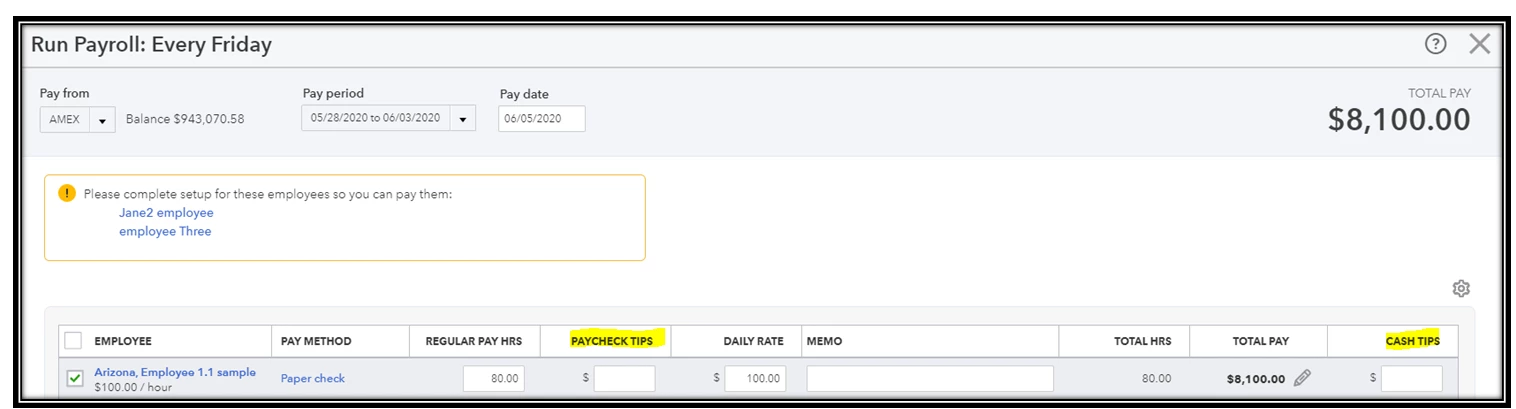
 

For additional details, feel free to read about managing tips and paychecks in QuickBooks Online Payroll. 


Please let me know if you have follow-up questions or need further clarification with this. I'll be around to guide and help you out. Take care and stay safe!


1 reply

SarahannCAnswer
September 11, 2020

Hello there, dg311.


Let me share with you a few details about handling and recording tips in QuickBooks Online Payroll.


We'll need to determine first what kind of tips you're about to record in your book. If you've given tips to your employee directly through cash, it's the Cash tip that we'll have to enter in QuickBooks. On the other hand, if we added them to your employee's paycheck, we'll have to include the Paycheck tip option in your employee's details. 


Let's check about the difference between cash tips and paycheck tips. Once you've figured out, we can follow these steps to include the type of tip of your employee.  Here's how:


  1. Go to Payroll on the left panel.
  2. Within the Employees tab, find the name of the employee.
  3. In the Employee details, click the Edit icon next to Pay.
  4. In the How much do you pay section, tick the Cash Tip or Paycheck Tip.
  5. Then, Done.


Then, manually record the amount on each employee's paycheck within your QBO account. Let's take a look at this sample screenshot:


For additional details, feel free to read about managing tips and paychecks in QuickBooks Online Payroll. 


Please let me know if you have follow-up questions or need further clarification with this. I'll be around to guide and help you out. Take care and stay safe!

dg311Author
September 11, 2020

Hi 


September 11, 2020

Hey dg311. 


Thanks for dropping by this afternoon. I'm happy to see that my colleague was able to provide you with the help you needed. If you have any other questions, we're just a few clicks away.


Thanks again and have a nice weekend.