Thank you for providing a detailed description of your concern, SarahCo. Let's work side-by-side to ensure you can set up your employees retirement plan.
Since your company is providing a contribution to all employees that isn't a match, you'll need to create a different payroll item for each employee and customize it accordingly. I'll guide you on how:
- On the left navigation panel, choose Payroll and Employees.
- Select each employee on the list.
- Choose Start or Edit in the Deductions & Contributions section.
- From the Edit deductions and contribution, click + Add deduction/contribution.
- Select + Add deduction/contribution from the dropdown menu and pick Retirement Plans for the Deduction/contribution type and 401(k) for the Type.
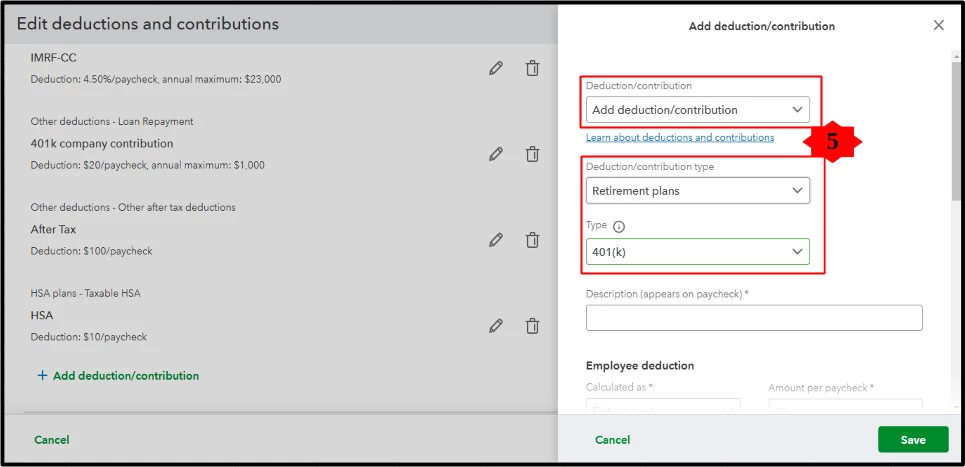
- Scroll down and enter necessary details, including the different Employee deductions and Company contributions.
- Click Save.
- Repeat steps 2 to 7 for the rest of your employees.
I'm adding these articles that will help run your payroll reports to see your employees' current year-to-date data in the future:
Feel at ease to comment down below if you have other questions about 401k retirement plan contributions and deductions. I'll be here to ensure you have all the support you need.

