December 27, 2022
Solved

ENTERING PAYROLL DEDUCTION

  • December 27, 2022
  • 1 reply
  • 0 views

I'm having issues setting up a payroll deduction in QB Desktop 2020.  The state of Colorado has mandated a deduction for sick leave beginning in 2023.  I have set up the deduction in payroll but I can't get it to display in Payroll Review or in any reports.  The deduction is 0.45% of gross pay, paid by the employee, and not to reduce an employee's taxable income.


What am I doing wrong?


Ken  

Best answer by KlentB

I'll point you to the right direction and ensure you'll be able to view that info, Ken.


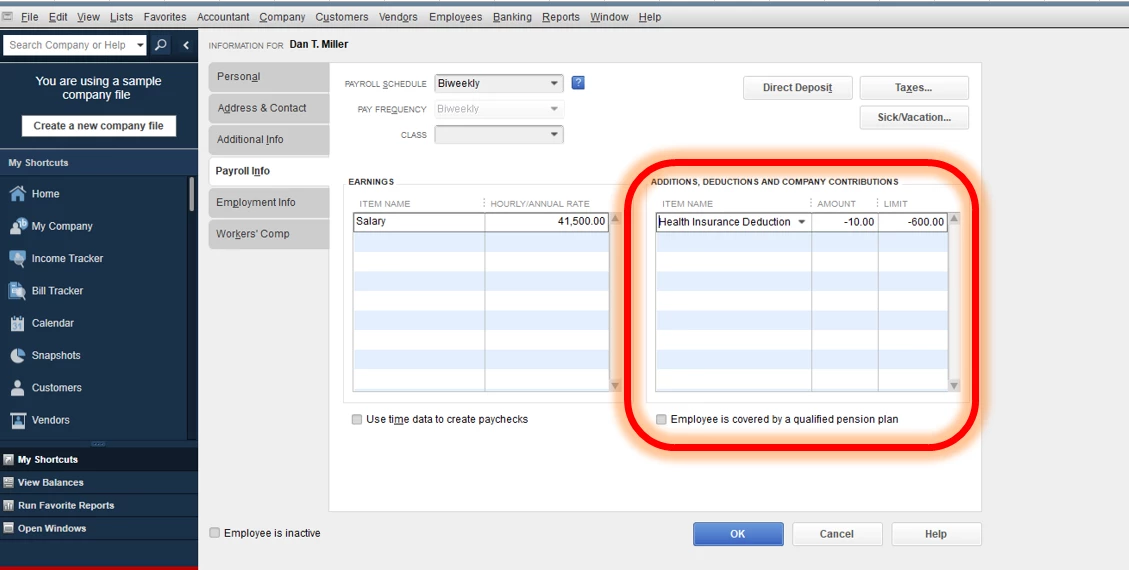
After setting up the payroll deduction, you'll have to assign it to the employee profile. Then, use it in your paychecks so the item will show in the payroll reports. Here's how:


  1. Go to the Employees menu.
  2. Choose Employee Center, then pick an employee.
  3. Click the Edit icon, then select Payroll Info.
  4. From the Additions, Deductions, and Company Contributions section, add the deduction item.
  5. Enter the amount per period and a limit if applicable.
  6. Hit OK.


Once you're ready to run your payroll for the month, don't forget to apply this deduction item when you create direct deposit or paper paychecks. To learn more, feel free to read this article: Create and run your payroll.


Finally, if you need to keep track of employee expenses in QuickBooks Desktop, you can customize the payroll and employee reports.


Keep me posted if you need more help in handling your payroll transactions. I look forward to working with you again, Ken. Have a pleasant day ahead!


1 reply

KlentB
KlentBAnswer
December 27, 2022

I'll point you to the right direction and ensure you'll be able to view that info, Ken.


After setting up the payroll deduction, you'll have to assign it to the employee profile. Then, use it in your paychecks so the item will show in the payroll reports. Here's how:


  1. Go to the Employees menu.
  2. Choose Employee Center, then pick an employee.
  3. Click the Edit icon, then select Payroll Info.
  4. From the Additions, Deductions, and Company Contributions section, add the deduction item.
  5. Enter the amount per period and a limit if applicable.
  6. Hit OK.


Once you're ready to run your payroll for the month, don't forget to apply this deduction item when you create direct deposit or paper paychecks. To learn more, feel free to read this article: Create and run your payroll.


Finally, if you need to keep track of employee expenses in QuickBooks Desktop, you can customize the payroll and employee reports.


Keep me posted if you need more help in handling your payroll transactions. I look forward to working with you again, Ken. Have a pleasant day ahead!

rock451Author
December 28, 2022

KlentB, you are the one!  That worked!  Thanks so much for the info!!!


Ken J

KlentB
December 28, 2022

You make me blush, Ken.


I'm glad that I was able to help you in resolving your concern about payroll deductions. The QuickBooks Community will always be around to lend you a hand any time you need guidance. I hope you have a great day. Happy Holidays!