You're right, @FCN1.
The Federal 940 is annual tax payment. There's a chance the 940 is not scheduled to yearly, thus, you received the overdue alert. Let's ensure the 940 pay schedule is set to Annually. Let me guide you on how to check it in your QuickBooks Desktop (QBDT).
Here's how:
- Go to the Employees menu.
- Select Payroll Center.
- Go to the Pay Liabilities tab.
- From the Other Activities list at the bottom, select the Change Payment Method to open the QuickBooks Payroll Setup.
- Select a scheduled tax payment Federal 940.
- Click Edit.
- Ensure the Payment (deposit) frequency field is set to Annually.
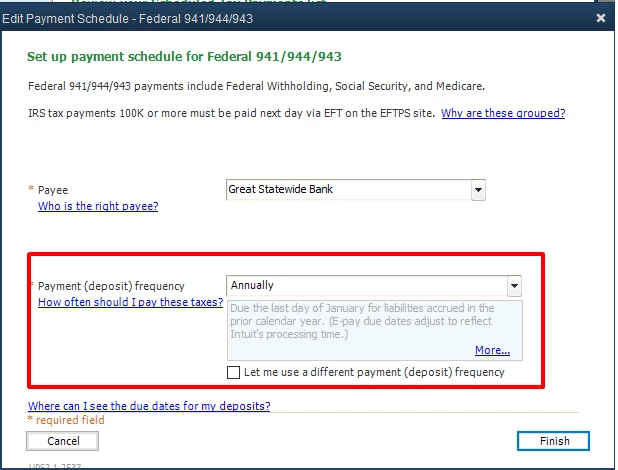
- Click Finish when done.
However, if the payment frequency is already set to annual, it could be the liabilities were paid but were not recorded in your QBDT. Here's an article you can read for additional reference. This link provides detailed information on why scheduled liabilities show overdue: Scheduled liabilities payroll show as overdue or in red.
I also got you this article for reference in case you need to remove a scheduled payroll liability: Remove or delete a scheduled payroll liability.
Know that I'm always here to help you in case you have other concerns or questions in the future. Keep safe and stay healthy!

