January 6, 2021
Solved

Health Insurance (Company Paid)

  • January 6, 2021
  • 1 reply
  • 0 views

Hello everyone,


I just came across this while looking at my payroll liabilities balance report. This time last year, we were setting up Quickbooks Desktop as my new business grew and I hired an employee (my daughter). Long story short, we were going to do health insurance (company paid) and it was deducted out of her very first paycheck. But then from the end of January 2020 through March 2020 (my company worked with an accountant from March 2020 through summer 2020 and she had gotten it worked out so for the remainder of the year it was not deducting health insurance from paychecks so I have no balance from April 2020 - Dec. 2020), it was no longer being taken out of her paychecks because we went a different route and weren't going to do the health insurance (company paid). So I have a balance of course on the reports for Jan 2020 - March 2020, and I was wondering if adjusting them would be ok and it wouldn't mess anything up seeing as this was all 2020, and we are now into a new year.


Thank you for your help in advance! I really appreciate it! And I have learned a lot from this community without a doubt!

Best answer by Rose-A

Let me help you go over to your account and have your balance for Jan-March 2020 corrected, JustinB75.


You can create a liability adjustment to correct the amount and ensure you don't have any balances left for the year 2020.


Here's how:


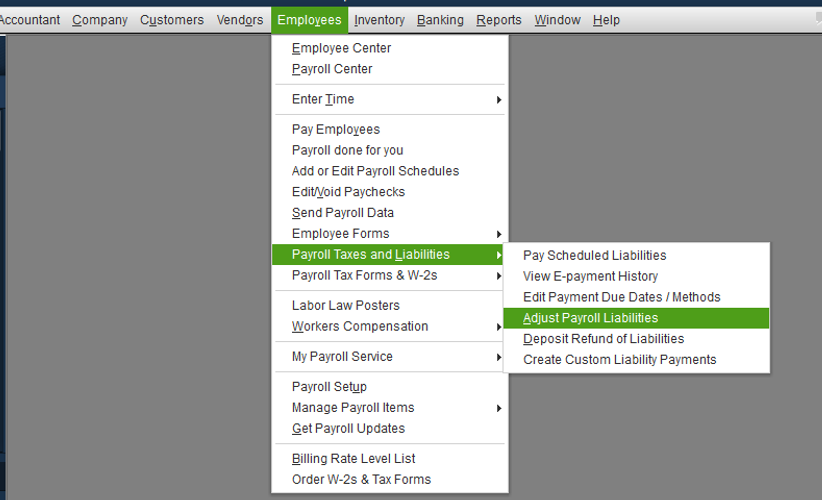
  1. Click Employees at the top menu bar and choose Payroll Taxes and Liabilities.
  2. Tap Adjust Payroll Liabilities.
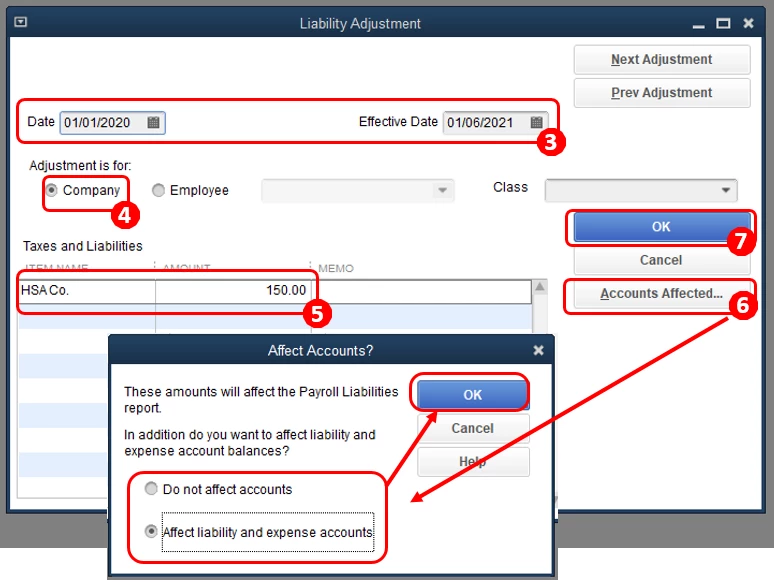
  3. Enter the Date and Effective Date.
  4. Under Adjustment is for, choose Company.
  5. Select the Health Insurance item and enter the Amount.
  6. Tick Accounts Affected and then OK.
  7. Hit OK.

I'd suggest consulting an accountant to ensure your books are accurate and not messing up other data. Your accountant can provide more expert advice regarding an accounting perspective.


For more details about this process, check out this article: Adjust payroll liabilities in QuickBooks Desktop. On the same link, you'll find a write-up about how to correct your year-to-date additions and deductions in QuickBooks.


Additionally, if you need help with removing overdue liabilities, you can refer to this article for the detailed steps and instructions: Enter historical tax payments in QuickBooks Desktop Payroll.


Please let me know how it goes by leaving a comment below. If you have more questions about payroll liabilities or need anything else, don’t hesitate to ask. I’ll be here to help. Have a most pleasant day!

1 reply

Rose-A
Rose-AAnswer
January 6, 2021

Let me help you go over to your account and have your balance for Jan-March 2020 corrected, JustinB75.


You can create a liability adjustment to correct the amount and ensure you don't have any balances left for the year 2020.


Here's how:


  1. Click Employees at the top menu bar and choose Payroll Taxes and Liabilities.
  2. Tap Adjust Payroll Liabilities.
  3. Enter the Date and Effective Date.
  4. Under Adjustment is for, choose Company.
  5. Select the Health Insurance item and enter the Amount.
  6. Tick Accounts Affected and then OK.
  7. Hit OK.

I'd suggest consulting an accountant to ensure your books are accurate and not messing up other data. Your accountant can provide more expert advice regarding an accounting perspective.


For more details about this process, check out this article: Adjust payroll liabilities in QuickBooks Desktop. On the same link, you'll find a write-up about how to correct your year-to-date additions and deductions in QuickBooks.


Additionally, if you need help with removing overdue liabilities, you can refer to this article for the detailed steps and instructions: Enter historical tax payments in QuickBooks Desktop Payroll.


Please let me know how it goes by leaving a comment below. If you have more questions about payroll liabilities or need anything else, don’t hesitate to ask. I’ll be here to help. Have a most pleasant day!

JustinB75Author
January 12, 2021

Thank you for your detailed step-by-step answer. I really do appreciate it and it was very helpful and useful.

January 29, 2021

I am not finding a way to do the payroll liability adjustment in the online product. Is there a way to do that?