December 14, 2023
Solved

How do I change the email address for Payroll Notifications? When I click the gear icon/payroll settings/email notifications/edit, the email address is not accessible.

  • December 14, 2023
  • 2 replies
  • 0 views
the current email address is a former accountant and we need her email address removed and updated to new contact.
Best answer by SheandL

Hello there, @arickelmann.


I'll be glad to walk you through the process of changing the email address for your Payroll Notification since you want to remove the existing one and update it with a new contact. To do so, Here's how:


  1. Go to the Gear icon.  
  2. Under Your Company, select Payroll Settings.
  3. Find the Contact Information and click the pencil icon to edit. 
  4. Update the Email address, then click Save. 
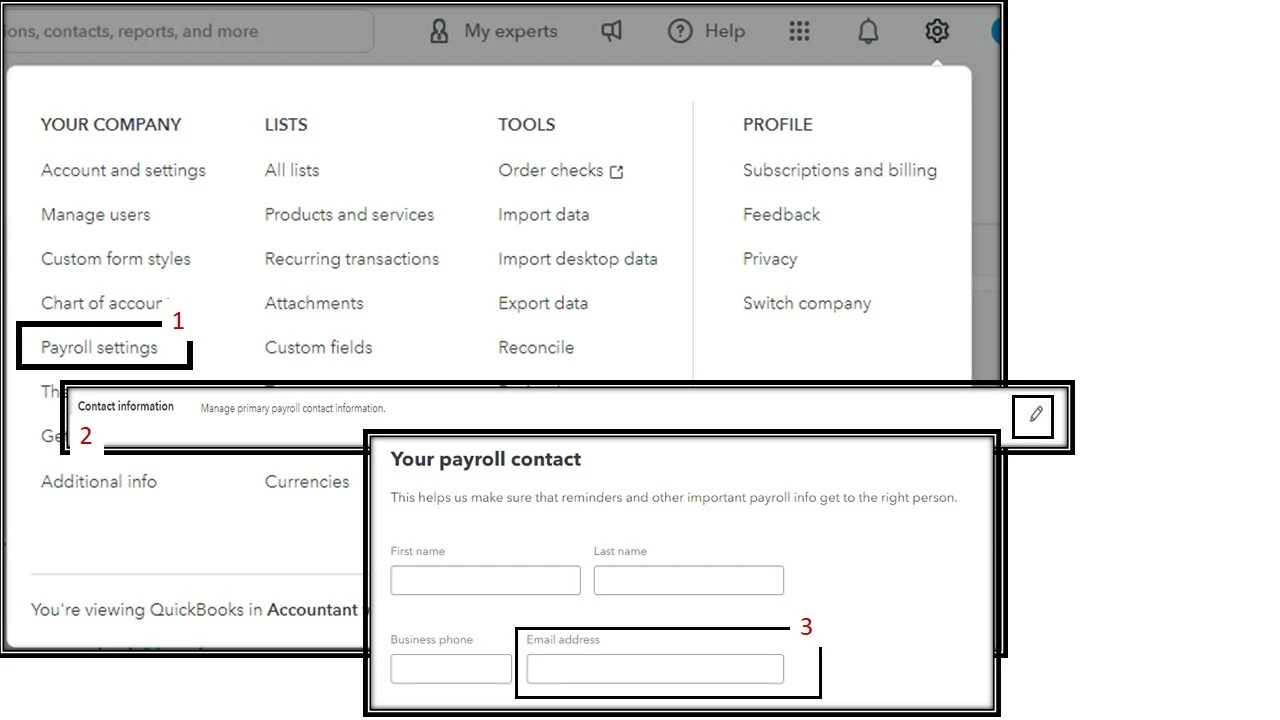


After doing the steps mentioned, the email notification will be updated with the latest contact you entered.


For future reference about tracking works with your customer, you can visit this article: Manage and track your work with client requests, projects, and tasks.


If you have further questions about payroll notification, feel welcome to always visit us again here in the Community.


2 replies

SheandLAnswer
December 14, 2023

Hello there, @arickelmann.


I'll be glad to walk you through the process of changing the email address for your Payroll Notification since you want to remove the existing one and update it with a new contact. To do so, Here's how:


  1. Go to the Gear icon.  
  2. Under Your Company, select Payroll Settings.
  3. Find the Contact Information and click the pencil icon to edit. 
  4. Update the Email address, then click Save. 


After doing the steps mentioned, the email notification will be updated with the latest contact you entered.


For future reference about tracking works with your customer, you can visit this article: Manage and track your work with client requests, projects, and tasks.


If you have further questions about payroll notification, feel welcome to always visit us again here in the Community.

July 24, 2024

Can you update this to send the payroll notifications to more than one email?  I have one client that gets payroll notifications and I do too.  That setting says "you and your firm".  I have another client that only I (accountant) get the payroll notifications.  That setting says "you".  There is no option in the box on how to change this.

July 24, 2024

Thanks for getting involved with this thread, taxnotarysolution.


I can certainly understand how an ability to add more than one email address for payroll notifications could be useful and have submitted a suggestion about it as of today.


You can also submit your own feature requests while signed in.


Here's how:


  1. Use the Gear icon, then go to Feedback.
  2. Enter your suggestion(s) in the Have feedback? window.
  3. If necessary, attach a file with your Camera icon.
  4. Select Next.


Your feedback's definitely valuable to Intuit. It will be reviewed by our Product Development team and considered in future updates. You can stay up-to-date with the latest news about your product by reviewing Intuit's Product Updates webpage.


For the time being, your client can add their own email for payroll notifications by using the steps in SheandL's post.


Please don't hesitate to send a reply if there's any additional questions. Have a great Wednesday!

March 28, 2025

It will not let me change the email address, see screen shot, there is no place to do that. 

March 28, 2025

Agreed. I still can’t figure out why some of my clients we both get the notifications and others only go to me. It’s so frustrating!