January 16, 2024
Solved

How do i print a 2023 W-2 on a 2 part form?

  • January 16, 2024
  • 1 reply
  • 0 views

I have the Enhanced payroll desktop version, and under file forms there is only 1 W-2 per page

Best answer by MadelynC

I'd be happy to assist you in printing your 2023 W-2 on a 2-part form, @PresCab476.


Before we proceed with the troubleshooting, could you please let me know where you purchased your W-2 paper? Did you buy it from QuickBooks or from an outside source?


If you've placed an order with our company, you have the option to print your W-2 form on 3 or 4-part perforated paper.


Please know that when printing tax forms using QuickBooks Desktop Enhanced Payroll, it’s essential to update both QuickBooks and the payroll tax table. This process can help optimize your system and improve features. I'm glad to guide you through the steps to complete this update.


To update QuickBooks Desktop to the latest release:
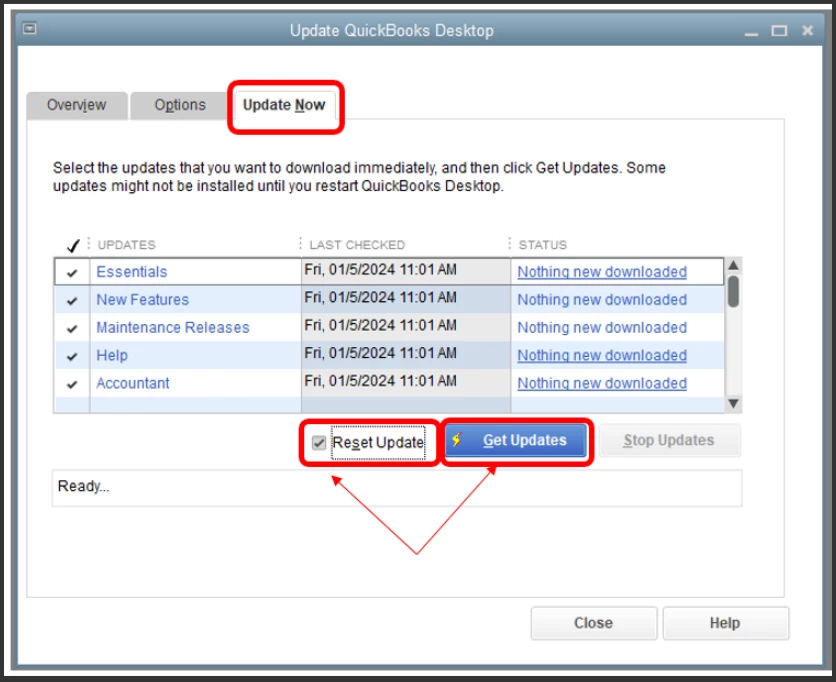
 

  1. Go to the Help menu and select Update QuickBooks Desktop.
  2. Click Update Now, then select the Reset Update checkbox.
  3. Select Get Updates.
  4. Close and reopen QuickBooks afterward.


To get the latest tax table:


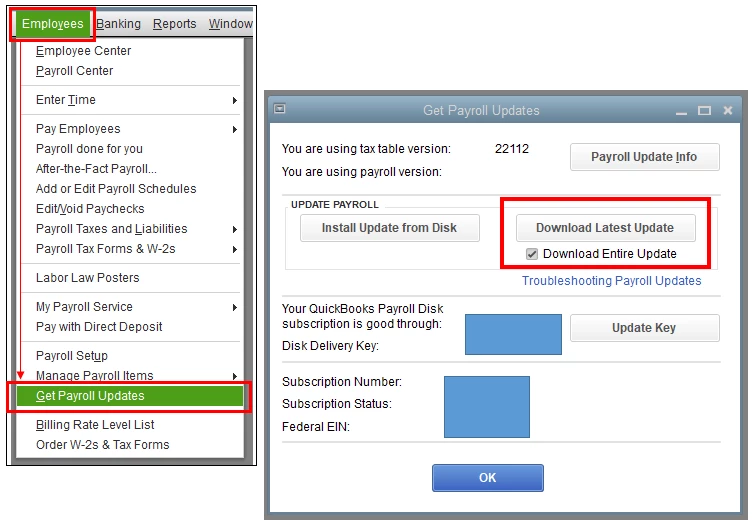
  1. Go to Employees, then select Get Payroll Updates.
  2. Click Download Entire Update.
  3. Select Update. An informational window appears when the download is complete.


Once done, try to print your W-2 on sample paper to check. If the issue persists, you may need to review your printer settings.


If you invite your employees to use QuickBooks Workforce, they can also view and print their own W-2 copies for the current year and previous years when they need to.


If you need further assistance managing your payroll tax forms, you can inform me by leaving comments below. I’ll be here to answer them for you. Thanks for dropping by and take care always, @PresCab476.

1 reply

MadelynCAnswer
January 16, 2024

I'd be happy to assist you in printing your 2023 W-2 on a 2-part form, @PresCab476.


Before we proceed with the troubleshooting, could you please let me know where you purchased your W-2 paper? Did you buy it from QuickBooks or from an outside source?


If you've placed an order with our company, you have the option to print your W-2 form on 3 or 4-part perforated paper.


Please know that when printing tax forms using QuickBooks Desktop Enhanced Payroll, it’s essential to update both QuickBooks and the payroll tax table. This process can help optimize your system and improve features. I'm glad to guide you through the steps to complete this update.


To update QuickBooks Desktop to the latest release:


  1. Go to the Help menu and select Update QuickBooks Desktop.
  2. Click Update Now, then select the Reset Update checkbox.
  3. Select Get Updates.
  4. Close and reopen QuickBooks afterward.


To get the latest tax table:


  1. Go to Employees, then select Get Payroll Updates.
  2. Click Download Entire Update.
  3. Select Update. An informational window appears when the download is complete.


Once done, try to print your W-2 on sample paper to check. If the issue persists, you may need to review your printer settings.


If you invite your employees to use QuickBooks Workforce, they can also view and print their own W-2 copies for the current year and previous years when they need to.


If you need further assistance managing your payroll tax forms, you can inform me by leaving comments below. I’ll be here to answer them for you. Thanks for dropping by and take care always, @PresCab476.