
Solved
How do you change the pay period in on-line payroll? They are now set mid-month to mid-month and i want them from the 1st to 31st.
Original commenter did not share additional details


I appreciate you raising your query here in the Community forum.
Before anything else, are you referring to your employees' pay period schedule? If so, I have here some insights to share about your query. In QuickBooks Online (QBO) Payroll, although you can change your payroll schedule to Twice a month, however, it's not possible to set the dates to the 1st and 31st of the month. You can only set the payday period to 20 days between the 1st and the 2nd period.
Let me guide you through the steps on how to change your pay schedule:
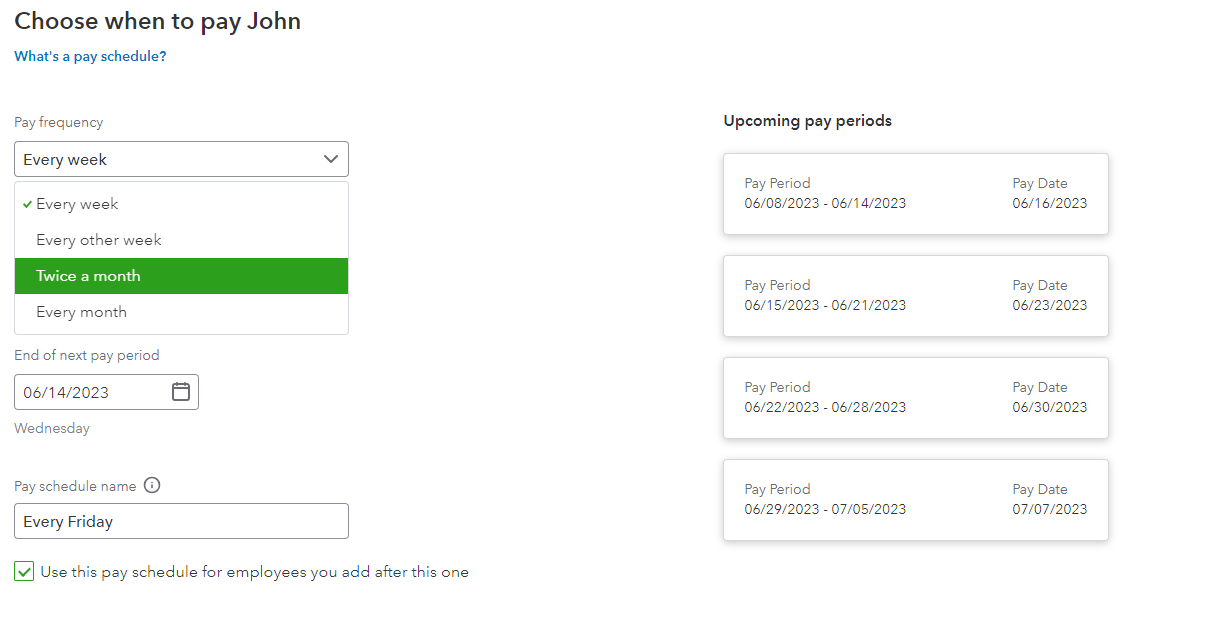
For detailed information, kindly visit: Set up and manage payroll schedules.
Moreover, I'll also share this article that can serve as your reference if you want to learn how to set up local tax withholding for your company and employees in QuickBooks: Set up local taxes in QuickBooks Online Payroll.
However, if you meant something else, feel free to leave a reply. The Community team always has your back. Have a good one.
Enter your E-mail address. We'll send you an e-mail with instructions to reset your password.