January 2, 2019
Solved

How to add S-corp owner's health and life insurance to wages

  • January 2, 2019
  • 1 reply
  • 0 views

I have S Corp paid health insurance set up to affect Federal and State taxes, but on the W-2 this amount is only showing up under Federal Wages, not State.  I am having to manually override the State wages for all of my clients.  Why isn't this working?

Best answer by PreciousB

Thanks for visiting the Community, Bethyde.


I can help you make sure that the S-Corp medical and life insurance payroll item affects the Federal and State taxes in the W-2 form.


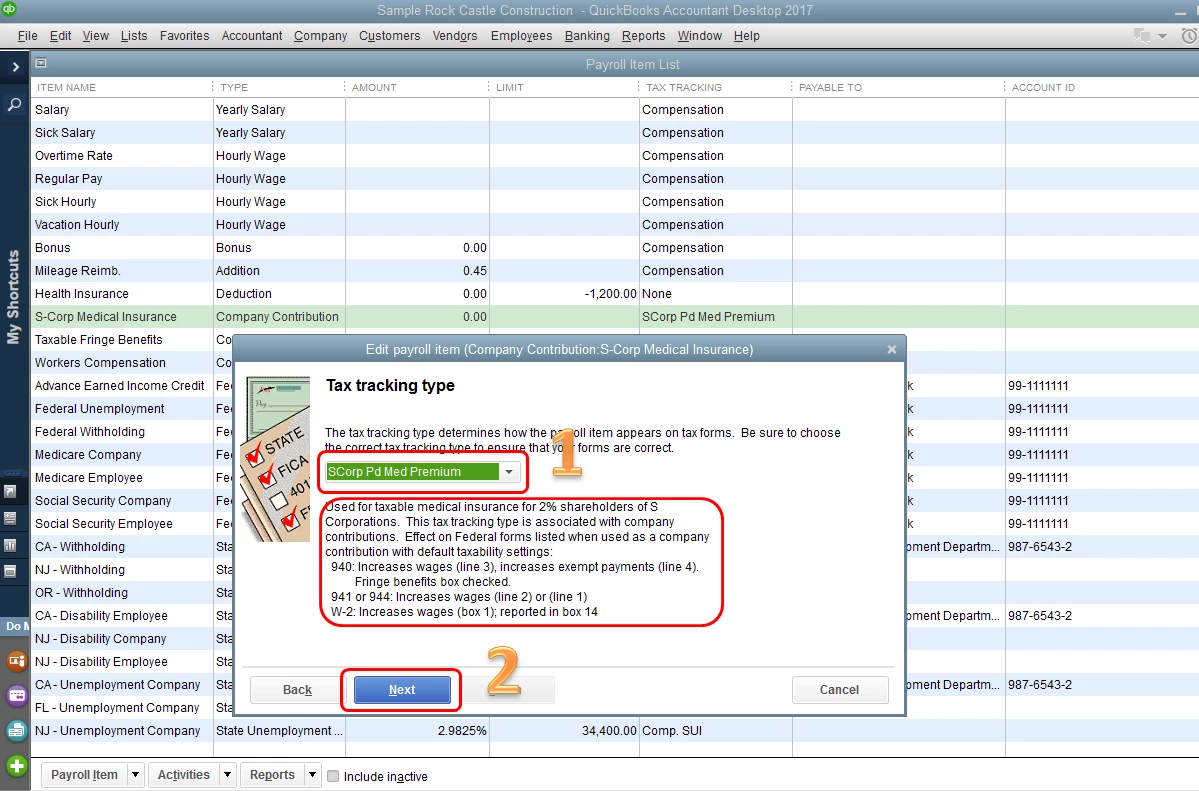
If you are a 2% shareholder and offer the same medical insurance plan to all your employees, the tax tracking type typically used for this payroll item is "S-Corp Pd Med Premium". However, if the 2% shareholders have a different plan from the other employees, or do not offer the plan to their employees at all, the tax tracking type typically used for this is "Fringe Benefits". This article will give you more details: How to set up S-corporation medical payroll items.


First, ensure that you're using the correct tax tracking type. This will determine how the item should affect the tax forms or its taxability. Based on the tax tracking type, QuickBooks will also automatically selects the taxes that are almost always affected by this payroll item.


Here's how:

  1. Click the Lists menu at the top, then choose Payroll Item List.
  2. Double-click the S-Corp payroll item.
  3. Click Next twice and verify that you're using the correct tax tracking type.
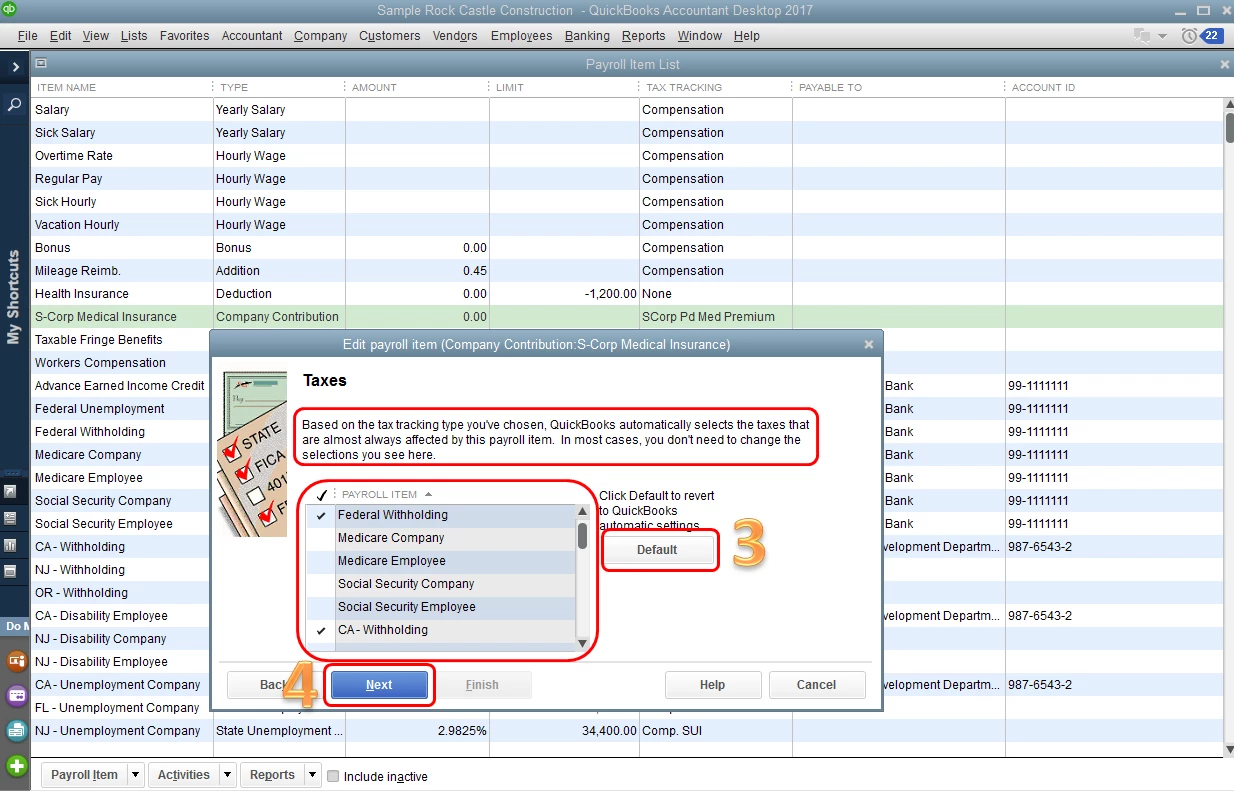
  4. Click Next and check if the taxes selected are correct.
  5. Select Next until Finish.

The screenshots below show these steps as well.


If you need to change the selections in the Taxes screen, I'd suggest consulting your accountant or tax advisor for assistance. You can also click the Default button to revert QuickBooks automatic settings.


Once done, please try creating the W-2 form again.


That should help you affect the State taxes in the W-2 form. I'd appreciate if you can update me on how it goes. I'll be here if there's anything else you need.

1 reply

PreciousB
PreciousBAnswer
January 2, 2019

Thanks for visiting the Community, Bethyde.


I can help you make sure that the S-Corp medical and life insurance payroll item affects the Federal and State taxes in the W-2 form.


If you are a 2% shareholder and offer the same medical insurance plan to all your employees, the tax tracking type typically used for this payroll item is "S-Corp Pd Med Premium". However, if the 2% shareholders have a different plan from the other employees, or do not offer the plan to their employees at all, the tax tracking type typically used for this is "Fringe Benefits". This article will give you more details: How to set up S-corporation medical payroll items.


First, ensure that you're using the correct tax tracking type. This will determine how the item should affect the tax forms or its taxability. Based on the tax tracking type, QuickBooks will also automatically selects the taxes that are almost always affected by this payroll item.


Here's how:

  1. Click the Lists menu at the top, then choose Payroll Item List.
  2. Double-click the S-Corp payroll item.
  3. Click Next twice and verify that you're using the correct tax tracking type.
  4. Click Next and check if the taxes selected are correct.
  5. Select Next until Finish.

The screenshots below show these steps as well.


If you need to change the selections in the Taxes screen, I'd suggest consulting your accountant or tax advisor for assistance. You can also click the Default button to revert QuickBooks automatic settings.


Once done, please try creating the W-2 form again.


That should help you affect the State taxes in the W-2 form. I'd appreciate if you can update me on how it goes. I'll be here if there's anything else you need.


BethydeAuthor
January 2, 2019

I have done everything right.  It will not add this amount into the State wages on the W-2.

PreciousB
January 2, 2019

Thanks for your quick response, Bethyde.


When recreating the W-2 form, please click the Start New Form button. This will ensure that the changes applied in the payroll item will reflect on the tax form. I've attached a screenshot below for your visual point of reference.


If it's still doing the same thing, please share a screenshot for the Taxes screen of the S-corp payroll item.


Please let me know how this turns out. I'm right here if you need more assistance.