October 24, 2022
Solved

How to change the pay rate for an hourly person to become a salaried individual with three months remaining in the calender year?

  • October 24, 2022
  • 1 reply
  • 0 views
The hourly rate is $22/hour and the annual salary is $$60,000 pro-rated over the remaining three months of the calendar year or $15,000.
Best answer by Kevin_C

I've got your back, @lenw1.


Thanks for dropping by the Community. I'm here to provide you with the steps to change your employees' pay rate from hourly to annually in QuickBooks Online (QBO).


We can change the pay types of your employees to update them to an annual-based salary. But we still have to input the actual annual wage because the system automatically figures out the yearly amount and gives the correct rate for the rest of the months.


  1. Go to the Payroll menu, then select the Employees tab.
  2. Select your employee.
  3. Under Pay types, click the Edit button.
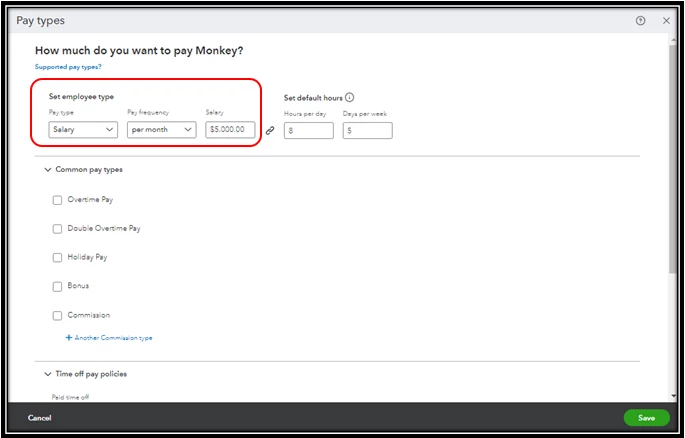
  4. From the Pay type dropdown, choose Salary.
  5. Select per year under the Pay frequency.
  6. Enter $60,000 in the Salary field.
  7. Edit other necessary fields.
  8. Once done, select Save.


On the other hand, you can also set up the pay types of your employees with a monthly salary of $5,000. See the screenshot below for an example.
 

For more information about this process, please refer to this article: Add or change pay types.


In addition to this, you can also pull up a variety of payroll reports in QuickBooks. This will give you a closer look at your employee's total wages, deductions, and tax information in a certain period. For the complete list of available payroll reports and how to pull them up, kindly refer to this article: Run payroll reports.


I'd like to hear how you're doing after following the steps above. Please add a reply below if you need assistance with your other payroll concerns. It's always my pleasure to help you out again.


1 reply

Kevin_CAnswer
October 24, 2022

I've got your back, @lenw1.


Thanks for dropping by the Community. I'm here to provide you with the steps to change your employees' pay rate from hourly to annually in QuickBooks Online (QBO).


We can change the pay types of your employees to update them to an annual-based salary. But we still have to input the actual annual wage because the system automatically figures out the yearly amount and gives the correct rate for the rest of the months.


  1. Go to the Payroll menu, then select the Employees tab.
  2. Select your employee.
  3. Under Pay types, click the Edit button.
  4. From the Pay type dropdown, choose Salary.
  5. Select per year under the Pay frequency.
  6. Enter $60,000 in the Salary field.
  7. Edit other necessary fields.
  8. Once done, select Save.


On the other hand, you can also set up the pay types of your employees with a monthly salary of $5,000. See the screenshot below for an example.


For more information about this process, please refer to this article: Add or change pay types.


In addition to this, you can also pull up a variety of payroll reports in QuickBooks. This will give you a closer look at your employee's total wages, deductions, and tax information in a certain period. For the complete list of available payroll reports and how to pull them up, kindly refer to this article: Run payroll reports.


I'd like to hear how you're doing after following the steps above. Please add a reply below if you need assistance with your other payroll concerns. It's always my pleasure to help you out again.