

January 4, 2023
Question

How to put billable time on an invoice if using QuickBooks Time.

  • January 4, 2023
  • 1 reply
  • 0 views

Our company sometimes does consulting work for law firms. These projects are done on a time and material basis. Most of our other projects are fixed cost. When submitting invoices to the law firms, they want to see itemized time entries. This looks like the following:



We have several employees whose time is billed out at individual rates different from their pay rates. These rates don't vary between projects or clients, just between the individual employees based on seniority, education level,  expertise, etc. Historically, I have prepared these manually in a separate document template and then I created an equivalent invoice with just the total for accounting purposes in QuickBooks Online. This is a pain though, and I would like to do this all in QB Online if possible. However when I try to import billable time on the invoice creation screen, the rate is always zero. See screenshot below.



When we originally started using QuickBooks Online and I set up employees, I remember there being a field on their employee information screen that allowed me to input a billable rate (example from the forums below). I can't find this screen again though. At the time we weren't using Payroll or QB Time (T-Sheets), just QB Online.
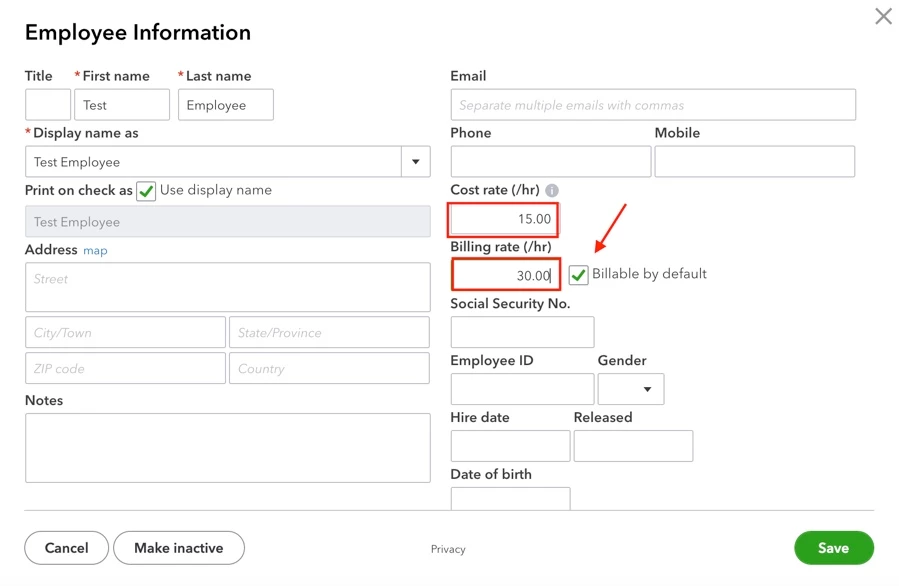


From what I can gather talking to QB support and digging around on the forums, because we are now using QB Time and Payroll, this isn't really possible. The employee billable rate only works if I'm using the more cumbersome (for us) time functionality in QB Online and NOT QB Time. This seems like a gap in the overlap or interaction between the two products. 


Is this a correct understanding? 


Whenever I call support I just get passed back and forth between the Online and Time teams with each saying it is the other side's problem or fault.


1 reply

JaeAnnC
January 4, 2023

Thanks for coming here with your concern, @SMHDTX. Let me show you how we can invoice customers in QuickBooks Online (QBO) for billable hours using QuickBooks Time (QBT).


After you've created Projects, you can bill customers for specific project-related expenses, including timesheets. 


First, let's turn on the billable expenses feature to enter billable time by job in QBO. Here's how: 


  1. Go to the Gear icon and select Account and settings.
  2. Click the Expenses tab.
  3. Select the Bills and expenses section to expand it, and turn on the switch for Make expenses and items billable.
  4. Please click Save and then Done.


Once done, your employees can track their time directly to the project we set up. Ensure to approve and export those timesheets to show them in your projects. 


Now that we've made the timesheets billable, let's create an invoice for them. To do that:


  1. Go to Projects and select the project.
  2. Click Add to project, then select Invoice
  3. Select the Customer.
  4. The billable timesheets will appear in the Add to Invoice pane. Click Add to all the billable time you want to include in the invoice.
  5. Fill out all other necessary information and click Save and close.


Moreover, we can enter an employee's billable hourly rate by clicking the Add to Project and selecting Time.


For more detailed information, I'll be providing you with this article: Invoice customers for project expenses in QuickBooks Online.


In QB Time, we can generate project reports to assist job costing by displaying the total hours tracked against each job or customer, as well as which team members worked on each one. 


Please let us know in the comment section below if you have further clarifications about entering a billable time on a project. This way, we can address your concerns right away so you can get back to business seamlessly. Take care, and have a good day!

SMHDTXAuthor
January 4, 2023

JaeAnnC,


Thanks for the response. However, as described in my question, this process doesn't work. The setting "Make expenses and items billable" was already enabled. As shown in the second screenshot in my question, whenever I import billable time to my invoices, the "Rate" field and total cost for that line item is $00.00. Furthermore, I can't find where I would need to go in settings or employee information to ensure that each employee has a correct "billable rate" set.

January 4, 2023

Glad to have you here in the Community again, @SMHDTX. Let's work this out so you can get through this situation and ensure each employee has a correct billable rate in QuickBooks Online (QBO).


In QuickBooks Online, you can set the rate of your employee in the project ahead of time. This way, when they begin to work on the project, you won't have to worry about having zero amount when creating the invoice for the work. I'll input the steps below so you can proceed. Here's how:


  1. Access your QuickBooks Online company.
  2. On the left navigational bar, go to the Projects tab.
  3. In the Projects page, click the Hourly cost rate at the top-right corner.
  4. Select the employees that you'd like enter the rate, and then click the Pencil icon beside it.
  5. Enter the cost rate, and then click Save.
  6. Once its set, press Done.


If the issue persists, I'd recommend reaching out to our QuickBooks Customer Care Team. This way, they can assign a representative to check your account and determine the root cause of the issue. See this article for further guidelines: QuickBooks Online Support.


In addition, please see this article to help you handle your projects in QBO: Set up and create projects in QuickBooks Online.


You can also check this page to learn how you can track a project's profitability in QuickBooks: Track hourly labor costs and profitability by project in QuickBooks Online.


Feel free to get back to me anytime if you need further assistance with this, @SMHDTX. I'll be more than happy to help you out again. Take care, and have a nice day!