Welcome to the Community, @FAD.
To run this employee's payroll without withholding any taxes, he must be set up as tax-exempt in QuickBooks Desktop (QBDT). This can be done by going to his Payroll Information.
Here's how:
- Go to the Employees menu at the top to get to the Employee Center.
- Double-click the name to open this information.
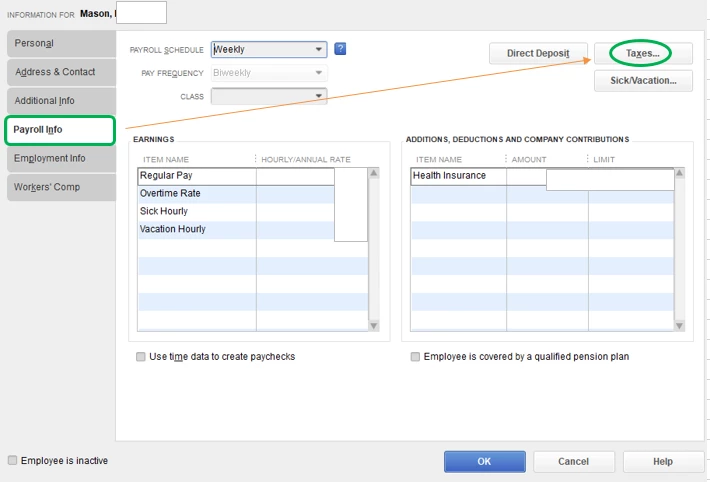
- Select the Payroll Info tab at the left pane, then tick the Taxes option.
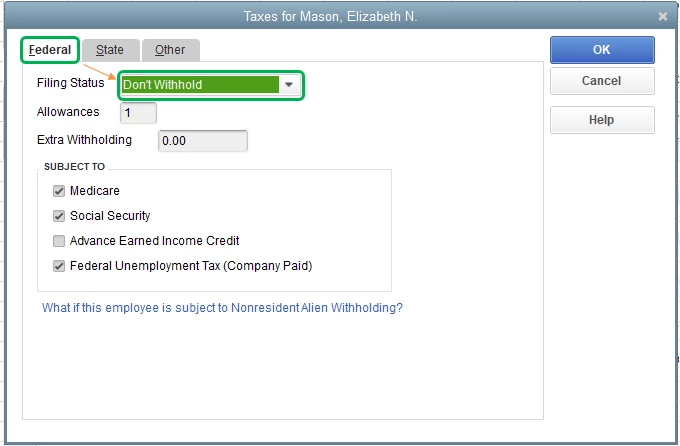
- On the Federal tab, pick Don't Withhold in the Filing Status drop-down.
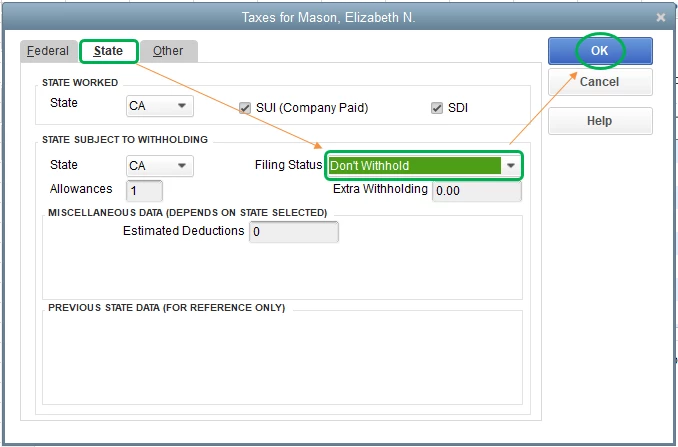
- Proceed to the State tab and choose Don't Withhold again Filing Status drop-down
- Hit OK to complete the process.
Once done, run his payroll to double-check. For more information, consider checking out these articles:
Please let me know if you have any other concerns or issues in the comment section below. I'm more than happy to help. Have a great rest of the day!


