June 18, 2022
Solved

I am using Projects in Quickbooks Online. I have subcontractors that use Quickbooks Time to track their time. Where can I load the hourly cost to show in Projects?

  • June 18, 2022
  • 1 reply
  • 0 views
There is a place for entering Hourly cost for employees but not subcontractors.  I also have rates in Quickbooks time for the subcontractors, but they are not coming across to QBO.
Best answer by Kevin_C

Thanks for sharing your concern with us, @JasperContracting. I'll share some details about tracking hourly rates for projects in QuickBooks Online (QBO).


You're right that we can track hourly cost rates for employees in QBO. Accordingly, the option to track hourly costs for subcontractors is only available by going to the vendor's profile section.


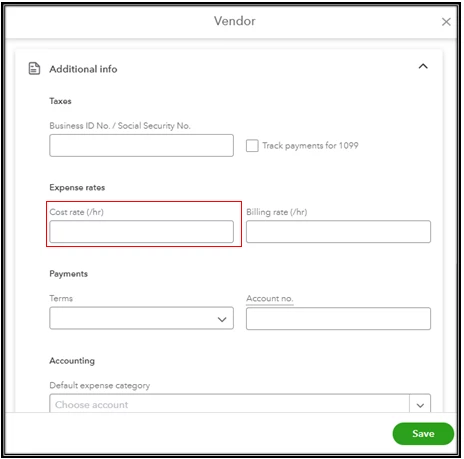
You'll want to enter the cost rate in the vendor setup in QBO to show it to your project. Here's how you can simply update your vendor's profile:


  1. Click Expenses on the left pane.
  2. Choose the Vendors tab.
  3. Click on the vendor's name you want to edit.
  4. Click Edit in the upper-right corner.
  5. The Vendor Information window will pop-up. Scroll down until the Additional info section.
  6. Enter the cost rate, then select Save.


In addition to this, I'm adding this article that you can also seek self-help video tutorials on our video tutorials for QBO. This contains details on how to efficiently manage your QBO account.


Keep me posted if you still have questions or concerns with managing your projects in QBO. I'll be here to lend a helping hand. Have a great day ahead!


1 reply

Kevin_CAnswer
June 18, 2022

Thanks for sharing your concern with us, @JasperContracting. I'll share some details about tracking hourly rates for projects in QuickBooks Online (QBO).


You're right that we can track hourly cost rates for employees in QBO. Accordingly, the option to track hourly costs for subcontractors is only available by going to the vendor's profile section.


You'll want to enter the cost rate in the vendor setup in QBO to show it to your project. Here's how you can simply update your vendor's profile:


  1. Click Expenses on the left pane.
  2. Choose the Vendors tab.
  3. Click on the vendor's name you want to edit.
  4. Click Edit in the upper-right corner.
  5. The Vendor Information window will pop-up. Scroll down until the Additional info section.
  6. Enter the cost rate, then select Save.


In addition to this, I'm adding this article that you can also seek self-help video tutorials on our video tutorials for QBO. This contains details on how to efficiently manage your QBO account.


Keep me posted if you still have questions or concerns with managing your projects in QBO. I'll be here to lend a helping hand. Have a great day ahead!

June 20, 2022

I was able to figure it out.  If you put the cost rate in the vendor setup in QBO, it will apply that rate to the project reports.

August 29, 2023

I did this and it doesn;t automatically add my subs time to projects even thought they're in qb time (Tsheets). I have tried everything. Areyou manually putting time in?