Glad to have you here, Lisa2112.
I can walk you through how to correct your employee's W4 information in QuickBooks Online (QBO).
Here's how:
- Go to the Payroll menu and select Employees.
- Click the name of the employee, then click the Pencil icon beside Pay.
- Go to Step2 or the part where the employee's withholding or W4 are set up, then click the Pencil icon underneath it.
- Scroll down to Federal withholding and click the link for Need a blank W-4 form.

- Enter the correct information.
- Click Save.
Check out this article about managing employee details for further guidance: Edit or Change Employee Info in Payroll.
Here's an article you can read to learn more: What’s changing with the Federal W-4?
To know the items that will post in Box:2c here's a great article that you can read: W2 form boxes explained.
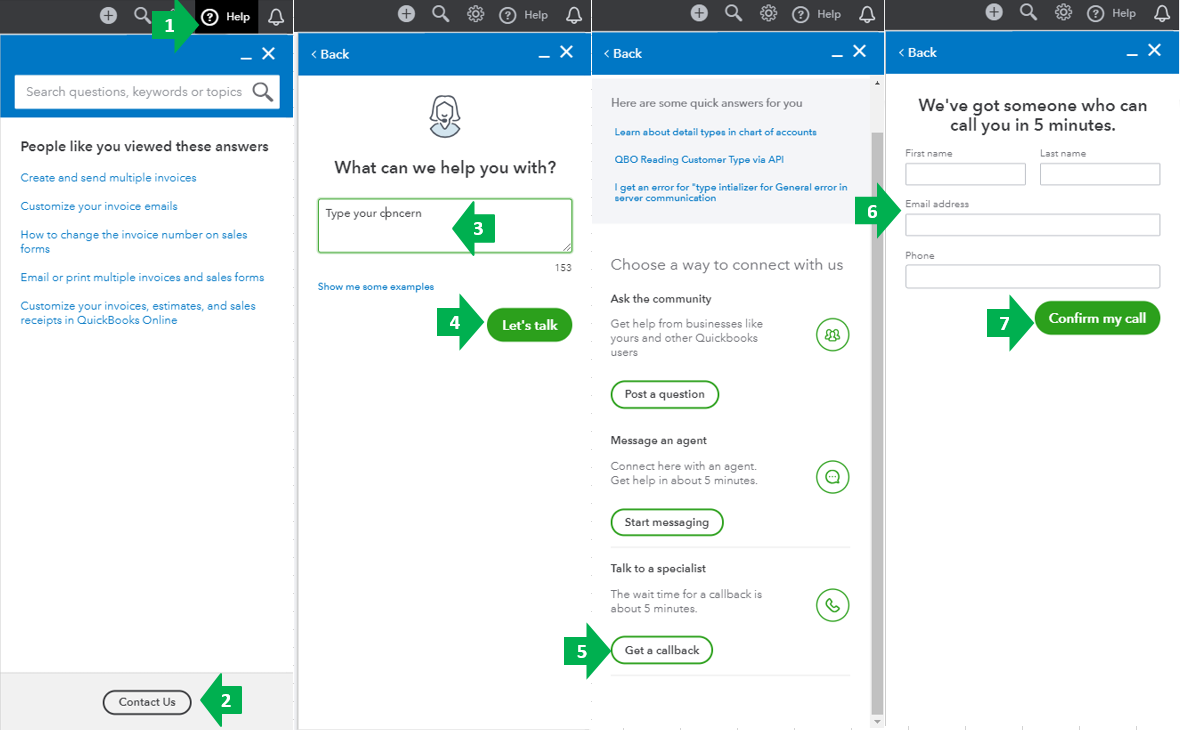
If you're still unable to correct it, I suggest contacting our QuickBooks Care Team. This needs further investigation so our team can take a closer look and come up with a solution to change the W4 information.
Here's how:
- Go to the Help menu at the upper right.
- Select Contact Us.
- Enter your concern.
- Click Let’s talk.
- Choose Get a callback.
- Type in your contact info.
- Select Confirm my call.
You can check out this article for our most updated contact information: Support hours and types.
I'd also like to give you these articles for additional information and reference:
Anything else you need help with managing W4's can be answered in the Community. Feel free to visit us again and I'll be around to assist. Stay safe and have a good one.

