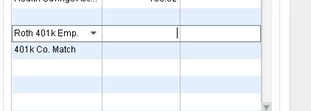
Welcome to the Community space, @Carly03. I'll share input to help you add the contribution to Roth 401(K) in QuickBooks Desktop (QBDT).
Depending on the current setting, you can use 401(K) or Roth 401(K) and then pair them with the 401(K) Co. Match to complete the process. Roth 401(K) contributions are made with after-tax income, while traditional 401(K) are tax-deferred, allowing employees to postpone income tax until retirement withdrawals. To learn more, check out this page: Get a Guideline 401(k) plan through QuickBooks Desktop Payroll.
Additionally, check out this article to guide you on modifying payroll or employee related reports and company contributions in QBDT:
I enjoyed your interaction about what 401(K) to use inside QuickBooks. Please know you're always welcome to leave a message in the comment section below so I can supply the correct details to resolve your concerns.