Solved
I made some products and services inactive but now have an issue with my purchasing software not linking. How do I bring them back and make them active again.
Original commenter did not share additional details


Hello, Karen.
Let's make your items active again, so you can use your purchasing software with QuickBooks.
Reactivating your items is very easy. You'll want to go to your products and services list and do it from there. Here's how:
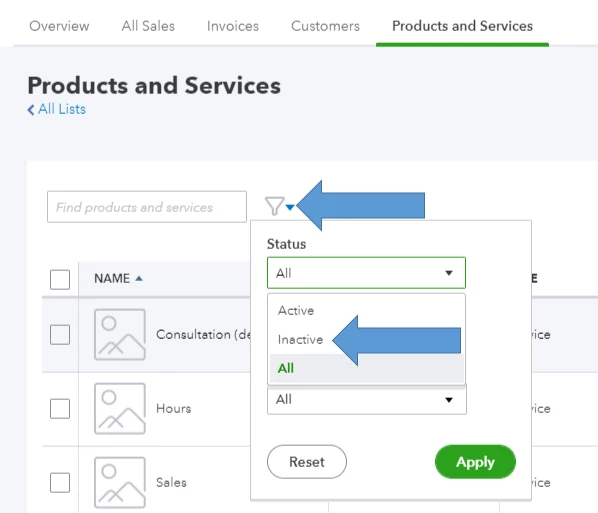
All inactive items have (deleted) tags beside their names. You'll just want to click Make active under the Action column to reactivate them. When you're done, link your purchasing software again.

After setting up everything, I recommend reading these articles to help you manage your sales and customers: Sales and customers articles.
We still welcome any follow-up questions about managing your products and services. We're also down to answer any other questions regarding QuickBooks Online.
Enter your E-mail address. We'll send you an e-mail with instructions to reset your password.