March 6, 2023
Solved

I was asked to create an employees paycheck half way through the pay period and no Federal taxes were removed, only SS and Med. The employee has been here for years

  • March 6, 2023
  • 1 reply
  • 0 views
Is this an online error or is it because I created the check early?  He claims 2 on his tax withholding
Best answer by JamaicaA

Thanks for laying out the details of your concern, @salamone. I can share information about the factors that affect the withholding calculations.


If you're employee has no federal withholding or if a paycheck shows $ 0.00, it can be because of the following:


  • They do not meet the taxable wage base.
  • In the employee setup, they were set to Do Not Withhold for federal and state income taxes.


Since your employee has been with you for years, let's review her or his profile. This way, we can ensure the correct taxes are enabled.
 

Here's how:


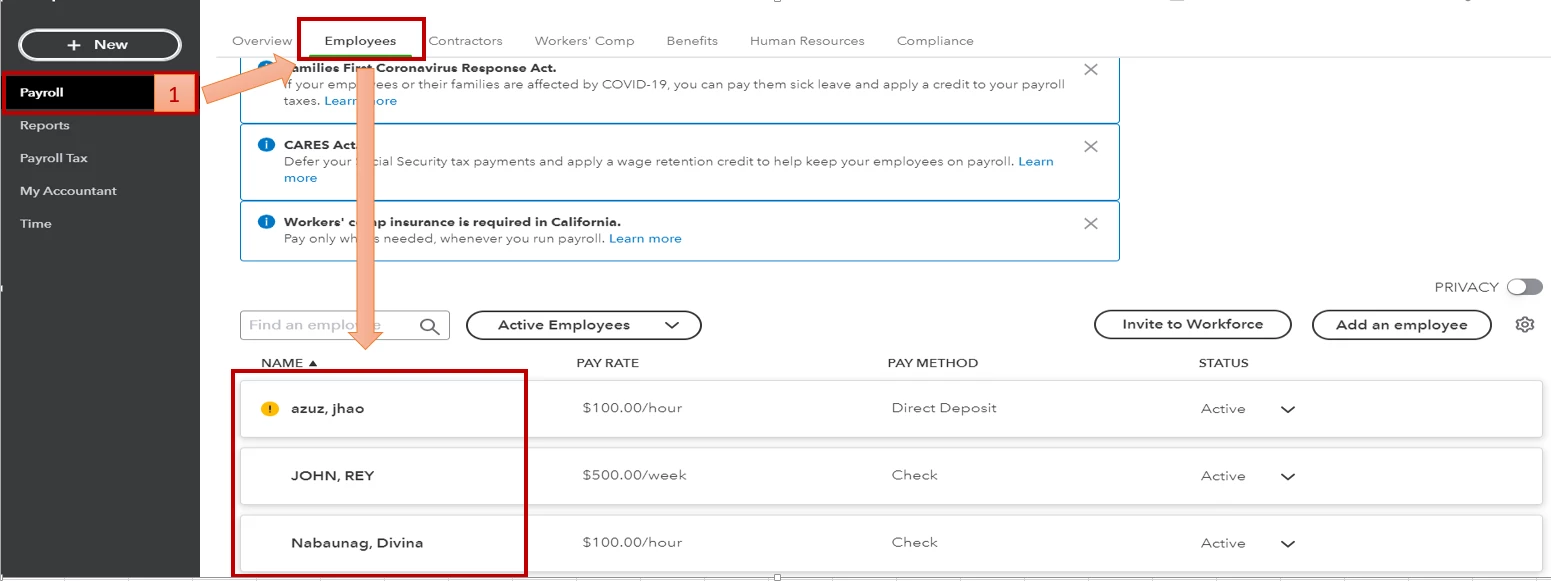
  1. Go to the Payroll menu, then select Employees.
  2. Click on the name of the employee.
  3. Choose the edit icon beside Pay.
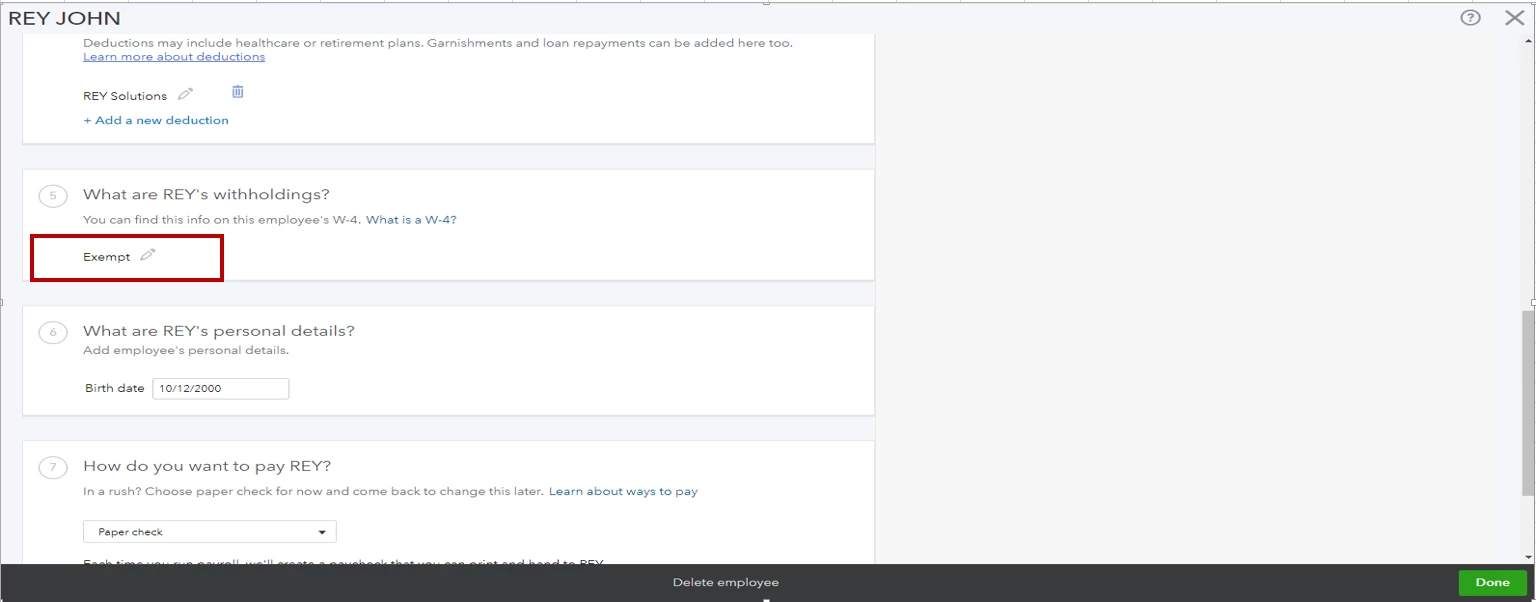
  4. Next to the withholding section, press the edit icon.
  5. Examine the Federal Filing Status/State Filing Status.
 

Feel free to check out this guide to learn more about the annual wage base limits in QuickBooks: Understand payroll tax wage bases and limits.


You can also refer to this article for more troubleshooting solutions when payroll taxes are not withheld: Troubleshoot no income tax withheld from a paycheck.


You are always welcome to visit the Community whenever you need assistance. We are always here to help. I hope you enjoy the rest of your day. Take care.


1 reply

JamaicaAAnswer
March 6, 2023

Thanks for laying out the details of your concern, @salamone. I can share information about the factors that affect the withholding calculations.


If you're employee has no federal withholding or if a paycheck shows $ 0.00, it can be because of the following:


  • They do not meet the taxable wage base.
  • In the employee setup, they were set to Do Not Withhold for federal and state income taxes.


Since your employee has been with you for years, let's review her or his profile. This way, we can ensure the correct taxes are enabled.
 

Here's how:


  1. Go to the Payroll menu, then select Employees.
  2. Click on the name of the employee.
  3. Choose the edit icon beside Pay.
  4. Next to the withholding section, press the edit icon.
  5. Examine the Federal Filing Status/State Filing Status.


Feel free to check out this guide to learn more about the annual wage base limits in QuickBooks: Understand payroll tax wage bases and limits.


You can also refer to this article for more troubleshooting solutions when payroll taxes are not withheld: Troubleshoot no income tax withheld from a paycheck.


You are always welcome to visit the Community whenever you need assistance. We are always here to help. I hope you enjoy the rest of your day. Take care.