April 27, 2024
Solved

I was using self employed and I recently got online, I did not go through up grade. How do I transfer mileage data?


  • April 27, 2024
  • 1 reply
  • 0 views
I was using self employed and I recently got online, I did not go through up grade.  How do I transfer mileage data?
Best answer by IrishNinoJ

Hello there, jmdi757707.


I'm here to guide you on how to import your mileage data from QuickBooks Self-Employed (QBSE) into QuickBooks Online (QBO).


First, you need to export your mileage data before importing it to QBO. To do this, go to the Miles menu, and choose Download trips from the Add trip dropdown.
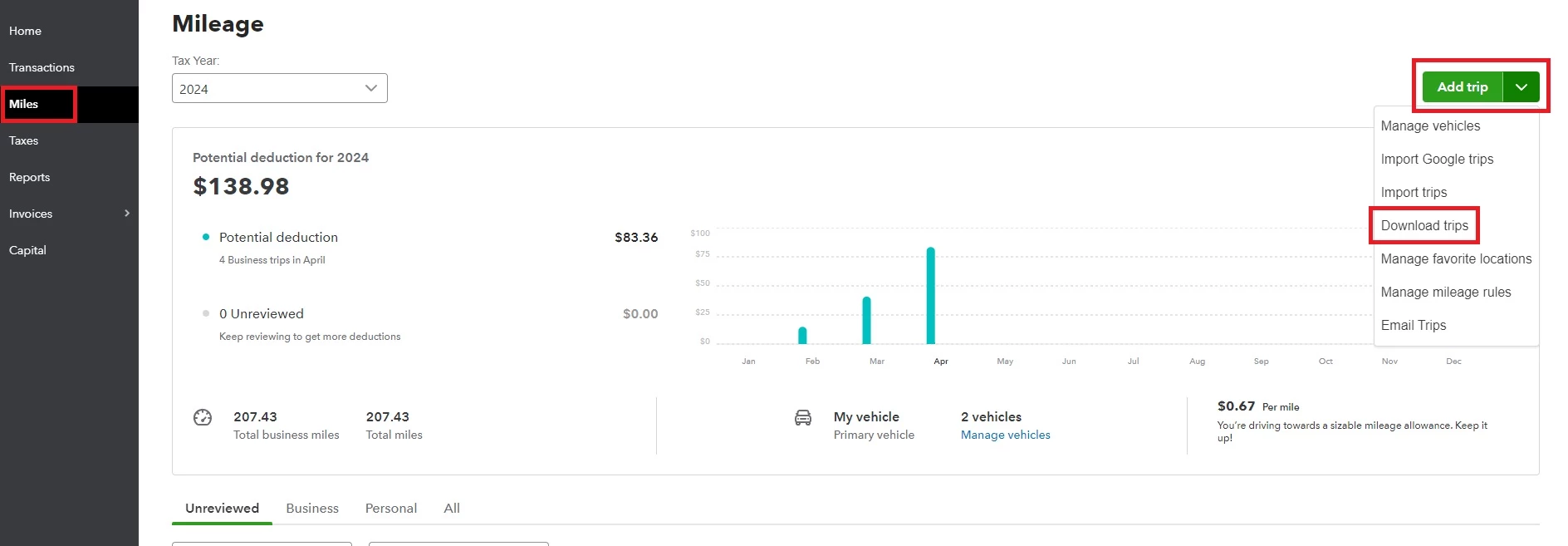


Once done, you can now import your mileage data into QBO. Here's how:


  1. Go to the Expenses menu, and then head to the Mileage tab.
  2. From the Add trip dropdown, choose Import trips.
  3. On the Import trips from select QuickBooks.
  4. Hit Select and import.


I've also collected some articles that you can use for reference in case you run into issues in tracking your mileage.


I'll keep an eye out for your reply. And if you have any other QuickBooks-related concerns, feel free to include them in the comments. We're here to assist you 24/7.

1 reply

April 27, 2024

Hello there, jmdi757707.


I'm here to guide you on how to import your mileage data from QuickBooks Self-Employed (QBSE) into QuickBooks Online (QBO).


First, you need to export your mileage data before importing it to QBO. To do this, go to the Miles menu, and choose Download trips from the Add trip dropdown.


Once done, you can now import your mileage data into QBO. Here's how:


  1. Go to the Expenses menu, and then head to the Mileage tab.
  2. From the Add trip dropdown, choose Import trips.
  3. On the Import trips from select QuickBooks.
  4. Hit Select and import.


I've also collected some articles that you can use for reference in case you run into issues in tracking your mileage.


I'll keep an eye out for your reply. And if you have any other QuickBooks-related concerns, feel free to include them in the comments. We're here to assist you 24/7.

April 29, 2024

It worked!  Thanks 😊 

Tori B
April 29, 2024

Happy to hear the steps provided by my colleague worked for you, @jmdi757707.


Please let me know if there is anything else we can assist you with. Take care and have a wonderful day ahead!