
Solved
I went to use our QBO this morning and after the latest update, all of our existing Projects are gone. What happened and how do I get them back?
Original commenter did not share additional details

Unfortunately, it is not a browser nor a browser cache issue. I did clear and try on 2 different browsers but it did not clear up the problem.
However, I incorrectly reported in the originally post because I was try to accomplish a critical task for a client that involved an existing Project. And it just so happened that the next task also involved another Project that disappeared.
A more accurate description of the issue is that after this last UI update, I lost 2 Projects that I am aware of. Not all Projects are missing. But 2 that I worked on yesterday have lost all of the items stored in the project.
This client does subcontracting work for general contractors. The addition of the Projects feature has been awesome by offering a better tool for managing multiple jobs for a single customer. Much better, in my opinion, than the sub-customer route. So much cleaner and much more intuitive for the client. And the accounting features of job costing are fantastic. It allows for easier accounting education of a client using this feature.
However, these programming glitches after a major UI update get frustrating to me. I called support but because of the nature of only a few Projects being deleted (or whatever happened to them), the support agent wanted me to spend way too much time helping to find a bug.
Sorry but unless Intuit is going to offer to pay me our hourly rate to stay on the phone helping an agent tract down a bug, I don't have the time or the luxury of helping their programmers troubleshoot. I have noticed bugs after most of the major updates. Frustrating interruption of our daily workflow.
We value your time and effort in trying to perform the troubleshooting steps shared by my colleague above, charley.
Any data, including projects entered into the system, shouldn't be deleted without someone doing it. Thus, we can utilize the Audit log feature to review if other users in your account have accidentally deleted them.
If you haven't tried it, please sign in as an admin to access the audit log. Here's how you could do it:
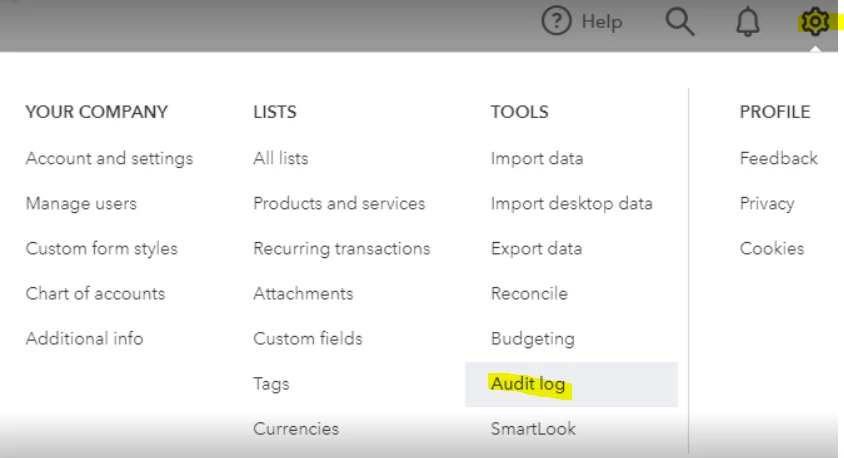
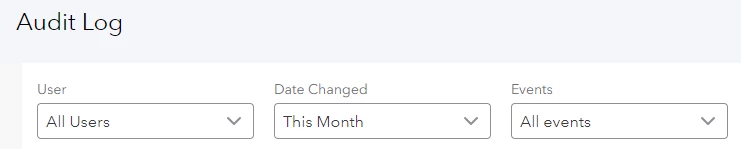
If you found nothing from the Audit log feature, please give us a short call. We acknowledge that you've previously been in touch with our Support Team, but in this instance, we'll need to contact them once more to conduct a more thorough investigation as the initial troubleshooting steps did not resolve the issue.
Within your QBO account, go to Help in the upper-right corner. In the Search tab, click Contact us.
Know that you can always post in the Community if you have other questions. I always want to make sure you can view your data in the system. Bye for now and take care always.
Enter your E-mail address. We'll send you an e-mail with instructions to reset your password.