Hello and welcome to the Community, jandhcody.
I'd be pleased to assist with your question about tracking subcontractors you assign on an invoice.
You can add the subcontractors to the Sales Rep List window to keep track of the information from the invoices. When adding a sales rep, you'll have an option to choose a vendor.
Here's how:
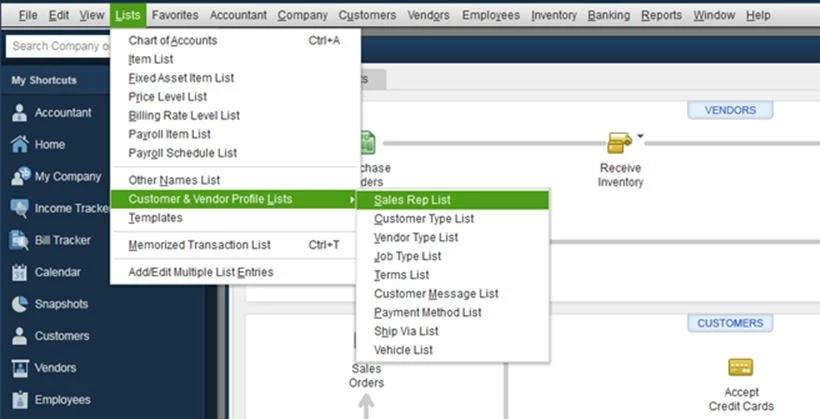
- Click the List tab at the top menu bar.
- Select Customer & Vendor Profile Lists.
- Click Sales Rep List.
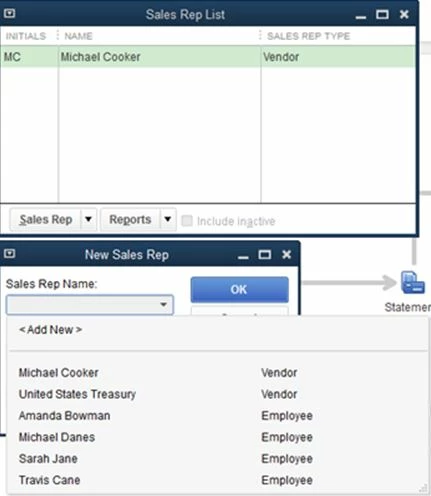
- Click the dropdown arrow next to Sales Rep.
- Click New.
- Below Sales Rep Name, select the name of the driver.
- Click OK.
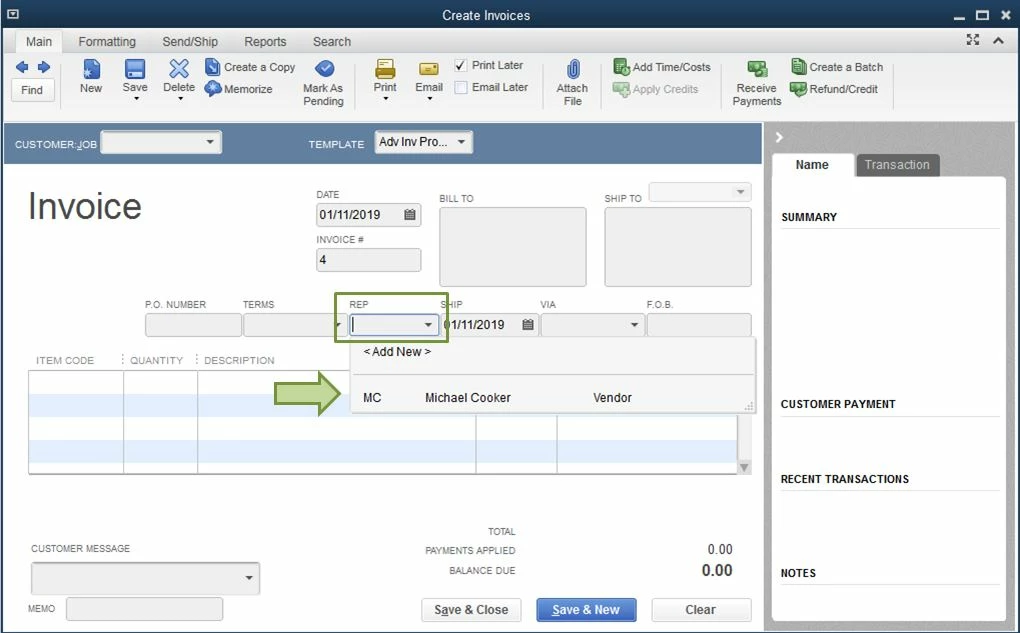
- Open an invoice.
- Below REP, click the dropdown and add the name of the driver.
After adding them to your invoices, you can then run a Sales By Rep report to manually calculate their percentage for each load hauled. You can either pay them through creating a check or bill.
Here's how to run the report:
- Click the Reports tab at the top menu bar.
- Select Sales.
- Choose a Sales By Rep report.
Please be sure to let me know if there's anything else I can do to help you succeed. I'll be eyeing out on your response.