December 14, 2019
Solved

Is there a report that shows hours worked by an employee by the weeks for a specified term? This is for a TDI claim?

  • December 14, 2019
  • 1 reply
  • 0 views
Original commenter did not share additional details

Best answer by ShallyMarR

Hello, Wailele.


Welcome to the Community.


Yes, you can pull up the Payroll Summary report that shows the employees' worked hours and weeks' term. To check the specific worked weeks, you'll need to customize the date. Let me guide you how:


1. In the QuickBooks homepage, click on Reports at the top menu bar.

2. Select Employees and Payroll.
3. Click on Payroll Summary.
4. Make the necessary customization by clicking on Customize Report.
5. Under Show Columns, select Employee. Make sure to customize the dates correctly from the start date of the employee.

6. Refresh the report.
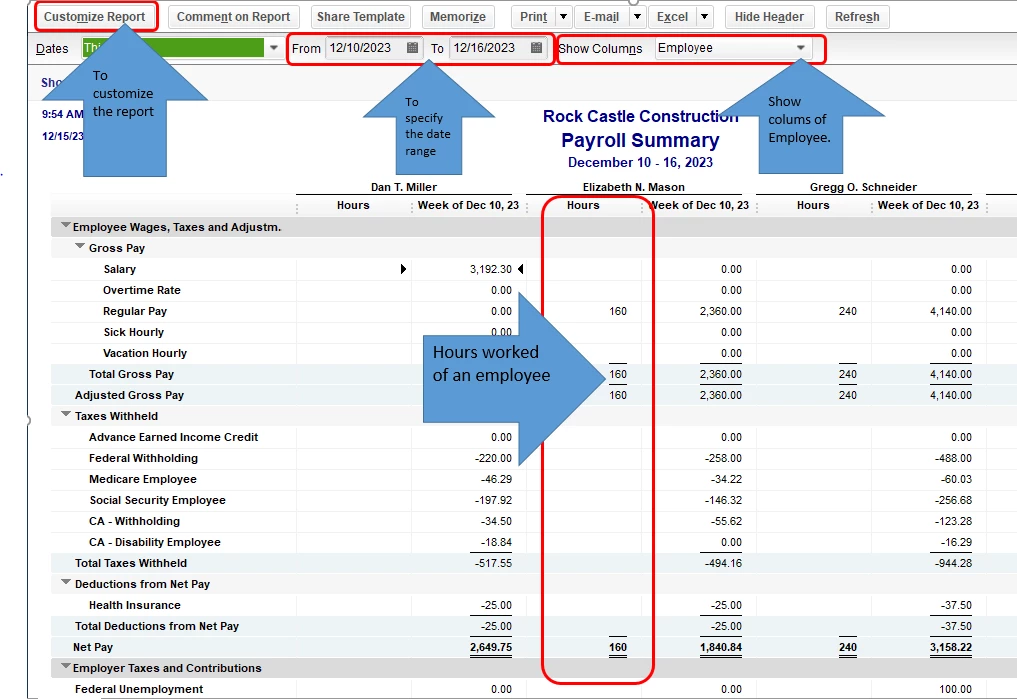


For additional reference, check out this article about adding total hours worked by employee report in QuickBooks Desktop.


You can check this resource page for future reference in case you want to learn more about the recording of timesheets by an employee in QuickBooks Desktop: Create and print timesheets.


Please let me know if there's anything I can do to help. I'm always around to assist you. Have a good day!

1 reply

ShallyMarR
December 14, 2019

Hello, Wailele.


Welcome to the Community.


Yes, you can pull up the Payroll Summary report that shows the employees' worked hours and weeks' term. To check the specific worked weeks, you'll need to customize the date. Let me guide you how:


1. In the QuickBooks homepage, click on Reports at the top menu bar.

2. Select Employees and Payroll.
3. Click on Payroll Summary.
4. Make the necessary customization by clicking on Customize Report.
5. Under Show Columns, select Employee. Make sure to customize the dates correctly from the start date of the employee.

6. Refresh the report.


For additional reference, check out this article about adding total hours worked by employee report in QuickBooks Desktop.


You can check this resource page for future reference in case you want to learn more about the recording of timesheets by an employee in QuickBooks Desktop: Create and print timesheets.


Please let me know if there's anything I can do to help. I'm always around to assist you. Have a good day!

January 10, 2021

this is great - but I need a report that shows me the number of pay periods an employee worked

When we were with Sage 50- the payroll reports would show me a report by employee, that had the pay period date in column 1 with the breakdown of their pay along the columns.  I could quickly reconcile their CPP that way.  

Why? They get a CPP Exemption of $134.61 per pay - but they don't work all year.  I have to make sure that they paid enough CPP for the year.  


They also get sporadic bonus, and the CPP deduction needs to be manually adjusted so that they DON'T get the CPP deduction on those cheques.


I'm looking for a report that will allow me to quickly see if I deducted enough CPP bi-weekly


any hopes of that?

Heather

January 10, 2021

OMG! I found one!!! I've asked this question over the years and could never get a straight answer!

Transactions by Payroll item - change Total by 2 week.

It's not a simple as I would like - but I'm working on it - hopefully I can perfect it and save as a memorized report.  Not really sure why this isn't a default report.  It's great info


If you know of a better way - please share!
