September 1, 2020
Solved

Is there a way to print a Social Security Number on the Pay stub?

  • September 1, 2020
  • 2 replies
  • 0 views
I want to print the most current pay stub based on my direct deposit. 
It needs to show BOTH my legal name and SSN number. 
Is there a way to print a Social Security Number on the Pay stub?
 
Thank you.
Best answer by BigRedConsulting

@alexleotiger 

@JamesBAL2020 

RE: Is there a way to print a Social Security Number on the Pay stub?


Yes, of course there is with QuickBooks Desktop.


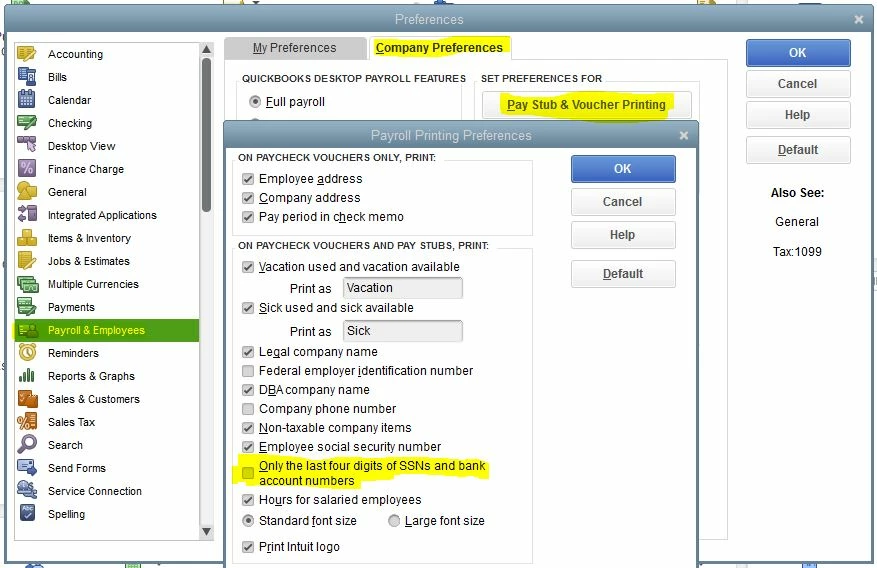
To do this, start at Edit | Preferences.  Make sure the highlighted option below is unchecked:


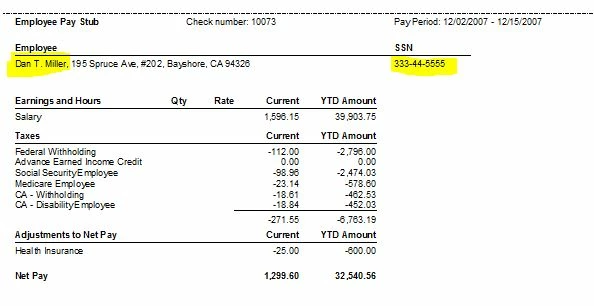
Then the pay stub will look like this, with both the employee's legal name and SSN:

2 replies

September 2, 2020

Hello, JamesBAL2020. 


Printing the Social Security Number on a paystub is unavailable. For security reasons, you can only see the last four digits of the SSN number.


If you need to view the full SSN of the employee, you can pull up the Employee Details report to see the complete number. 


Here's how: 


  1. Click Reports
  2. In the search bar type Employee Details
  3. Tap the Share drop-down and then choose Printer Friendly if you want to print the report. 


For more details about printing checks and Pay stubs, you can refer to this article: Printing Checks and Pay Stubs


Also, I'm adding this article for your reference: Set up online pay stub access for employees


That's it!  Please reach out with me here if there's anything else you need, I'm just a post away. Have a great day!

January 1, 2021

I am a W-2 employee and the employer uses Quickbooks Workforce.  I need to obtain and print a pay stub with my social security number.  How can I do this?

January 1, 2021

Welcome to the QuickBooks Community, @alexleotiger.


QuickBooks Workforce lets you view your pay stubs, W-2s, and other employment info (i.e. home address and bank account). When your employer has invited you to the said platform and you've set up your account, you just need to log into it. This way, you're able to obtain and print a pay stub with your social security number. However, you can only see and print the last four digits for security reasons. Here's how:

  1. Sign in to QuickBooks Workforce.
  2. Select Paychecks.
  3. Set the appropriate date range.
  4. Choose the pay stub you want to open its details, then click the Print icon.


On the other hand, in case you don't have access to QuickBooks Workforce yet, you'll first have to let your employer send you an invitation. Once received, set up your account to start viewing and printing your paychecks, W-2s, and other employment details. You can refer to this article for the step-by-step guide: Set up your QuickBooks Workforce account.


Additionally, here's an article that answers the most frequently asked questions about QuickBooks Workforce: View your paychecks and W-2s. It also includes topics about changing account details such as email address, password, and W-4 to name a few.


Please don't hesitate to leave a comment below if you have other payroll concerns. I'm just around to help. Take care always.

BigRedConsulting
January 1, 2021

@alexleotiger 

@JamesBAL2020 

RE: Is there a way to print a Social Security Number on the Pay stub?


Yes, of course there is with QuickBooks Desktop.


To do this, start at Edit | Preferences.  Make sure the highlighted option below is unchecked:


Then the pay stub will look like this, with both the employee's legal name and SSN:

November 15, 2024

THANK YOU! I needed this for a REAL ID in the state I live in as 2nd proof of residency and could not find clearer instructions. This is perfect! Appreciate it!