December 2, 2021
Solved

Is there a way to update/correct pre-tax employee deduction on a processed payroll in QBO Payroll? The employee will be owned money after the adjustment.

  • December 2, 2021
  • 2 replies
  • 0 views
This was the last payroll of the year, so it cannot be adjusted in the next payroll.

Best answer by Charies_M

Thanks for following this thread, bhavin2.


Payroll adjustments for QuickBooks Online can be achieved with the help of our QuickBooks Care Team. This procedure requires company information which needs to be pulled up in a secure environment. With that, I suggest contacting us so we can take a closer look at adjusting your employee deductions.


Here's how you can reach us:
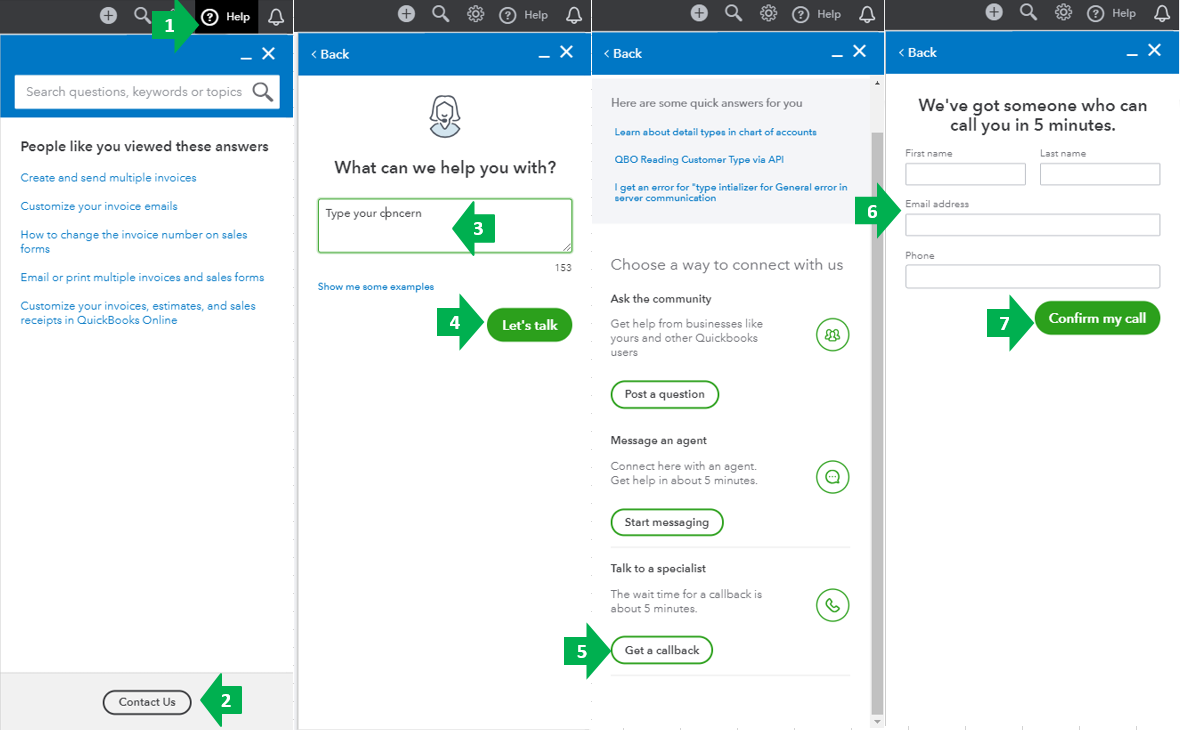
  1. Go to the Help menu at the upper right.
  2. Select Contact Us.
  3. Enter your concern: Payroll Adjustment.
  4. Click Let’s talk.
  5. Choose Get a callback
  6. Type in your contact info.
  7. Select Confirm my call.


Please know that the availability of support depends on which type of subscription you're using. You can check out this article for our contact information. Click on the QuickBooks Online drop-down to see the most updated support schedule: Support hours and types.


Since you're working with payroll, you might want to check this article for some links about the payroll tasks in QuickBooks Online: Everything you need to know about QuickBooks Online Payroll


The Community is always open if you have other questions while working with payroll. I'll be around to help. Wishing you a great day ahead!


2 replies

December 2, 2021

Welcome, @bhavin2 and thank you for coming to the QuickBooks Community for assistance. I have some insight about pre-tax deductions to pass along.


In QuickBooks Online (QBO), once a deduction is set up, you won't be able to change whether it is pre-tax or not. Instead, you'll want to remove the old deduction and create a new one that is pre-tax. Let me guide you on how.


1. Go to the Workers menu and select the Employees tab.

2. Chose and click the employee's name.

3. Click the Edit ✎ (pencil) icon next to the Pay section.

4. Go to the, Does this employee have any deduction? 

5. Click the + Add a new deduction or + Add deductions link.

6. From the Deductions/contributions ▼ drop-down menu, choose New deduction/contribution.

7. Select a Deduction/contribution type from the small arrow ▼ icon.

8. Enter the needed information.

9. Then click Done once finished.


Here's an article you can read for more details in adding a deduction in QBO: Add or edit a deduction or contribution.


I'd also recommend consulting with a tax adviser or accountant for further guidance. This way, we'll ensure the accuracy of your accounts after recording this.


Once everything is set up, you can already create paychecks for your employees. See this article for more details: Create paychecks in online payroll.


Additionally, do check our Employees and payroll taxes page for reference. From there, you can read great articles and learn some best practices in managing your payroll taxes effectively. 


Please know the Community has your back. If you have additional questions or concerns, leave a comment below. I’ll pop right back in to assist further. Have a great rest of the day.

bhavin2Author
December 3, 2021

Hi @Maybelle_S! I need to correct a deduction on the payroll that has already been processed. Is there a way to achieve that? Thanks

bhavin2Author
December 3, 2021

I need to adjust the employee deduction on a payroll that has already be processed. How can I achieve that? Thanks

Charies_MAnswer
December 3, 2021

Thanks for following this thread, bhavin2.


Payroll adjustments for QuickBooks Online can be achieved with the help of our QuickBooks Care Team. This procedure requires company information which needs to be pulled up in a secure environment. With that, I suggest contacting us so we can take a closer look at adjusting your employee deductions.


Here's how you can reach us:

  1. Go to the Help menu at the upper right.
  2. Select Contact Us.
  3. Enter your concern: Payroll Adjustment.
  4. Click Let’s talk.
  5. Choose Get a callback
  6. Type in your contact info.
  7. Select Confirm my call.


Please know that the availability of support depends on which type of subscription you're using. You can check out this article for our contact information. Click on the QuickBooks Online drop-down to see the most updated support schedule: Support hours and types.


Since you're working with payroll, you might want to check this article for some links about the payroll tasks in QuickBooks Online: Everything you need to know about QuickBooks Online Payroll


The Community is always open if you have other questions while working with payroll. I'll be around to help. Wishing you a great day ahead!
