

November 7, 2022
Question

Issue with Paying Holidays at 1.5x Base Rate - employees are getting paid $1/hr in error

  • November 7, 2022
  • 1 reply
  • 0 views

THE ISSUE: 

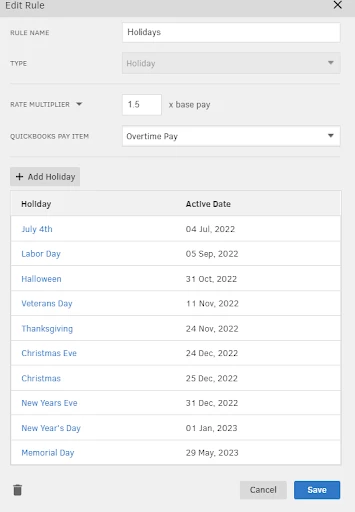
I am trying to pay designated holidays at 1.5x the base pay rate.  I created a new pay rate, called Holiday 1.5 in Quickbooks Time. See the second screenshot to see this new pay rate in Quickbooks Time. 

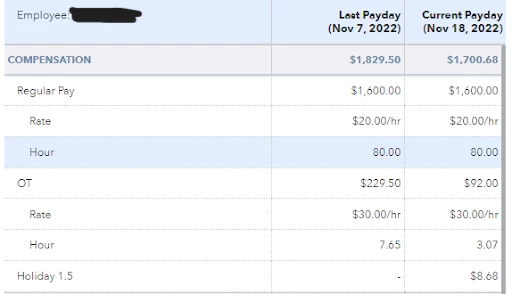
The first screenshot shows the employee’s paystub. The regular pay is $20.00 per hour. The employee worked 80 hours at the regular pay rate. You can also see that OT (overtime) is paid at $30 per hour. The employee worked 7.65 hours of OT. The next pay item (Holiday 1.5) shows that the employee received $8.68 of pay at $1/hr when the employee worked 8.68 hours and should be paid $260.40 at $30/hr.


My products: Quickbooks Online Plus, Quickbooks Time, Quickbooks Payrool Premium


Paystub (Quickbooks Online)
Quickbooks Time Pay Rates Rule
 

Appreciate your help! This has been driving me crazy for several hours. 

1 reply

November 7, 2022

Not to worry, help has arrived, @MLAUGHLIN.


There are several reasons why payroll items calculate incorrectly on a paycheck. The most common error is found in the mapping rule. You’ll want to review your preferences to determine what is causing the inconsistency in your situation.


Here’s how:


  1. Select the QB icon within your QuickBooks Time account.
  2. Choose Preferences.
  3. Go to your payroll item mapping. Make sure the OT pay type is tagged.


You can also follow the steps below to ensure the OT rule is set up properly.


  1. Click Feature Add-ons, then Pay rate engine.
  2. Select the OT setting and then pay heed to the OT rule.
  3. Select the OT pay type and save.
  4. Check the figure on your pay stub after.


You can read these resources to learn more about managing time off in the program:


Don’t hesitate to add a comment below if you have any other questions or payroll concerns. I’ll always be here to help. Take care!