January 12, 2021
Solved

Job Costing payroll service items

  • January 12, 2021
  • 1 reply
  • 0 views

Hi all,


I work for a small construction company and currently use QuickBooks Desktop: Premier Contractor Edition 2020 (for windows) I am trying to get more accurate job costing reports and want to have labor hours assigned to a job and a service job. For example if employee 1 spent 2 hours on framing at the "smith" job, I would like to be able to assign the two hours of labor to the job but also to a service item. So when the Job Costing Report is run, it reflects the cost of labor and materials. Is this possible? If yes, what is the best/most accurate way to do so. 


For Reference, we do not use QuickBooks Payroll service, we use a third party and import the transactions to QuickBooks


Thanks!
Best answer by JenoP

Jumping in to help with your question about job costing, Freeland_Home_Remodelers.


Yes, you can assign an employee's hourly work to a job and a service item as well. Here's how:


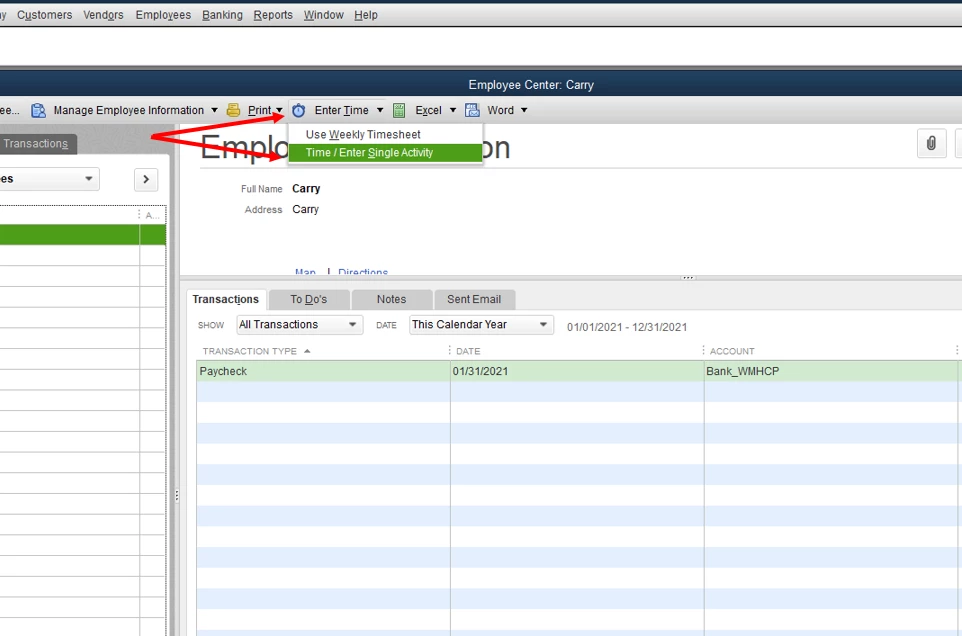
  1. Open your Payroll Center. 
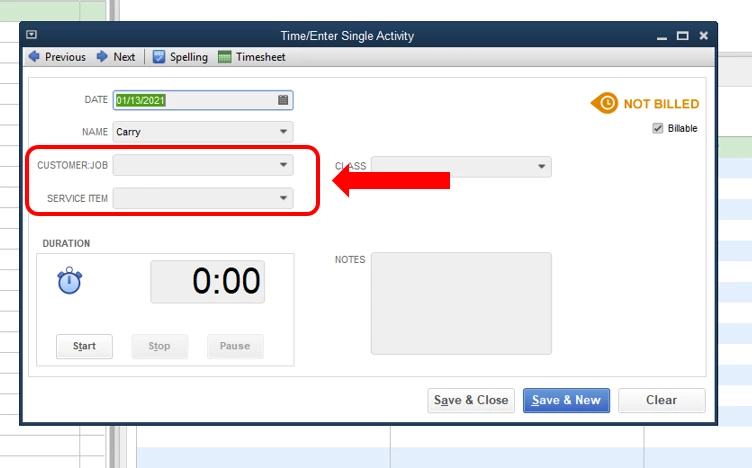
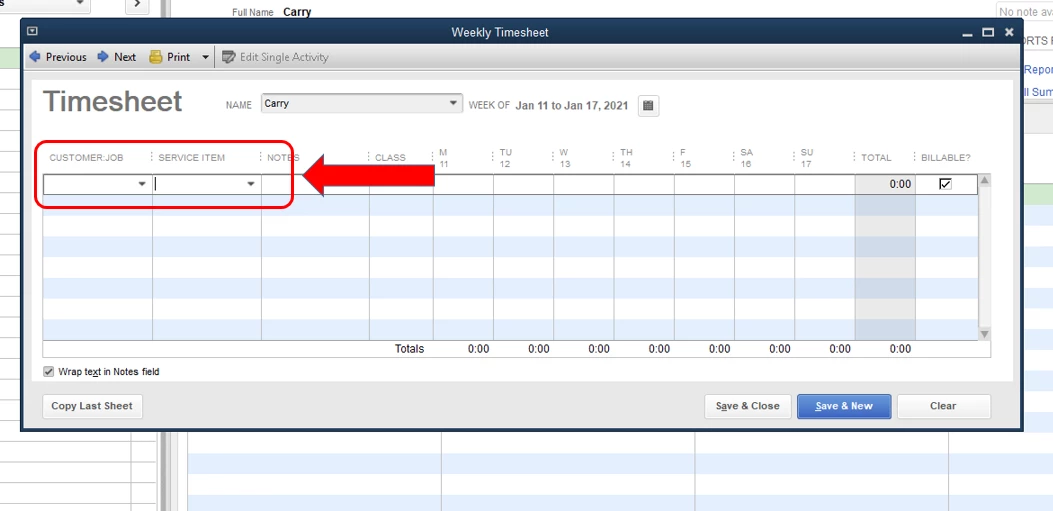
  2. Click Enter Time, then choose between Use Weekly Timesheet or Time/Enter Single Activity.
  3. Enter the name of the employee and the date where the employee worked.
  4. Select the job in the Customer:Job field, then look for the correct service item in the Service Item field.
  5. Click Save and close

Let me also share these articles about this feature for more details: 


The Community is always here if you need more help when tracking your transactions in QuickBooks Desktop.


1 reply

JenoP
JenoPAnswer
January 12, 2021

Jumping in to help with your question about job costing, Freeland_Home_Remodelers.


Yes, you can assign an employee's hourly work to a job and a service item as well. Here's how:


  1. Open your Payroll Center. 
  2. Click Enter Time, then choose between Use Weekly Timesheet or Time/Enter Single Activity.
  3. Enter the name of the employee and the date where the employee worked.
  4. Select the job in the Customer:Job field, then look for the correct service item in the Service Item field.
  5. Click Save and close

Let me also share these articles about this feature for more details: 


The Community is always here if you need more help when tracking your transactions in QuickBooks Desktop.


June 28, 2021

Can this be done if you are paying a contractor rather than an employee?

June 28, 2021

I'll give some details to ensure you'll be able to track the job cost, dfcurry581.


Yes, it's possible. You can follow the steps provided by my peers JenoP above to assigned hours of work for your contractors. Let's ensure to select the correct contractor and service item. Also, you can create a new service item if you haven't had it yet on the list. Here's how.


  1. Go to Lists,  then select Item List.
  2. Click Item, then New.
  3. Choose the type of item you want to create.
  4. Fill out the item fields.
  5. Use Custom Fields to add customized fields.
  6. Hit Save.


You can review this guide: Add, edit, and delete items. It contains detailed steps and helpful information about managing items in QuickBooks Desktop.


In addition, feel free to check this material here to learn more about the reports available specifically for your business need: Understand reports


I'll be right here to continue helping if you have further questions about tracking job costs. You're welcome to post a reply. I'm always here to help.