RE: This due to the rounding factor if I enter straight 80 hours for example (80 hours x 16.10 hrs. gives me 1288.00) If I break the same 80 hours into holiday pay, vacation time it gives me 1288.01.
You don't need to fix this. Thee is really nothing wrong. It's a penny. No one cares.
Still, any given hourly payroll item, when used alone will work the same exact way.
80 hours x 16.10 per hour will always give the same answer.
However, if you split the hours into multiple rows on the paycheck, each row calculates by itself and rounds to the nearest cent. Which is correct. There is no code or goal to make multiple line items with the same total time add up the the same amount as one line item for the total time.
QB does do this for an annual Salary item, but not hourly items, which arguably would be incorrect.This is very typical of payroll systems, and QB, and is true all over QB and other accounting systems, where each accounting line item is stored in dollars and cents, and never parts of cents.
You can duplicate this in Excel. For example:
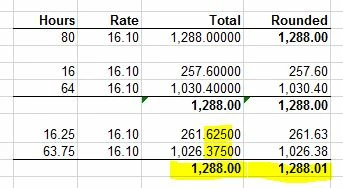
Seen here in the last example, where the holiday time is a portion of an hour, each line initially calculates a 1/2 cent, like .625 and .375, but that has to be rounded. In this case both lines round up by 1/2 cent, since each decimal ends with with 1/2 cent or more. And when they do that, then you get one extra cent as a total. Both lines are correct and both totals are correct because your data is different.
In your case you're thinking of making the total the same, perhaps because of the vacation concept, but this same concept applies when you split earnings by job or class or other way that requires multiple line items for the period's pay.
You can duplicate the same thing on a QB invoice or a check or any other table where there is a construct like qty * rate = amount, because every line must be rounded to a cent in order to save it in an accounting system.
Hope this helps!


