Thank you for your thorough response. Just one little question...
It looks like you still need to enter $1 in the salary field, so on your P&L, you'll have a lingering $26 (assuming a bi-weekly pay schedule) for your employees under Payroll. Correct?
*A work-around I have been experimenting with is simply to enter a recurring journal entry after each pay period to adjust the wages to the appropriate accounts.*
Thoughts?
Greetings, @okshakes.
I appreciate you coming back to us for additional support. Allow me to join this thread and share some more insights about employee setup.
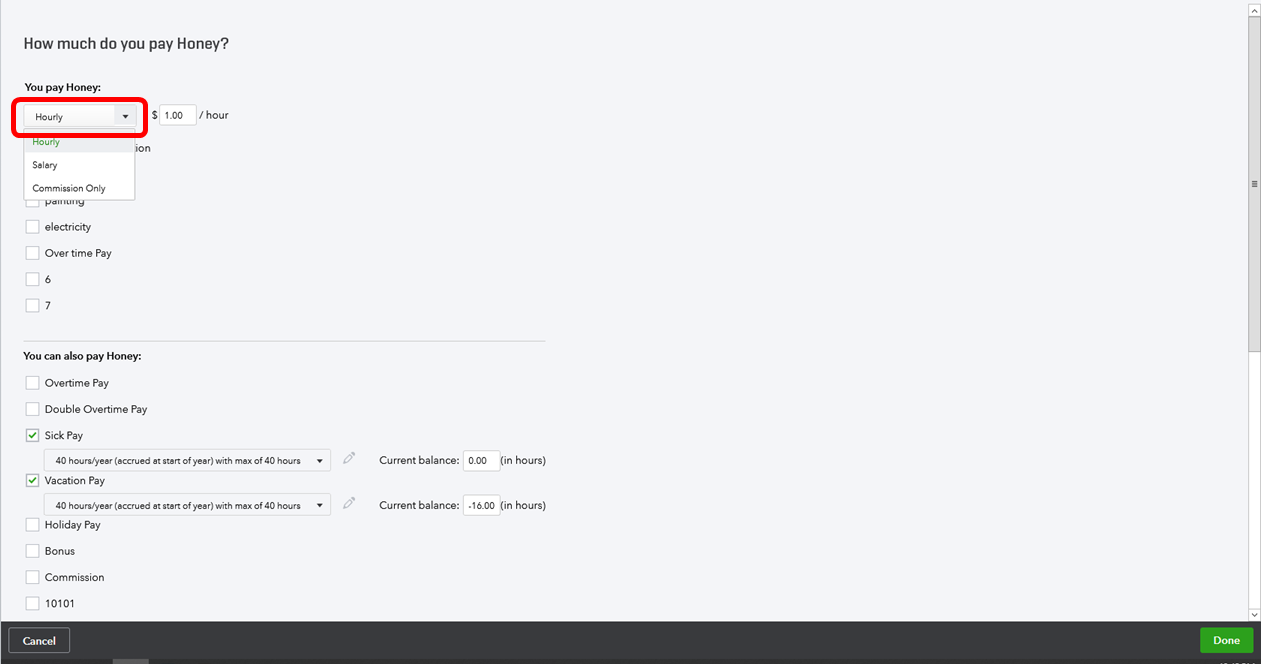
The workaround you've provided is amazing. You can use that as an option to record your employee's paycheck. Another recommendation I can provide is changing your employee's pay type to Hourly.
Here's how:
- Click Workers.
- Select Employees.
- Look for the employee and open it's employee information.
- Click on the Pencil icon beside Pay.
- Click the Edit icon on number 3 ( How much do you pay Employee Name?).
- Change the pay type to Hourly and use $1.
- Click Done to save changes.
Once you run a paycheck for the employee, you can manually enter zero amount on the Regular Pay Hrs field. Through this, you'll no longer have to create a journal entry to adjust the wages on the accounts.

I also advise reaching out to your accountant who can tell you which process would be better for your specific books.
That should get you going today, okshakes.
Keep me posted if you have additional questions about payroll. Please know that I'm still for you. Just click the "Reply" button. Wishing you and your business continued success!

