Solved
Need some help please. Our non profit board voted to increase payroll as of January 1. Payroll was changed a month early.
One pay period has paid at the higher rate. How can I adjust the next pay period to fix the error?


One pay period has paid at the higher rate. How can I adjust the next pay period to fix the error?
I can guide you on how to correct payroll overpayment in QuickBooks Online Payroll (QBOP), @Krewe001.
Depending on your processing time, you can delete or void a paycheck to amend it or cancel a payroll run.
Here's how:
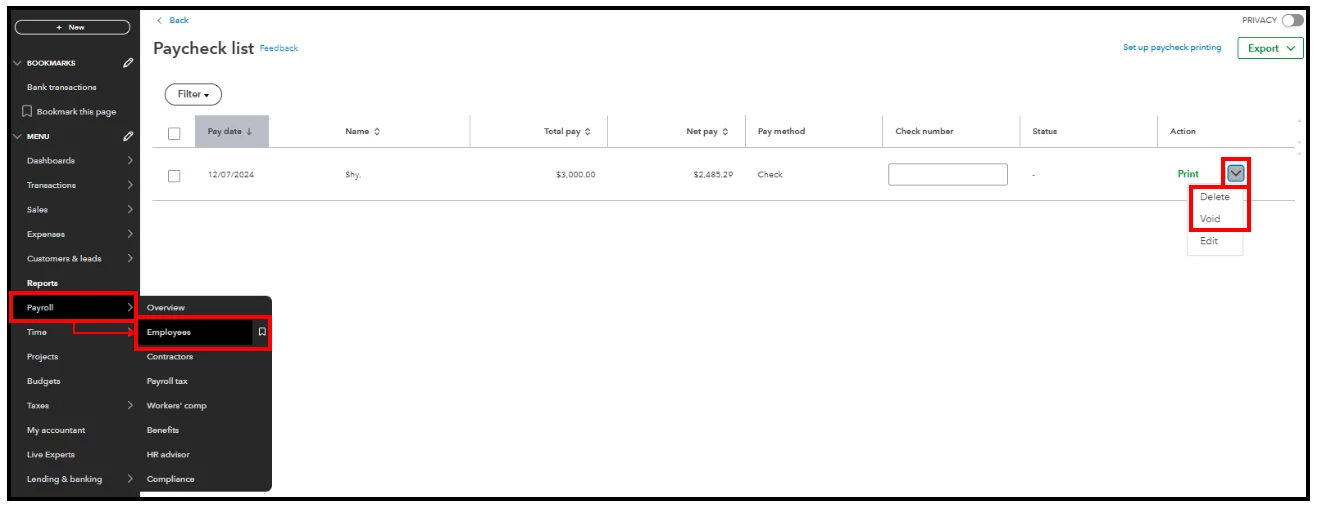
If you're unable to do so, an error message will inform you of the issue. In such cases, I recommend contacting our customer support team so they can adjust your employees' wages on your behalf. Otherwise, recreate the paycheck with the correct amount.
More in-depth information is discussed in this article: Reduce paycheck wages for an employee who has been overpaid.
Furthermore, I encourage your employees to set up a QuickBooks Workforce account to view their pay stubs and W-2s when made available.
In addition, you'll want to streamline your payroll operations with the help of QuickBooks Live Assisted. This way, you'll have access to live experts for personalized assistance and peace of mind during tax season.
Please don't hesitate to notify us if you need additional assistance with running payroll in QBOP. We'll keep an eye out for your response and provide further help. Stay safe.
Enter your E-mail address. We'll send you an e-mail with instructions to reset your password.