

April 20, 2021
Question

New Employee, can't get past initial setup of withholdings.

  • April 20, 2021
  • 5 replies
  • 0 views

New employee in withholdings (W-4 details) screen gets error message "Something's not quite right."  Per previous instructions to resolve, employer manually entered all the withholdings (W-4 details) for new employee.  That fix allowed for payroll to be run and employee is receiving direct deposits correctly.  The original issue remains - the new employee logs into workforce.intuit.com and is put right back into the setup screen for withholdings which they still cannot bypass even though the data has been entered manually by the employer.


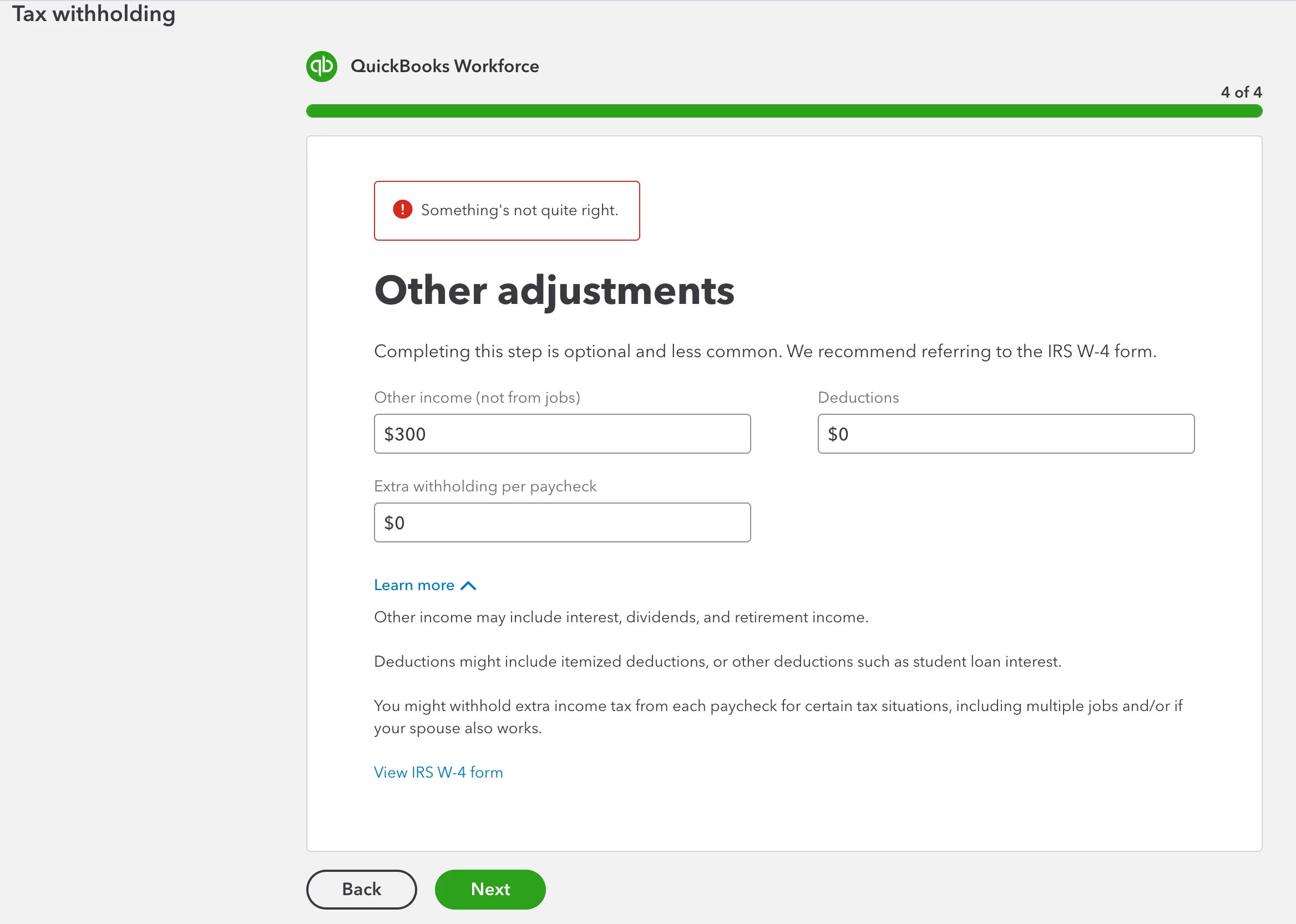
How do we get around this so the employee isn't prompted to enter withholdings and can access their pay stubs and other features?  Screen shot of error on last page of withholdings data entry: 
5 replies

Kristine Mae
April 20, 2021

I've checked our records and haven't seen any open investigation the same as yours, Bellacuda.


They may be experiencing some browser hiccups. We'll perform some basic troubleshooting. Let's start with logging into their account through a private browser. It's the best place to isolate web issues. These are the shortcut keys:

  • Google Chrome: press Ctrl + Shift + N 
  • Mozilla Firefox: press Ctrl + Shift + P
  • Safari: press Command + Shift + N

If your employee was able to access their stubs using the private browsing session, go back to the regular browser and clear its cache to refresh the program. It's advisable to clear them periodically to prevent and fix issues like this.


Also, using a different browser can help narrow down the issue.


I'll also add this reference to help your employees view their stubs: View your paychecks and W-2s in QuickBooks Workforce.


We're available 24/7. Feel free to reach out to us again. Take care!

July 6, 2021

I was having this exact same problem.  I tried the incognito browser for Chrome and Firefox and this didn't help.  I was finally able to get it to go through using Microsoft Edge.  However, when I log in again through Chrome, it's still reflecting that I haven't entered my withholding information yet, even though I got to the confirmation screen in Edge.


Hopefully, you all can identify the bug going on in Chrome.

MorganB
July 6, 2021

Good morning, adawes.


Thanks for letting me know about the steps you've taken so far to resolve the problem with the withholding info. I want to make sure you're able to get this entered in any browser you choose.


Since the incognito window and clearing the cache didn't do the trick, you may want to reach out to a member of the QuickBooks Support Team. Agents have specialized tools, like the ability to screen-share, to take a more in depth look. They'll be able to determine what's causing the problem, report it to the proper channel, and ultimately get it resolved as quickly as possible. Here's how to get in touch with the team:


1. Click the Help button in the top right corner.
2. Select Contact Us.
3. Enter Support in the field and choose Let's talk.
4. From here you can select to receive a callback at a time that's convenient for you, or begin a live chat session with an agent.


The following linked article provides these steps if you ever need them again in the future: QuickBooks Online Support


With this info, you'll be back up and running in no time. Please know I'm only a comment or post away if you have any other questions.

January 18, 2022

Did you get this resolved? Do you remember the exact steps taken to fix? Thank you. 

May 31, 2022

Hi! I see this post is getting old but I'm having the same problem. I am unable to get past the last portion of the Tax Withholding page where it asks about my state's withholdings. I have tried using incognito, clearing the cache, switching browsers, and talking with QB staff online through the chat, and I am still unable to solve this problem, all I get is "Something's not quite right." Is there any way to solve this still?

June 2, 2022

    I'm also a new employee, and have been trying to sign up to get paid for a few days. I'll let you know if I run into a solution, but that doesn't seem likely; I've used three different browsers, their respective 'private' modes, two computers, a phone, and the desktop and mobiles apps (which claim that I'm not part of a company).

    I actually had a similar problem with one of the earlier sections, which was resolved by changing some data on a previous question, but that doesn't seem to work for the Tax Withholdings section—besides, I'd rather not use incorrect information.... I'm at a loss. Has anyone been able to get it working?

Candice C
June 2, 2022

Good evening, @ScintillantShadow013


Thanks for chiming in on this thread. 


If you've tried all the browser troubleshooting, then I suggest contacting our Customer Support Team for additional assistance. They'll be able to review the account and determine why this is happening. 


Feel free to let us know how the call went. We want to ensure you get this taken care of as soon as possible. Have a great day! 

September 2, 2022

I'm having the exact same issue, super frustrating! Looking over this thread, it looks like intuit support responds with the same generic message to everyone but nothing is ever resolved.. Do they not realize this is something that needs to be fixed?


Has anyone found a workaround?

MichelleBh
September 2, 2022

I understand that the error needs to be corrected as quickly as feasible, @ccert. As a result, you may start handling your employees' taxes without delay. 


Please know this isn't the impression we wish to leave you with. The Something's not quite right error should be fixed by following the browser troubleshooting procedures above. Since it doesn't resolve and there's no open investigation, I'd advise getting in touch with our experts. Our support team may securely examine your account and look into this issue more thoroughly. Also, they can escalate the situation and launch an investigation if necessary.


Although I'd love to look further into this for you, but I don't have the same types of tools needed for the job as our Customer Care agents do. To reach them, follow the steps outlined by my peer Rea_M above. Ensure to contact them within business hours to ensure a swift response.


Moreover, visit these articles below on how to manage your employee's paystubs, information, new hire report, and other payroll topics: 


Do you need help in managing your employee's information or running payroll? Just leave them in the comment section. I'm happy to provide guides to achieve your tasks. Keep safe always. 


June 27, 2023

Can’t believe this has been going on for so long and they still haven’t fixed it. This is a major problem and apparently after over a year, it still isn’t a priority for them. May need to explore other options since this doesn’t work, and therefore can’t even finish setup. 

March 24, 2024

I apologize if there is a separate thread for employees attempting to make changes to their federal W4. I can change the tax information and I make it to the signature page. After signing, I receive the SOMETHING'S NOT QUITE RIGHT message. I've used two different computers, every browser, except Edge, and my phone. Nothing works. I've cleared histories and cookies and used private browsing mode. Has there been any progress made on this problem? 


Thanks! 

March 24, 2024

Thanks for reaching out, @esturges.


I appreciate you for sharing the troubleshooting you've performed on your end. To ensure that your concern is addressed in the best possible way, let me connect you with the most appropriate support team, who can investigate the root cause of the error further.


After hearing your sentiments, I would recommend that you contact our QuickBooks Workforce Customer Care Team for assistance with your account. Our team of experts will work to resolve any unusual behaviors and investigate the root cause of any errors. They have the tools and expertise needed to provide a more in-depth review and help you get back to using your Workforce account seamlessly.


To assist you further, here's a step-by-step guide to help you get in touch with the QuickBooks Workforce Customer Care Team:


  1. Open your Workforce account on your web browser.
  2. Go to the Help section.
  3. Click on Contact Us.
  4. Select Chat with us.
  5. Enter your email address, name, and question.
  6. Hit Start Chat.


If you're having trouble logging in to your account, refer to this article to learn about the steps you need to take to reach our support team: Contact Support. You'll also find our support hours in that article.


I'll also add this reference to help your employees view their stubs: View your paychecks and W-2s in QuickBooks Workforce.


Let me know how it goes in the comments below. If you have other payroll concerns or questions about managing employees in QuickBooks, I'm always ready to help. Have a great day!