Solved


I am hoping you can help again. 🙂 I opened another business so I have opened a new company file. I am having the same problem as I did before and followed the instructions you gave me but it did not fix it in the new company file. Any other suggestions?
I know other troubleshooting steps so you can pay your contractor through direct deposit, @junegerhardt.
Since the provided solutions didn’t work in your new company file, you can update your QuickBooks Desktop to the latest release to get it fixed. This process can help optimize your system and improve features. Additionally, updating is necessary to successfully pay your contractors.
Here’s how:
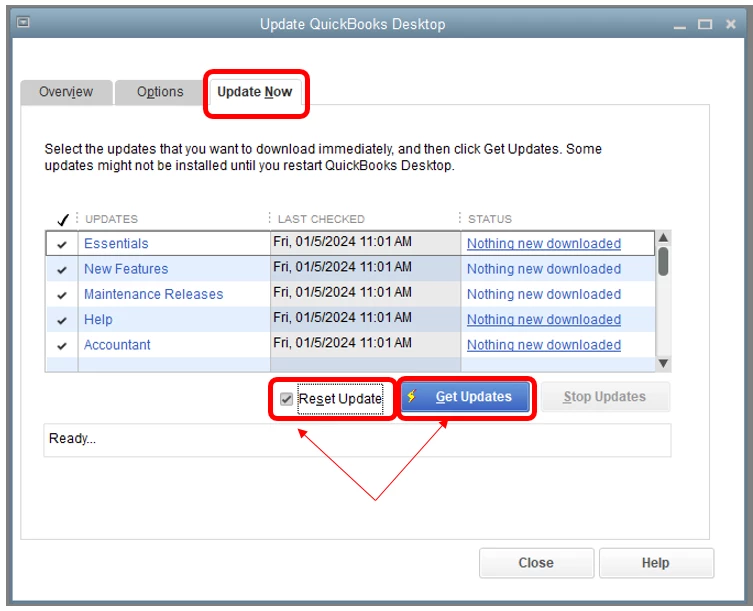
- Go to the Help menu and select Update QuickBooks Desktop.
- Click Update Now, then select the Reset Update checkbox.
- Select Get Updates after.
- Close and reopen QuickBooks to install the update.
If the issue persists, you can reach out to our payroll support team to investigate it further. Our representatives can provide additional solutions to ensure the said option is accessible.
When everything is good, you can start paying your contractors using direct deposit in the program.
If you're interested in learning more about 1099 forms, the state's requirements for filing, and ways to prepare them, check out the resources below:
You can add comments below if you have other payroll questions or concerns. The Community team is always here to help, @junegerhardt.
Enter your E-mail address. We'll send you an e-mail with instructions to reset your password.