The employee is hourly, not salary, and Qty shows on her actual pay stub that prints with her paycheck. I also went back and looked. Every other hourly employee's pay stub says Hours. I have no idea why she's different. She's set up exactly like all of our other employees.
@Tori B "Salary employees will only show Qty, whereas hourly will show hours. "
This is not correct and would not be compliant if it were. QB does track salaries by hour if you enter hours, and it will optionally print the hours for salaries, or not, depending in your settings in payroll settings.
@jstabler
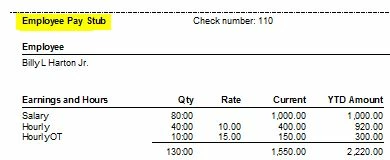
I tested this for awhile and this is what I found: Pay stubs always appear to put the label "Qty" at the top of the earnings table, though the values in the column are hours:
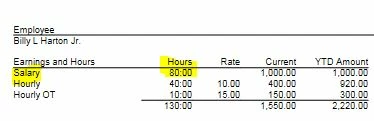
Paycheck vouchers are different, and there the column says Hours where Salary and Hourly items are in the earnings table:
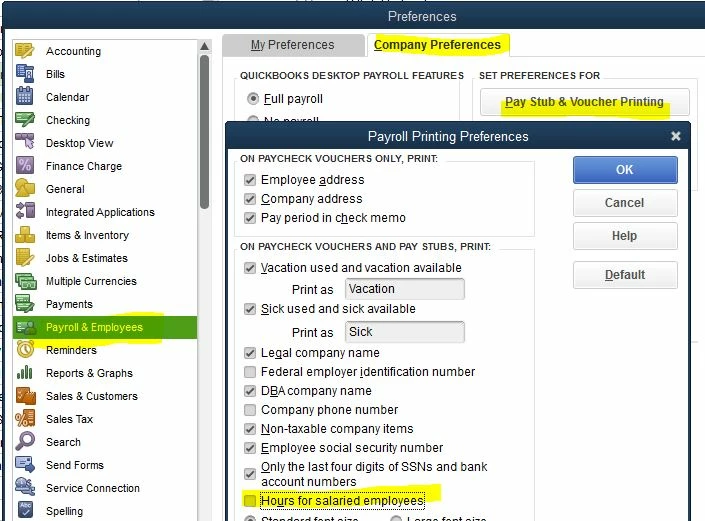
There is a preference to print hours for Salary items, or not:
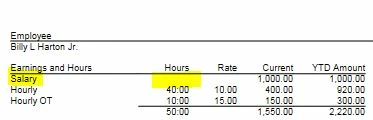
If you turn it off, then no hours print for Salary type items, even if you enter hours:
If you add Qty based items like Commission to the paycheck, then the title of the column on Paycheck stub changes (it's sort of smart):
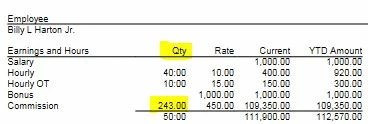
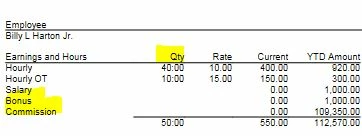
AND, once this happens for an employee, all future checks YTD will also have the column title change, even if you don't use the Qty based item (Commission in this case) on the future checks, presumably since the items are printed for the YTD data:
So, basically the rule is:
- On paycheck vouchers, the column title will be "Hours" until you use an item in the earnings table that is not based on hours, such as a Bonus or Commission type item.
- Once you do this, the title changes to "Qty" for the rest of the year, and then the column will contain a mix of hours and Qty. If your time display option is set to "Minutes" then the column will contain a mix of time and qty, like "40:15" and "40.25".

