October 16, 2023
Solved

Payroll

  • October 16, 2023
  • 1 reply
  • 0 views

Hello!  When entering payroll information for the paycheck I put 8 hours as Vacation instead of Sick Pay.

I have already printed the pay stub.  Is there a way to change that, after it has been printed?  It is the same pay rate.  Thank you.

Best answer by LeizylM

I appreciate you for reaching out to us here in the Community, missmissy. I'm here to help you correct the paystub information in QuickBooks Desktop (QBDT). 


If it's a regular paycheck, as long as there are no changes in the amounts, you can edit it by toggling the correct item. However, if it's a direct deposit, you'll want to void the existing paycheck and create a new one.

Before doing so, let's create a backup copy of your company file to ensure you have the original data. You can restore it in case of accidental loss or damage.


Here's how to edit a paycheck:


  1. Go to Banking at the top menu bar and select Use Register.
  2. Choose your bank account, then OK.
  3. Select and open the check in question.
  4. Click Paycheck Detail and make a necessary update.
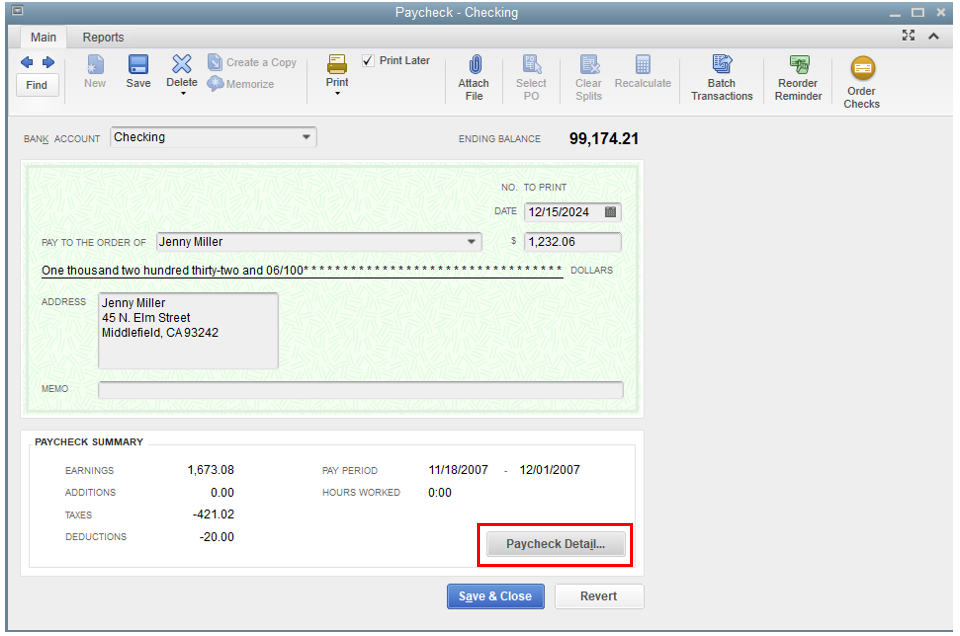
  5. When you are ready select OK.
  6. Once done, click Save & Close, then Yes.


Here's how to void a direct deposit paycheck:

  1. Go to the Employees at the top menu bar, then choose Edit/Void Paychecks.
  2. Change the Show paychecks through/from dates to the date of the paychecks you need to void.
  3. Select the Employee and click Void. 


You can create a direct deposit offset payroll item when you recreate missing or voided direct deposit paychecks that are sent to employees' accounts. It is to zero out the net pay amount so that your employee doesn’t get paid again.

You might find it helpful to refer to this article to have a quick overview of your payroll totals, including employee taxes and contributions: Create a payroll summary report in QuickBooks.


Keep your post coming if you need more assistance with managing your paychecks in QBDT, missmissy. I'm always here to help. Have a great day. 

1 reply

LeizylMAnswer
October 16, 2023

I appreciate you for reaching out to us here in the Community, missmissy. I'm here to help you correct the paystub information in QuickBooks Desktop (QBDT). 


If it's a regular paycheck, as long as there are no changes in the amounts, you can edit it by toggling the correct item. However, if it's a direct deposit, you'll want to void the existing paycheck and create a new one.

Before doing so, let's create a backup copy of your company file to ensure you have the original data. You can restore it in case of accidental loss or damage.


Here's how to edit a paycheck:


  1. Go to Banking at the top menu bar and select Use Register.
  2. Choose your bank account, then OK.
  3. Select and open the check in question.
  4. Click Paycheck Detail and make a necessary update.
  5. When you are ready select OK.
  6. Once done, click Save & Close, then Yes.


Here's how to void a direct deposit paycheck:

  1. Go to the Employees at the top menu bar, then choose Edit/Void Paychecks.
  2. Change the Show paychecks through/from dates to the date of the paychecks you need to void.
  3. Select the Employee and click Void. 


You can create a direct deposit offset payroll item when you recreate missing or voided direct deposit paychecks that are sent to employees' accounts. It is to zero out the net pay amount so that your employee doesn’t get paid again.

You might find it helpful to refer to this article to have a quick overview of your payroll totals, including employee taxes and contributions: Create a payroll summary report in QuickBooks.


Keep your post coming if you need more assistance with managing your paychecks in QBDT, missmissy. I'm always here to help. Have a great day. 

October 17, 2023

This worked perfectly!  Thank you so much.  

October 17, 2023

You're always welcome, missmissySEI.


I'm glad to know that the steps I shared earlier were effective in resolving the issue of correcting paystub information in QuickBooks Desktop (QBDT).


 If you require further assistance or have any other questions, please don't hesitate to reach out to us. We're here to help. Have a fantastic day!