November 19, 2024
Solved

payroll

  • November 19, 2024
  • 1 reply
  • 0 views

I have a trucking company and my drivers get a percentage of the loads they deliver I am in Oregon and we have to show hours worked My question is how do I show hours worked on a percentage pay ?


Best answer by LouiseG12

I know how essential it is to show the hours worked on a percentage pay in QuickBooks Online (QBO) Payroll to accurately track labor costs, Miranda. Currently, this feature isn't available on the platform as it is set to show the pay amounts in dollars by default. However, I'll outline a workaround below.


In the meantime, you will need to manually calculate the hours worked for each employee and add a pay type before overriding the amount during payroll processing.


Here's how you can add a pay type:
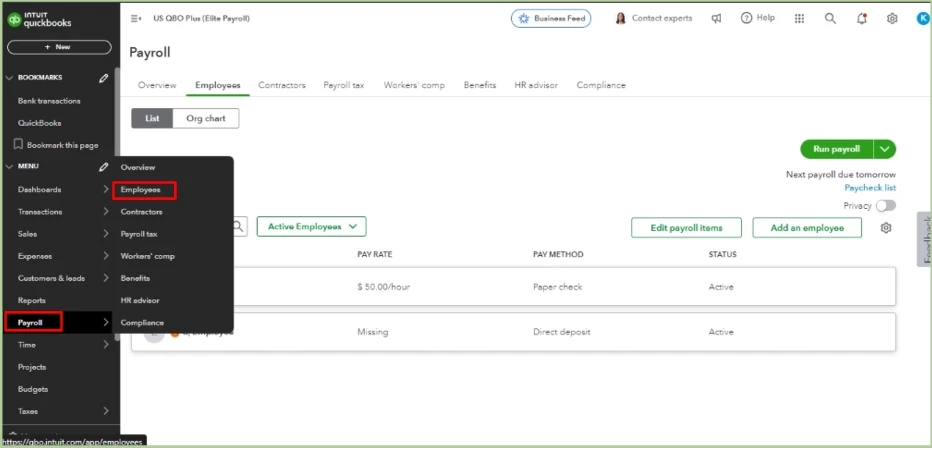
  1. Navigate to the Payroll menu, then Employees.

  2. Select your employee.
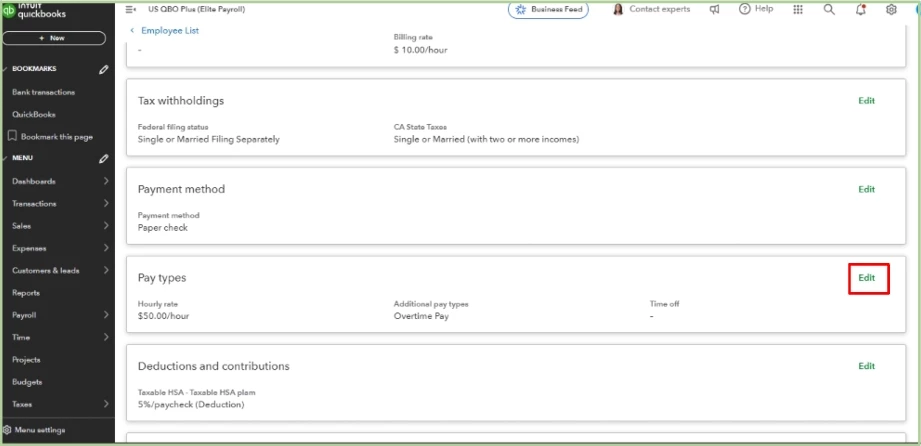
  3. From the Pay type section, click Start or Edit.


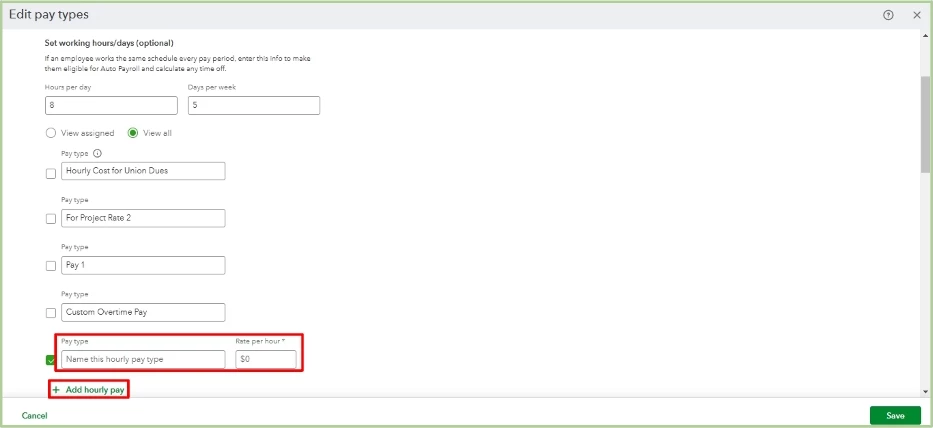
  4. Click + Add hourly pay under Pay type and then enter a pay type name. You can leave the Rate per hour as 0, so you can enter the amount when processing payroll.

  5. Hit Save.


Moreover, I know how beneficial it would be to have this feature to manage your business. Thus, I encourage you to submit a feature request regarding this capability. Your suggestion can help shape future updates and enhance the user experience.

To send your feedback:

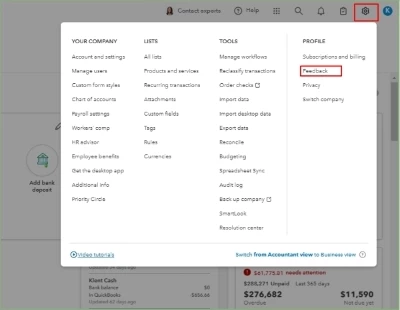
1. Go to the Gear icon and then select Feedback.
2. Type in your feature request in the description box.
3. Once done, click on Next.

Furthermore, I'll add these articles to guide you in adjusting an employee's fixed salary and run a report to ensure your data is accurate.


Your feedback will help us improve your workflow. By sharing your insights, you can help us identify areas for development, resulting in a more efficient and productive process. If you need further assistance with managing or processing your payroll, feel free to reach out. Have a great day!

1 reply

LouiseG12Answer
November 19, 2024

I know how essential it is to show the hours worked on a percentage pay in QuickBooks Online (QBO) Payroll to accurately track labor costs, Miranda. Currently, this feature isn't available on the platform as it is set to show the pay amounts in dollars by default. However, I'll outline a workaround below.


In the meantime, you will need to manually calculate the hours worked for each employee and add a pay type before overriding the amount during payroll processing.


Here's how you can add a pay type:
  1. Navigate to the Payroll menu, then Employees.

  2. Select your employee.
  3. From the Pay type section, click Start or Edit.


  4. Click + Add hourly pay under Pay type and then enter a pay type name. You can leave the Rate per hour as 0, so you can enter the amount when processing payroll.

  5. Hit Save.


Moreover, I know how beneficial it would be to have this feature to manage your business. Thus, I encourage you to submit a feature request regarding this capability. Your suggestion can help shape future updates and enhance the user experience.

To send your feedback:

1. Go to the Gear icon and then select Feedback.
2. Type in your feature request in the description box.
3. Once done, click on Next.
Furthermore, I'll add these articles to guide you in adjusting an employee's fixed salary and run a report to ensure your data is accurate.


Your feedback will help us improve your workflow. By sharing your insights, you can help us identify areas for development, resulting in a more efficient and productive process. If you need further assistance with managing or processing your payroll, feel free to reach out. Have a great day!

November 21, 2024

Thank you so much!

JenoP
November 21, 2024

You're very welcome, Miranda!


We're also glad to know that we're able to provide details and answer your questions about showing worked hours when compensating your employees on a percentage-based pay system.


Let me also share these articles in case you need to print the paychecks and give them to the drivers:


Remember, we're available 24/7 to help you navigate the payroll functions in QuickBooks Online. Whether you have questions about percentage-based pay, printing checks, or any other payroll-related topics, don't hesitate to reach out. We're committed to ensuring you can efficiently manage your payroll processes.