January 7, 2021
Solved

payroll

  • January 7, 2021
  • 2 replies
  • 0 views

My company uses Paychex for payroll. How do I enter this:

for January 2021 Payroll--

Net pay taken out of bank account 12/31/20 $10,000

Taxes and fees taken out of bank acct 1/4/21


thanks.

Best answer by JenoP

Banking transactions can still be matched even if they have different dates, parksbarbie.


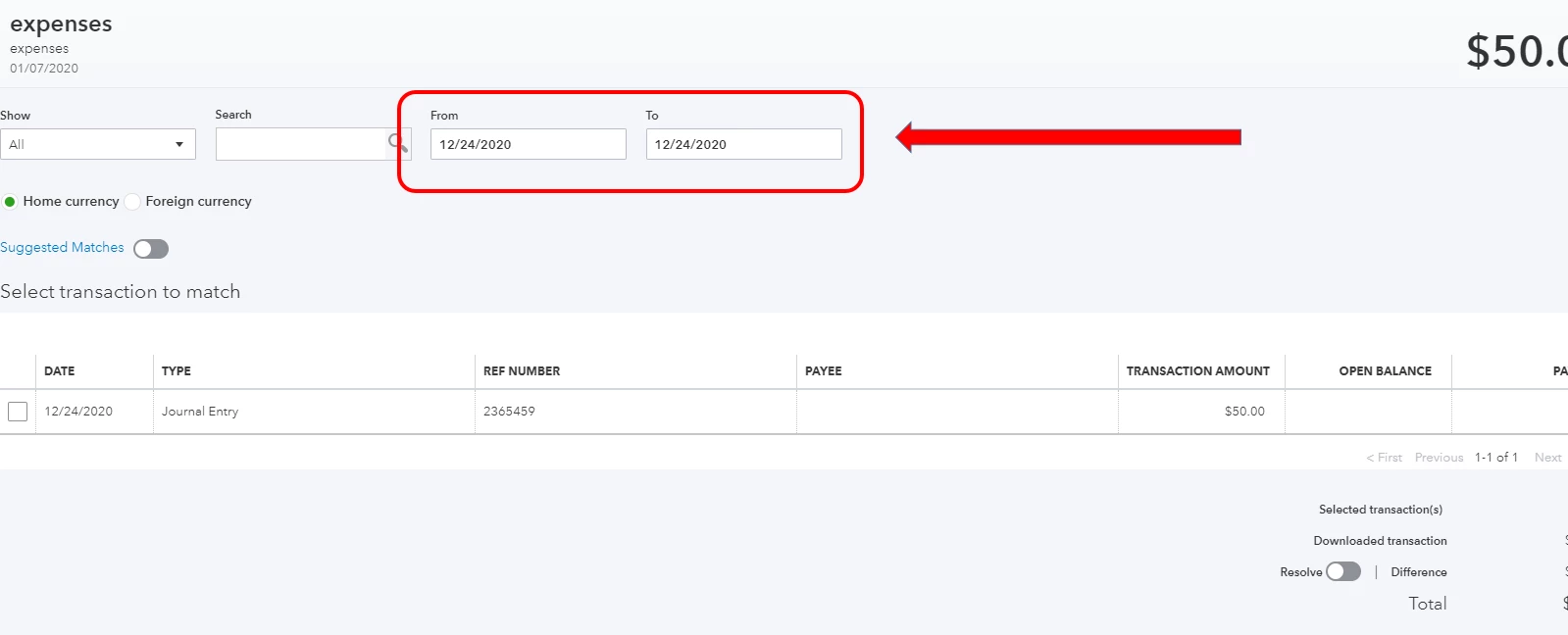
You can manually change the From and To dates when looking for a match. Just make sure they have the same amount so they can be paired together. Here's how:


  1. Go back to the For review tab.
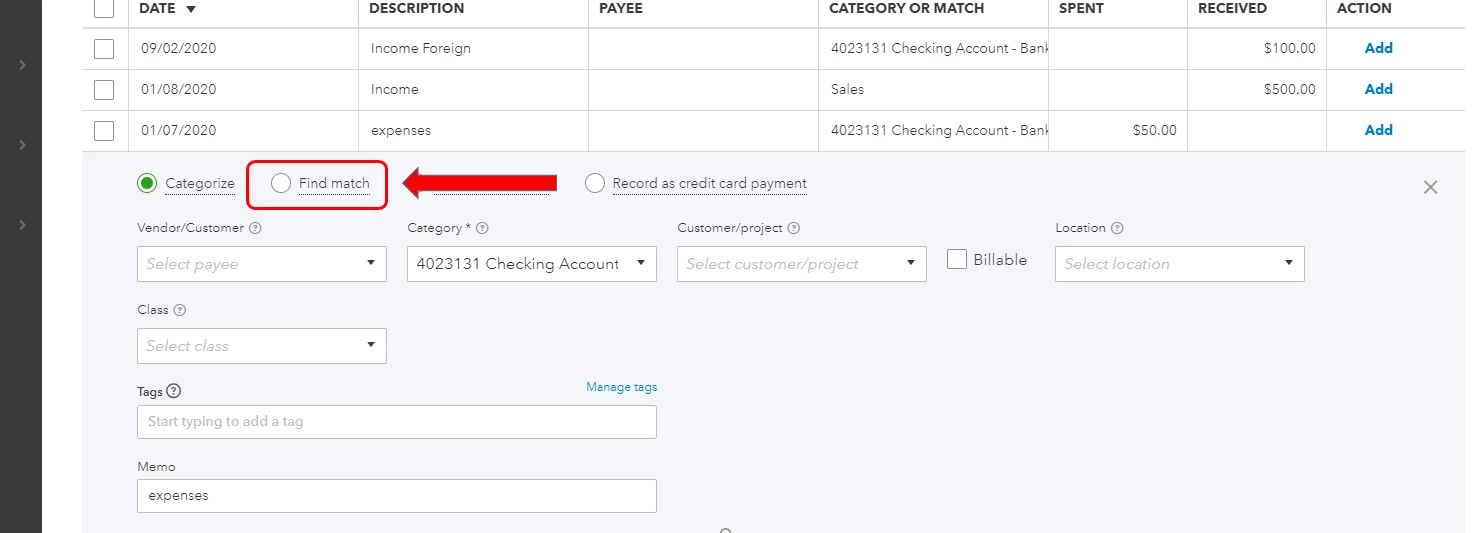
  2. Look for the transaction that you want to match and click Find Match.
  3. Change the From and To dates to 1/04/2021.
  4. Look for the journal entry and check the box before it.
  5. Click Save.

Let me also share this article about finding a match for more details: Categorize And Match Online Bank Transactions In QuickBooks Online.


Don't hesitate to get back to this thread if you have follow-up questions. I'll jump right back to help you again. 
 

2 replies

MJoy_D
January 7, 2021

I can help you enter these payroll transactions to your account, @parksbarbie.


You can create journal entries to track those paychecks you've created outside QuickBooks Online (QBO). First, you'll just have to create manual tracking accounts for your payroll liabilities and expenses.


You must have or create accounts for Payroll Expenses (Wages and Taxes) and Liability accounts (Federal Taxes, Federal Unemployment, and State Taxes). 


To create these new accounts:

  1. Go to Gear icon () and select Chart of Accounts.
  2. Click New to create a new account.
  3. Provide the Account Type, Detail Type and account name.
  4. Choose Save and Close once you're done. 

To create the journal entry:

  1. Go to the + New button and select Journal Entry.
  2. On the Journal date, enter the paycheck date.
  3. Enter the payroll expenses under debit 
  4. Add your payroll liabilities under credit. 
  5. Choose the bank account where you're paying your employees from and put these amounts to the credits column.
  6. Click on Save once you're done. 

You may also consult an accountant for guidance with the best category to use.


Check these articles for more information:

Let me know if there's anything that I can help in tracking these payroll transactions. Take care and have a wonderful day!

January 8, 2021

How do I account for the money taken out on 12/31 if the journal entry is dated 1/4/21? I do not think it will match in the QBO banking feed.

January 11, 2021

One final problem. When I reconsile the bank account the money that came out on 12/31 is not on the list to reconsile since the GJE is dated 1/4/21. How do I reconsile??

March 17, 2021

Payroll help

JasroV
March 17, 2021

Good day to you, @Need to chat with someone.


I’m more than happy to help you with your payroll concern. Can you share with me what specific payroll issue you need help with? This way, I’ll be able to provide you with the right resolution for it. Any additional information is appreciated.


Nevertheless, if you’re referring to running your payroll in QuickBooks Online (QBO), you may follow these easy steps: 


  1. Go to the Payroll menu, then select Run payroll.
  2. Select a pay schedule, then Continue.
  3. Click the employees you want to pay.
  4. Enter hours worked if applicable.
  5. Select Preview Payroll.
  6. To edit or preview a specific check, select the Edit (pencil) icon next to the check's net pay, then select OK when done.
  7. When you're ready, select Submit payroll.
  8. To print paychecks, select Print paychecks, then Finish payroll.


You can also see this article for more details about the process: Process or run payroll.


However, you’re implying to running payroll reports, you can utilize this link for guidance: Run payroll reports. If you wish to get in touch with our Support team, you can refer to the steps provided in this article: QuickBooks Online Support. Ensure to review their Support hours to know when agents are available.


Know that you’re always welcome to get back to me in this thread if you’re referring to something else. I’ll be around to help you in managing your payroll and your account. Keep safe and have a great week ahead!