January 6, 2023
Question

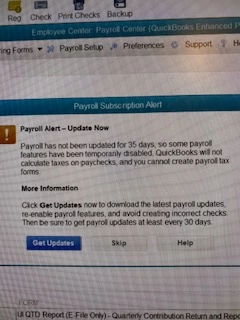
Payroll alert - Update Now

  • January 6, 2023
  • 1 reply
  • 0 views

I am having trouble running my quarterly/yearly reports. It is telling me I need to update, which I have to the latest 22301 and it wont let me run the reports

1 reply

January 6, 2023

Hello there, @bas58. Let me help you with the payroll alert you receive.


The message you have encountered is usually the effect of the following scenarios:


  • The automatic renewal isn't successful because of an outdated bank account.
  • QuickBooks is not updated.  
  • You're not using the latest payroll tax table.


To fix this, let's first verify the status of your payroll service in the Accounts/Billing Information menu. It will identify the status of your subscription. 


Here's how:


  1. Go to the Employees menu at the top.
  2. Choose My Payroll Service.
  3. Select Account/Billing Information.
  4. Sign in to your Intuit account.
  5. Check the status in the  Service Information section.


Once done, get the newest payroll tax table in QuickBooks Desktop Payroll to refresh your payroll settings.


  1. Go to the Employees menu.
  2. Choose Get Payroll Updates.
  3. Click the Download Entire Update radio button.
  4. Select Download Latest Update.
  5. A pop-up window will appear once the download is complete.


However, if you get the same result, I suggest updating the information to the QuickBooks Payroll Account Maintenance page. You can refer to this article for more details: Update or renew your subscription.


Keep me posted on how this works. I'll be happy to help. Keep safe
