March 27, 2023
Question

Payroll Chart of Account...wrong.

  • March 27, 2023
  • 2 replies
  • 0 views

We have always had payroll configured to be pulled from our main checking account, and the money does in fact still get pulled from this checking account, but QBO is now mapping the transaction to the wrong bank account in our chart of accounts.


We are on full service payroll, and the settings under Payroll Settings > Bank Accounts and under Payroll Settings > Accounting > Paycheck and Payroll Tax Payments are all set to the correct bank account.


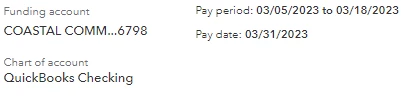
When I go to run payroll, however, I hit the Preview Payroll button, and under Funding account, the correct account is listed. However, under Chart of account, the wrong account is listed and this is where QBO is now dropping payroll transactions. This is the strangest thing...


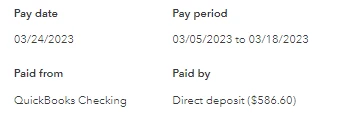
I've cleared my cookies, logged out and logged back in, tried using an incognito window on Google Chrome, but this issue persists. I've verified that this isn't just a display issue...I ran payroll last Friday and sure enough the funds got pulled from the right account, BUT QBO dropped the direct deposit transaction in the wrong account, so when the bank feed updated, I cannot match the transaction.


As seen in the screenshots below, our account is setup to use Bluevine Checking for payroll transactions, but QBO posts the transactions to QuickBooks Checking on its own for some reason.


Will be reaching out to support when they open today.



2 replies

March 27, 2023

Thanks for letting us know in advance the type of subscription that you're using, @urbancowboy1994.


To help fix your chart of accounts, I'd suggest reaching out to our Payroll Support Team since you're using QuickBooks Full Service Payroll. This way, they can further check your account and provide some information on why it happens.


Here's how:


  1. Click the Help menu in the upper-right-hand corner.
  2. Type in Talk to a human, then press Enter.
  3. Look for I still need a human and click on it.
  4. Click Get help from a human or Contact Support Team.
  5. Select between Send a messageSchedule an appointment, or Get a callback.


To make sure you get prioritized on your concern. Please check out our support hours and contact us at a time convenient: Support hours and types.


For additional resources about payroll, you can open the topics from these links:


Let me know if you have other questions about QuickBooks or payroll. I've got your back and am always happy to help.

March 27, 2023

T3 Department and system engineers are currently working on this.

March 29, 2023

I have the same issue. QB Checking was the worst decision ever.


I can't run payroll without it going to wrong account.


I have been talking to Tier 1 on Payroll Issues for the last month.  How can I get thru to anyone that can help!


I have 5 quickbooks instances and am about to switch to a different system. UGGGGGG

March 29, 2023

JUST HERE BECAUSE MISERY LOVES COMPANY!!!
Experiencing the exact same issue and problem...Have spent probably 4 or 5 hours speaking with multiple support agents - verifying setting, explaining the issue, etc. etc. etc. IT's been a clinic in frustration and lousy customer support.

The worse part is instead of acknowledging that it's broken I've been told MULTIPLE times, and as recent as today by a "supervisor" that it's working "as designed" and it will work this way moving forward and I have two choices.
1) Fund Payroll from Quickbooks checking (WHICH I HAVE NO DESIRE TO DO)

or 

2) Use Journal entries to correct the inaccurate entries made to the QuickBooks Checking Chart of Accounts.

BOTH OF THESE ARE UNEXCUSABLY WEAK SOLUTIONS AND QBO SHOULD BE EMBARRASSED TO EVEN SUGGEST THEM.

I've even attempted to close my QuickBooks Checking account as a work around since it's been nothing but problematic anyway.  However, QBO will not allow you to set it to inactive so it does no good.