@LarryKetch
RE: Only certain transactions from only certain items display correctly. Other Payroll Items display only transactions from 9/22 to current. The "missing" transactions from those Payroll Items are appearing in another expense account Payroll Expenses-Other... not one that we set up.
This is not a sign of data corruption. It will happen when the expense account on an item is changed and then, based on the user's choice, not all data is updated to use the new account. It's considered a feature, so that you have the option of not changing prior year's financial reports, like the P&L.
When the data is 'split' and uses different accounts, if you want to change that and make all or more of the data use one account, likely the new account you mention, here's how to do that:
1. Edit the payroll item and change the expense account to the old account, "Payroll Expenses" from your description. When prompted, select the option update all of the data to use that account:
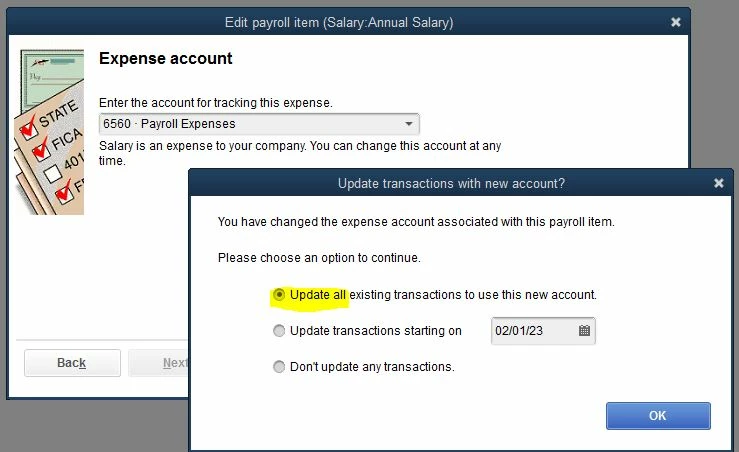
The Update all option is a little bit misleading. What it actually does is update all of the transactions that used the prior account, the one the payroll item used before you edited it. So, after you make this change, the transactions that use the ~"Direct Labor" account are updated, and so if all of the transactions in your file that use the item used only two accounts before, then now all of the transactions that use the item will use the same account.
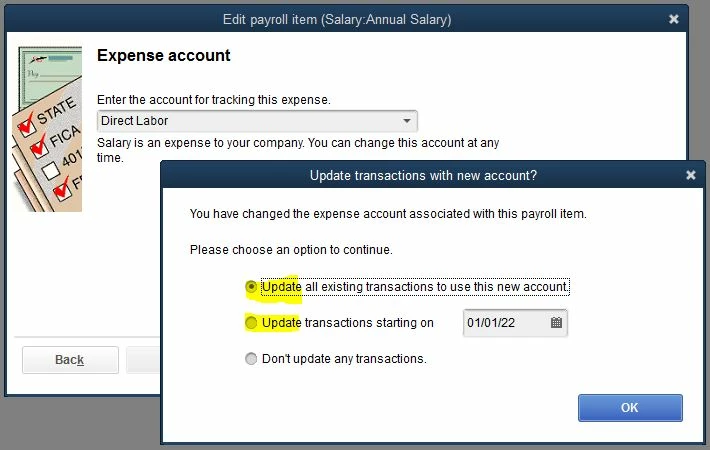
2. Edit the payroll item again and change the expense account to the desired account ~"Direct Labor" in your case. When prompted, this time select either all transactions or transactions starting on a specific date: