May 14, 2022
Solved

Payroll items (SS, Medicare...) are not calculated automatically.

  • May 14, 2022
  • 2 replies
  • 0 views

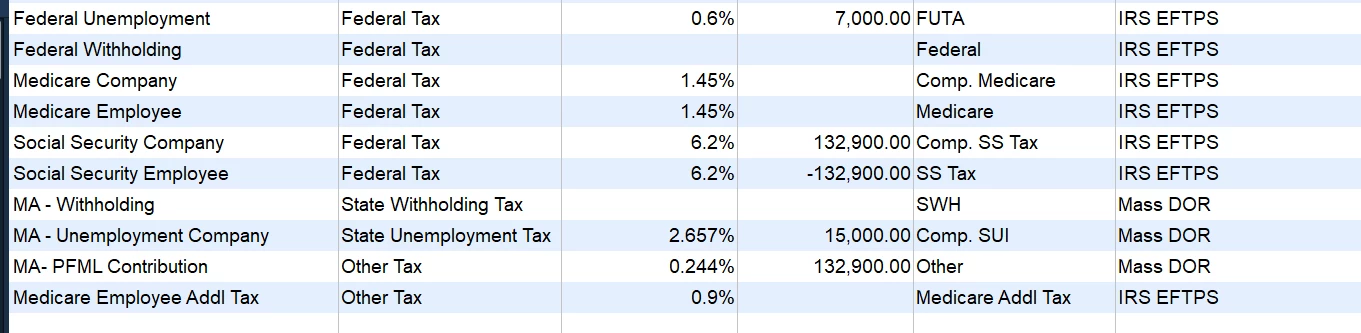
I have set up the payroll item list:

 However, the items are never calculated. I have to enter them manually ever time:
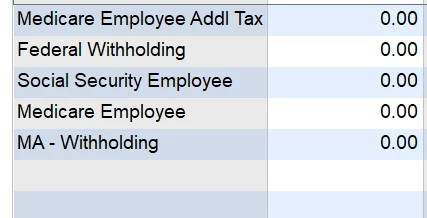
This has been the case all the time. I have finally decided to ask about it here. Hope an expert can shed some light on this.

I am not using any payroll service. I make paychecks with QB.

Best answer by BigRedConsulting

RE: I am not using any payroll service. I make paychecks with QB.


That is why the taxes don't calculate automatically. You need a payroll subscription in order for the taxes to calculate automatically.

2 replies

BigRedConsulting
May 14, 2022

RE: I am not using any payroll service. I make paychecks with QB.


That is why the taxes don't calculate automatically. You need a payroll subscription in order for the taxes to calculate automatically.

zipswichAuthor
May 14, 2022

@BigRedConsulting I wanted to make my question as simple and clear as possible, so I did not mention one thing that made me post this question. I initially thought no automatic calculation was by design until I added a payroll item (MA-PFML contribution) and it was calculated automatically. 

May 14, 2022

I'm here to ensure that the Medicare and Social Security of your employees will calculate correctly, @zipswich


As what @BigRedConsulting, we'll need to have a payroll subscription for taxes to automatically deduct in QuickBooks. If you'd like to do your payroll manually, you can track it in QuickBooks Desktop. Just remember, you'll need to calculate and enter payroll taxes, and file your tax forms yourself. To do this, just follow the steps and details in this article: Set up manual payroll without a subscription in QuickBooks Desktop


Just incase you'll be using our Payroll Service and taxes are not calculating, here's the following are reasons that can lead to this issue: 

  • QuickBooks is not updated or there is an internet interruption during the update.
  • Using the incorrect tax table version.
  • The gross wages of the employee's last payroll are too low.
  • The total annual salary exceeds the salary limit.


If the same thing happens after QuickBooks and the tax table update, I recommend reviewing your employee's profile to check if the taxes are set up correctly. QuickBooks calculates the federal withholding based on several factors such as taxable wages, number of allowances/dependents, pay frequency, and filing status. Here's how to review your employees’ payroll info:

  1. Navigate to the Employees menu.
  2. Choose Employee Center.
  3. Double-click the employee’s name, one at a time.
  4. Click Payroll Info and make sure the Pay Frequency is correct.
  5. Select the Taxes button.
  6. Review the Filing Status and Allowances fields in the Federal tab. Make the necessary corrections.
  7. Hit OK and OK again.


For other troubleshooting solutions, check out this article: Payroll items on a paycheck are not calculating or are calculating incorrectly. Feel free to browse this link here if you need help with other tasks in running payroll. It'll route you to our general payroll topics with articles.


The Community always has your back, and I'm just a post away should you ever need anything. Just leave a comment below and I'll get back to you. Have a great day ahead.

BigRedConsulting
May 14, 2022

@RCV 

Did you read the user's post? He doesn't have a payroll subscription and is doing payroll manually.