November 29, 2018
Solved

Payroll & Job Estimate vs. Actual Report

  • November 29, 2018
  • 1 reply
  • 0 views

Is there a way to have payroll transactions (that are already being job costed/tracked - including Workers Comp) show up on a Job Estimates vs. Actual Report?  I already have my Items List set up for two-sided items...

Best answer by AldrinS

Hi galaxy builders,


It's nice to hear from you again. Allow me to jump in and elaborate that part of qbteachmt's awesome answer.


It is referring to the columns you can find on our Timesheet feature. The following steps below will lead and guide you on how to use it:

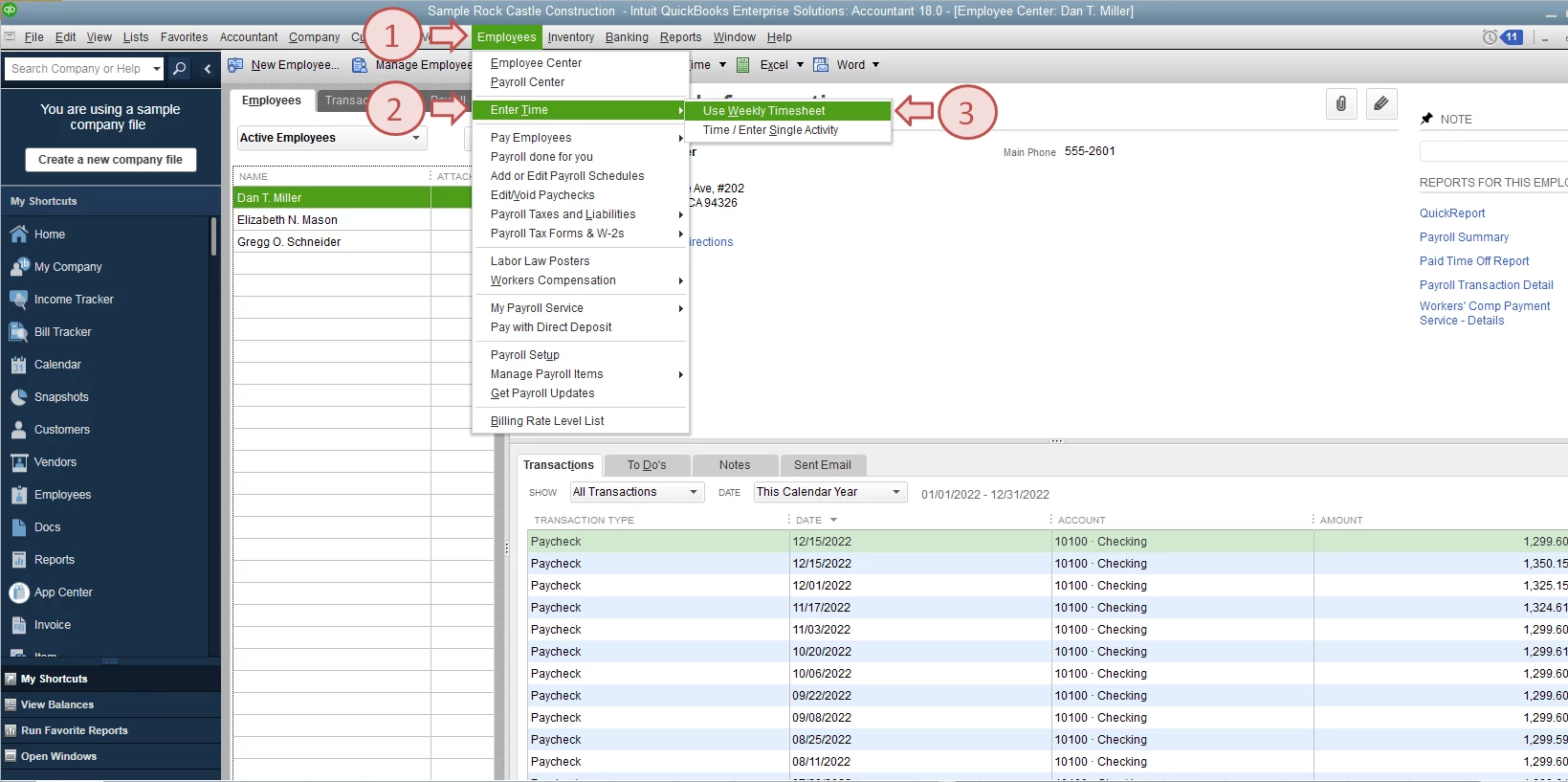
  1. From the Employees menu, select Enter Time and then Use Weekly Timesheet.
    - You'll be routed to the Timesheet page where you can find the Service Item and Payroll Item columns.
  2. Click the Name drop-down menu, then choose the correct employee.
  3. Enter the appropriate details in the Customer:Job, Service Item, Payroll Item, Class (if necessary), and the Hours.
  4. Hit Save & Close.

I've attached a couple of screenshots below to show you how it looks like. Also, check out our detailed guide on how to create timesheets and time data report in QuickBooks for additional information.


Keep in touch with me here and let me know what else I can do to help you succeed with QuickBooks. Thanks for reaching out, wishing you and your business the best!

1 reply

qbteachmt
November 29, 2018

For this: "I already have my Items List set up for two-sided items..."

That's only one step.


You need to mark Payroll Preferences to Job Track, and Per Earnings Item.


You need to set the Employee Default and edit each current name, and set them to Pay From Time Data.


Now you use Timesheets and see Two Columns. Payroll Item controls the data flow for costing. Service Item controls the Reporting on job reports. They need to be used Together.


The same item is in use in the Estimates, of course.


Now you can run Time based reports for Est and Actual, as well as Cost reports for that same activity, but Cost is from Paycheck Date. Time is from Task date.


Please see my attachment.

November 30, 2018

Payroll Preferences is marked to Job Track.  The "Job Costing, Class, and Item tracking for paycheck expenses" check box is selected.  However, the only section that allows me to select "Per Earnings Item" is the "Assign one class per" section.  


We have some employees who are paid on a job rate basis (they're paid a set amount per job instead of an hourly rate).  Thus, I don't enter time for these employees.  How would I go about tracking their pay for the Job Estimate vs. Actual report?


Can you elaborate on "Now you use Timesheets and see Two Columns. Payroll Item controls the data flow for costing. Service Item controls the Reporting on job reports. They need to be used Together."?

AldrinSAnswer
November 30, 2018

Hi galaxy builders,


It's nice to hear from you again. Allow me to jump in and elaborate that part of qbteachmt's awesome answer.


It is referring to the columns you can find on our Timesheet feature. The following steps below will lead and guide you on how to use it:

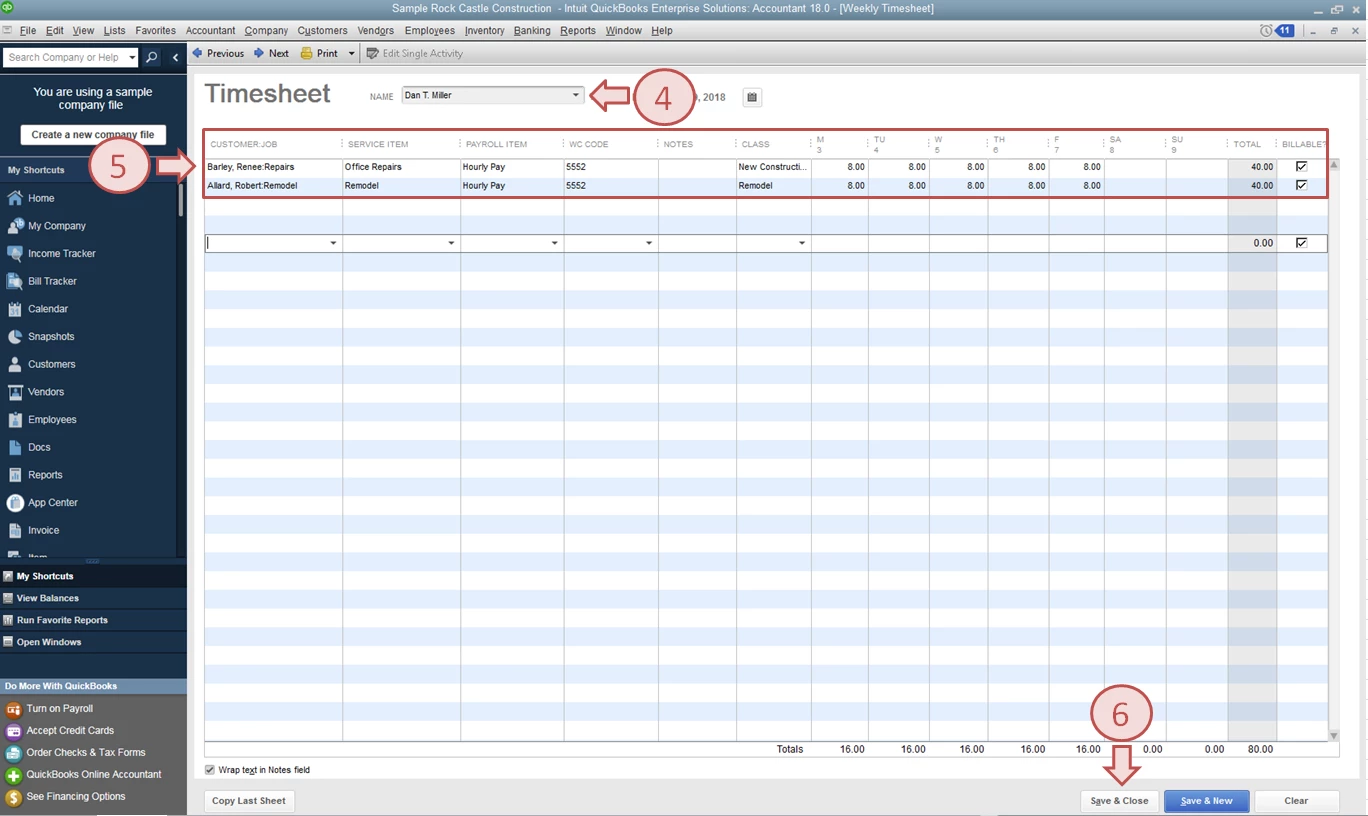
  1. From the Employees menu, select Enter Time and then Use Weekly Timesheet.
    - You'll be routed to the Timesheet page where you can find the Service Item and Payroll Item columns.
  2. Click the Name drop-down menu, then choose the correct employee.
  3. Enter the appropriate details in the Customer:Job, Service Item, Payroll Item, Class (if necessary), and the Hours.
  4. Hit Save & Close.

I've attached a couple of screenshots below to show you how it looks like. Also, check out our detailed guide on how to create timesheets and time data report in QuickBooks for additional information.


Keep in touch with me here and let me know what else I can do to help you succeed with QuickBooks. Thanks for reaching out, wishing you and your business the best!

