We appreciate your prompt response and the additional information you've provided regarding your concern about payroll liability, LizB. From your description, I can tell you're already on the right track in adjusting your payroll tax data. However, you'll need to ensure you input the correct date, effectivity, affected accounts, and purpose so that QuickBooks can accurately apply your liabilities.
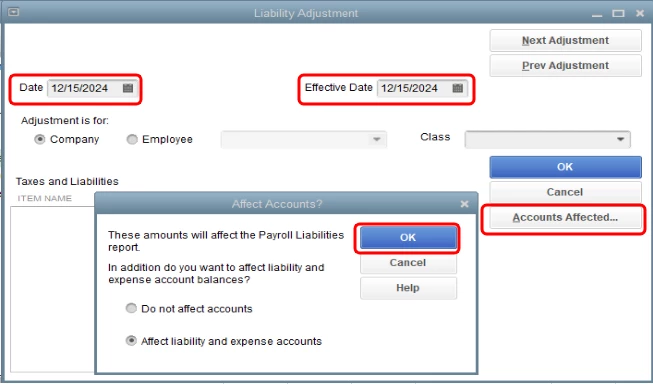
With that, we'll need to edit the adjustment you've made. Here's how:
- Open the payroll adjustment.
- Ensure the Date, Effective Date, and the Adjustment is for are correct.
- Select the Accounts Affected, then click OK.
- Repeat for the other employees, then click OK.
For the complete guide, please see this article: Adjust payroll liabilities in QuickBooks Desktop.
On the other hand, the negative amount can also be because of a duplicate payment. You can pull up the Liability Balances report and change the date to This calendar year. Once found, delete it.
Also, you may want to create a payroll summary report to have a quick view of your total payroll wages, taxes, deductions, and contributions. For the step-by-step guide on how to do this, you can check out this article: Payroll Summary Report in QuickBooks.
I'll keep an eye on this thread for any additional queries you may have in tracking payroll liabilities in QBDT. Feel free to leave a reply below, and I'll be around to get you covered.

