

August 12, 2022
Solved

Problem setting up employee direct deposit

  • August 12, 2022
  • 1 reply
  • 0 views

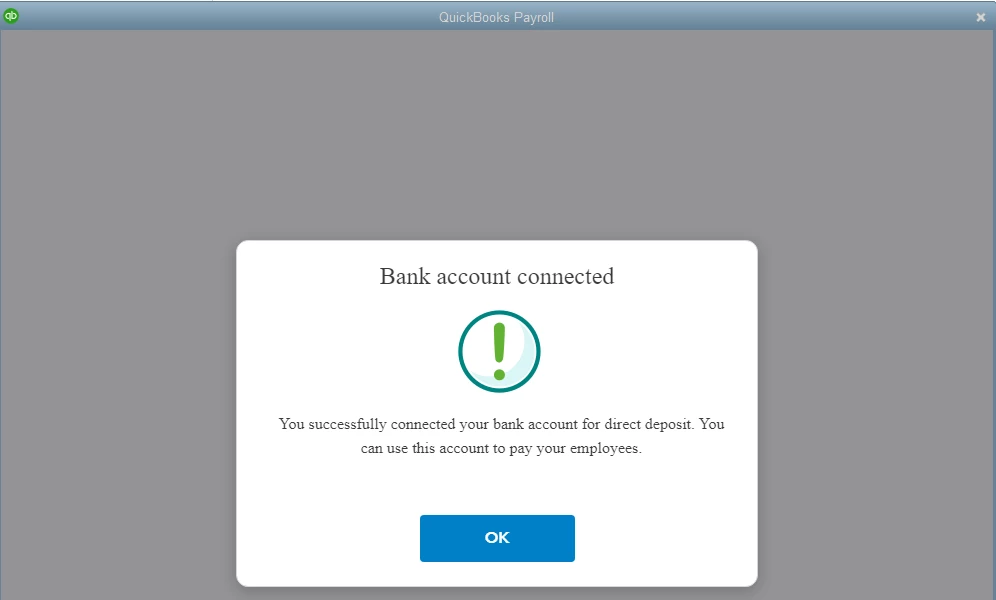
I'm using QB 2022 Pro Desktop. I set up my bank account for direct deposit. When I edit my first employee and click the Direct Deposit button to add their direct deposit information, it gives a window that says "Bank account connected! You successfully connected your bank account for direct deposit. You can use this account to pay your employees." as shown in image below. I click the OK button & it doesn't do anything. I tried clicking the x to close the window and that doesn't work. The cursor in showing a circle like it's working. At this point, I sometimes have to end the QB task, but sometimes it will give me a window that says it's connecting for the payroll update & then it will tell me that I have the latest payroll update. How do I get around this?
Best answer by CharleneMaeF

I'm not sure what you want me to do. I set up the company bank account this morning & that was accepted already (see image in 1st message). The links you included just tell me how to set up the company bank account which is already done & the employee's direct deposit which is what I'm trying to do. When I click the Direct Deposit button on the employee's Payroll Info tab, it just shows the window image in my first message.


I'm determined to help you set up direct deposit for your employees, CSI5.


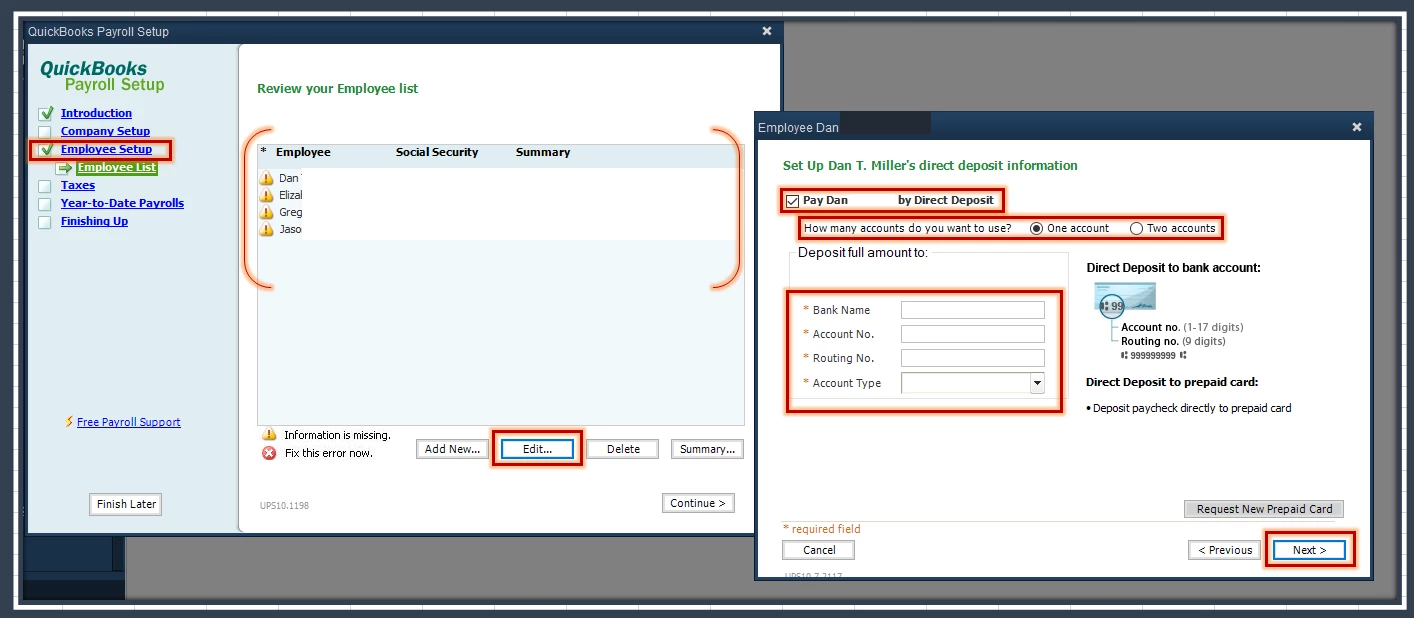
The error message occurs when the employee's bank account is already active in our system. Let's add their information via the Payroll Setup wizard. 


Here's how:


  1. Go to Employees and then select Payroll Setup.
  2. Choose the Employee Setup tab.
  3. Click Continue.
  4. Select the employee's name, then click Edit.
  5. Click Next until you reach the Set Up [Employee's Name] direct deposit information.
  6. Place a checkmark in the Pay [Employee's Name] Direct Deposit box.
  7. Decide how many account/s you want to use.
  8. Enter the employee's bank details.
  9. Follow the onscreen instructions to save the info.


Once done, you can now pay your employees using direct deposit. 


I've also added this article that'll help you modify the bank account information of your employees to make sure your record is up-to-date: Change Workers Direct Deposit Info.


I'd appreciate it if you'll update us if you have additional questions or concerns about the process. We want to make sure this gets resolved.

1 reply

Candice C
August 12, 2022

Good morning, @CSI5


It's great to see you back in the Community. Let's work together to get you past this message. 


The best route would be to try some troubleshooting steps to help resolve this loading problem. Using the Verify and Rebuild tool can assist in this situation. Here's how: 


Verify


  1. Tap the Window menu and hit Close All
  2. Go to the File menu. 
  3. Hover over Utilities
  4. Press Verify Data


Rebuild


  1. Go through steps 2-3. 
  2. Choose Rebuild Data
  3. Click OK when you receive a message to backup your company file. 
  4. Save the file. 
  5. When you see the message "Rebuild has completed," tap OK.


It's that easy! 


Let me know if this works or if we need to try other instructions. I'm only a post away if you need me again. Take care! 

CSI5Author
August 12, 2022

I did what you suggested. It didn't find any errors in the data. The solution didn't work though. It's still doing the same thing when I click the Direct Deposit button on the Employee's Payroll Info tab. The only difference I can see is that it's checking for the Payroll update every time after it shows the image in my previous message.

August 12, 2022

I appreciate the troubleshooting steps you've performed to resolve the issue with your employee's DD setup, CSI5."


For your future reference, you can always check these links attached to guide you in changing payroll bank accounts for direct deposit in QuickBooks Desktop: 


Let me know how it goes in the comments below. I'm just around to help if you have other payroll and direct deposit concerns in QBDT.