

September 6, 2022
Solved

processed payroll, tried to run Client Ready report and receive error message File not found

  • September 6, 2022
  • 1 reply
  • 0 views

after processing payroll, tried to run Client Ready report and also Summarize Payroll Data. Receive attached message. I checked the path and this file is gone. How do I fix?


Best answer by BigRedConsulting

That looks like a bug. First, that's not where the templates are located, the folder in the message - or a version of it - doesn't seem to exist (I don't think it ever has), and it isn't even spelled using actual words, which it probably would be if it did exist.  "Centetemplates"?  Really Intuit?  This seems like an error inside a screw up inside a bug to me:
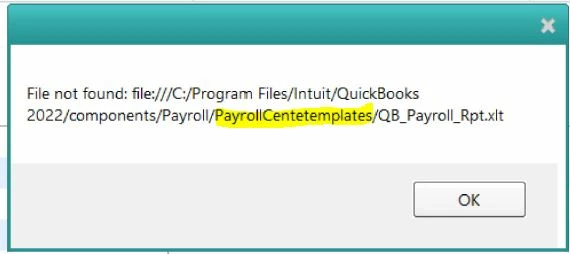
 

The template has always been located at:

C:\Program Files\Intuit\QuickBooks [version]\Components\Templates\


It's probably still there on your computer. It is on mine.


It is likely that if you try to launch it from the QB menu then it will work. Pick Reports | Employees & Payroll | Client Ready Payroll Reports to launch it.

1 reply

BigRedConsulting
September 6, 2022

That looks like a bug. First, that's not where the templates are located, the folder in the message - or a version of it - doesn't seem to exist (I don't think it ever has), and it isn't even spelled using actual words, which it probably would be if it did exist.  "Centetemplates"?  Really Intuit?  This seems like an error inside a screw up inside a bug to me:


The template has always been located at:

C:\Program Files\Intuit\QuickBooks [version]\Components\Templates\


It's probably still there on your computer. It is on mine.


It is likely that if you try to launch it from the QB menu then it will work. Pick Reports | Employees & Payroll | Client Ready Payroll Reports to launch it.

Adrian_A
September 6, 2022

Thank you for adding a screenshot, raleighkim.


Let's run some steps to resolve the error message.


Aside from the troubleshooting steps shared by BigRedConsulting, let's look for your file in a different directory.


First, go to your server computer and perform a wildcard search for all company files by typing one of the following into the search bar:


  • *.qbw (Working Files)
  • *.qbb (Back Up Files)
  • *.qba (Accountants Copy Files)
  • *.qbx (Accountants Transfer Files)
  • *.qby (Accountants Change Files)


Once the file is found, make a note of the file's location and proceed to open your QuickBooks file. I've added this link for the detailed steps: Solution 2: Open your file in QuickBooks.


Additional information and references are also provided here in case you might need them:


Join us again in the Community if you need anything else.

September 6, 2022

I think you misunderstood the problem. I have no control over error messages generated within Quickbooks so knowing where my company files are has nothing to do with looking for a file in the location in the error message.