I'll share the details on how to get the Maximum percent of disposable income rate for your new employee, @CK18.
The maximum percent of disposable income applies to Child/Spousal Support orders only. The withholding order may not state any percentage since there's a typical language for this. You can enter the rate based on this formula: "The total withheld amount, including your fee, cannot exceed xx% of the employee's aggregate disposable weekly earnings." View the screenshot below for your visual reference. For more details, check out this article: Setting Up A Wage Garnishment. Just locate the Add a garnishment - QuickBooks Online Payroll section. Then, go to the "Maximum % of disposable income" row.
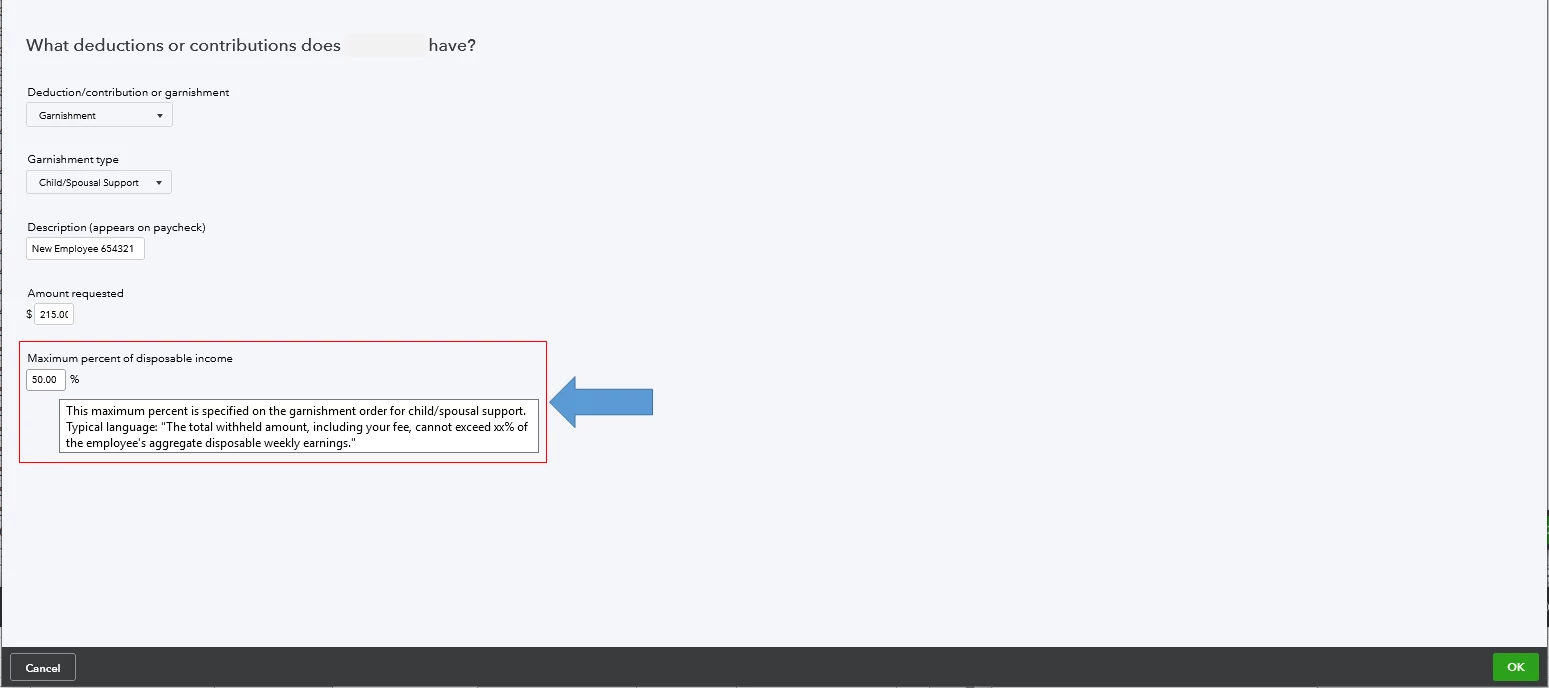
Also, the Federal Consumer Credit Protection Act (CCPA) limits garnishments to 25% of disposable income. You can enter the rate as 50% if the new employee is supporting a current spouse or child who is not the subject of the withholding order. Use 60% if the employee is not supporting them. You may garnish an additional 5% for support payments over 12 weeks in arrears.
If you're unsure of the rate, I'd suggest consulting your accountant. They can help you determine the appropriate percentage for your new employee. This way, their garnishment deductions will be set up accurately.
Once done, the system will auto-calculate the garnishment amount each time you create an employee's paycheck. In regards to their remittance, we currently don't support them. Thus, I'd suggest using the Deductions and Contributions report to serve as your reference when remitting them to the garnishing agency. You can also follow the instructions on the child support order for further compliance requirements.
I'll be right here to help if you need anything else. Keep safe always, @CK18.
Best regards,
Raymond Jay

