

August 21, 2023
Question

QB Pro auto adding wrong state to new employee payroll profile

  • August 21, 2023
  • 1 reply
  • 0 views

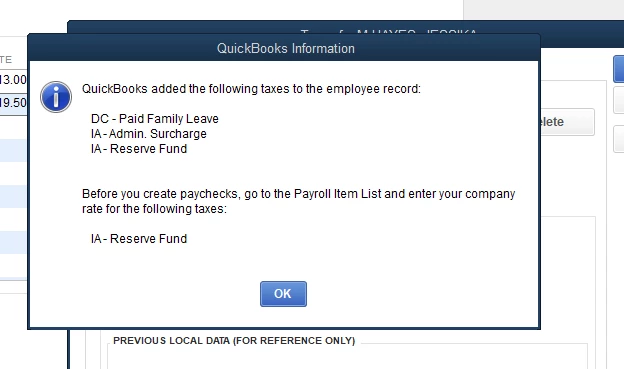
We have employees in many states, recently added DC and now whenever I add a new employee, no matter what state I choose for their work in and live in state, This DC family leave tax gets auto added to their profile!

I can delete it, but would prefer this didn't get auto added.

Checked everywhere and can't see how to stop this from auto adding. 
1 reply

JaeAnnC
August 21, 2023

Hello there, @SESolutions. It's my goal to ensure you'll be able to add the correct state for your employees in QuickBooks Desktop (QBDT).


QBDT provides a wide range of preferences and default settings that apply to all or most of your employees. Since only the DC state is being added to your employee's payroll information, it's possible that it's set as the default in your settings.


To rectify this, let's change the Taxes Defaults to None. Here's how:


  1. Go to Edit, then Preferences.
  2. Go to the Payroll & Employees section and click the Company Preferences tab.
  3. Select Employee Defaults, then Taxes.
  4. Click the State tab.
  5. In the State dropdown, select None
  6. Click OK.


Please see this article to learn more: Set payroll preferences in QuickBooks Desktop Payroll.


Moving forward, here's a reference containing a detailed step-by-step guide on how to run payroll for your employees: Create and run your payroll.


Feel free to swing by the Community if you have additional questions concerning your employees' payroll profiles. You can always count on us. Be safe and have a great rest of the day!

August 22, 2023

Thank you for the reply, however I checked that already and there is no default set.

DC is not the ONLY state being added, as you can see in my screen shot. But it is being added, no matter which state I select.

Any other suggestions?