April 15, 2019
Solved

QuickBooks Workforce Not displaying PTO

  • April 15, 2019
  • 4 replies
  • 0 views

The new Workforce does not reflect current PTO balances.  Is there a way to turn this setting on?  

Best answer by PreciousB

Thanks for visiting the Community, astanleyCTG.


I can help you display the PTO balances in QuickBooks Workforce.


Right now, PTO balances won't show on the Paycheck Detail screen of QuickBooks Workforce. The employees should download the paychecks to view the available sick and vacation hours.


I'm happy to show you how:
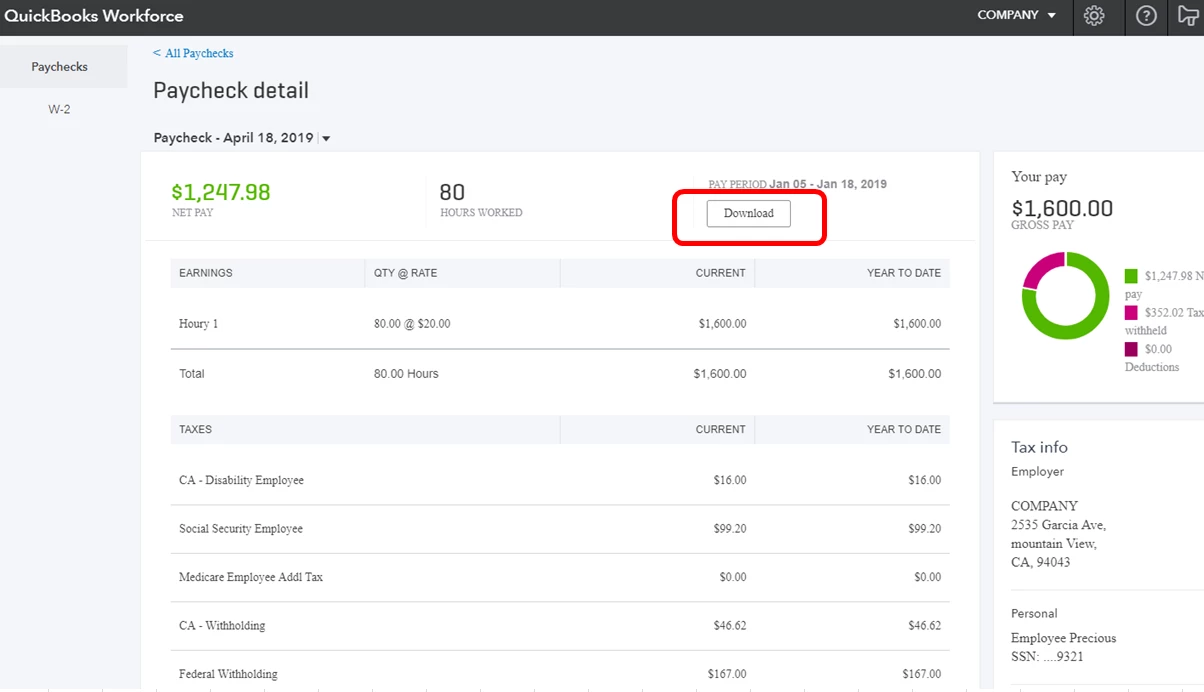
  1. Sign in to QuickBooks Workforce.
  2. Click the Download button (refer to the screenshot below).

These steps should let your employees see their PTO balances.


I'm including an article that provides further details about QuickBooks Workforce: Set up online pay stub access for employees.


That information should get you back in order. It's my priority that this is resolved for you, so please let me know how it goes. I'll be keeping an eye out for your response. Have a good one.

4 replies

PreciousB
PreciousBAnswer
April 16, 2019

Thanks for visiting the Community, astanleyCTG.


I can help you display the PTO balances in QuickBooks Workforce.


Right now, PTO balances won't show on the Paycheck Detail screen of QuickBooks Workforce. The employees should download the paychecks to view the available sick and vacation hours.


I'm happy to show you how:
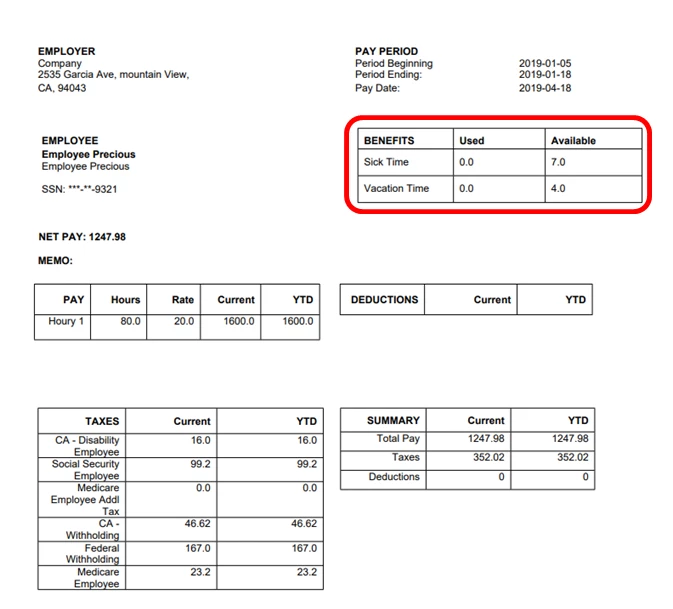
  1. Sign in to QuickBooks Workforce.
  2. Click the Download button (refer to the screenshot below).

These steps should let your employees see their PTO balances.


I'm including an article that provides further details about QuickBooks Workforce: Set up online pay stub access for employees.


That information should get you back in order. It's my priority that this is resolved for you, so please let me know how it goes. I'll be keeping an eye out for your response. Have a good one.

April 16, 2019

Thank you for the insight.   I will inform my employees.


PreciousB
April 16, 2019

It's my pleasure to help, astanleyCTG.


I'd like to share these article too for further details about QuickBooks Workforce:

Thanks again for being part of the QuickBooks family. Should you have more questions, please let me know. I'll be here if you need me. Have a lovely day!

July 11, 2022

We are having the same issue presently. Some employees can view vacation and sick leave, some cannot. They are using same kind of phones and same browsers. Chat for Workforce can not help. They keep leaving the conversation and don’t sound like they have any idea what they are doing. 

March 5, 2024

We started using Workforce in January 2024.  We noticed that PTO accrual and use per pay period do not show.  I've tried reaching Workforce for an answer for over 2 months.  We are required to show accrual and use in Washington.  Just wondering if anyone found a way to get this to show on Workforce?  Looks like its been an issue for years unfortunately.  The Chat Bot from Workforce told me it was a known issue and they were working on it.  I was hopeful until I saw posts from 2019 about the same issue.  Any insight will be appreciated.


March 5, 2024

Hello there. Thank you for sharing your concern here.. I've got you! I have here some information relating to this issue.


We currently have an open investigation (INV-100083) into this concern. For now, it is best to contact our QuickBooks Workforce Support Team so they can include you in the list of affected users. This way, they will be able to notify you as soon as any solution is available.


To speak with one of our experts from QuickBooks Workforce Support. Please follow the steps below to contact support:


Contact us through the web browser


  1. Go to Help.
  2. Select Contact Us.
  3. Click Chat with us.
  4. Enter your email address, name, and question.
  5. Choose Start Chat.


Contact us through the Workforce mobile app


  1. Tap Help.
  2. Tap Contact Us.
  3. Enter your email address, name, and question.
  4. Click Start Chat.


If you can't sign in to QuickBooks Workforce


Fill out the form and chat with us.


Workforce chat is available Monday to Friday, 6 AM to 6 PM PT.


I'm including these articles you may find helpful in the future while working on a task in QuickBooks Workforce:


Your patience on the matter is well appreciated. Our engineers are working hard to find the best solution. If you have further questions, drop a comment below, and I will answer them in any possible way. That's it for now. Stay safe!

March 6, 2024

Thank you for the information.  I first contacted Workforce Chat on 1.8.24 and was given a case number regarding this issue.  Their suggestion was to download the pay stub.  However, the information is not on the downloaded paystub in Workforce either.  I have regularly checked back with Workforce Chat for an update to the case number and am told to download the pay stub.  I've asked to talk directly with someone and Workforce tells me to call QB and when I do, QB tells me I need to deal with Workforce and Workforce does not have anyone to talk with only the Chat Bot.  I'm guessing I'm not the only one experiencing this issue nor the only one in Washington State with this requirement to show the Accrual and Use of PTO for the pay period, not Balance YTD. 

August 16, 2024

So this issue has been ongoing since 2019.....really??

Unbelievable!


Here is the QuickBooks Workforce accountant/bookkeeper view - it is beautiful.

Clearly this is prepared by an accountant/bookkeeper:

Below is what the employee receives as a paycheck stub!  What a joke.  Clearly this output was created by an IT computer programmer who is clueless on HOW TO present financial information!! 

NOTE:  Missing information

NOTE:  Disorganized

NOTE:  No use of comma in the $ amount figures.

The list goes on!!!!  SERIOUSLY!!!  Quickbooks Workforce should be ashamed.  This could be fixed in a day.


OK.  Let's watch the QuickBooks Workforce response.  It will be the generic blah blah blah, thank you for the feedback, blah blah blah, I'm just here to appease and patronize you, but not really resolve your concerns or needs.

Let the timer begin.......

Clark_B
August 16, 2024

Having issues regarding the paycheck stub will surely delay your working progress, @User_In_Virginia. I know how important it is to show the paycheck stub properly or to have the PTO displayed.  


As much as I'd love to help you with this, we're unable to check your account here in the Community space for security reasons. That said, I'll route you to your dedicated support. They have the tools to review and investigate what's causing this problem and guide you on a possible fix.


You can use this link to chat with our Workforce Support agents: Workforce Direct Chat link.


For future reference, check this article to learn how to export reports to Excel from QBDT: Export reports as Excel.


If you have any other concerns about the paycheck stub or anything else related to QuickBooks, feel free to ask me, @User_In_Virginia. I'll assist you in any way possible.
