Thank you for providing the screenshot, junegerhardt. I'm eager to assist you with the process of enabling direct deposit for your employees successfully.
The error message occurs when the employee's bank account information is already registered in your QuickBooks Desktop company file.
Instead of entering your employee's direct deposit information in their profile under Payroll Info, you have the option to add their details through the Payroll Setup wizard. Here are the steps that guide you through the process without encountering screen lock.
- To begin, navigate to the Employees menu.
- Locate the Payroll Setup option.
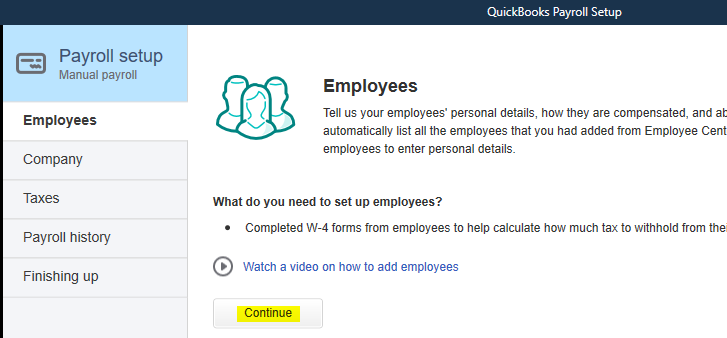
- From there, select the Employee Setup tab and proceed by clicking Continue.
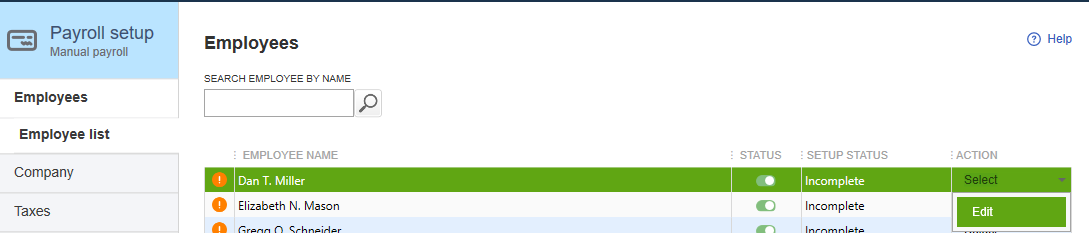
- Next, choose the desired employee's name. Then, click the drop-down arrow under the Action column and pick Edit.
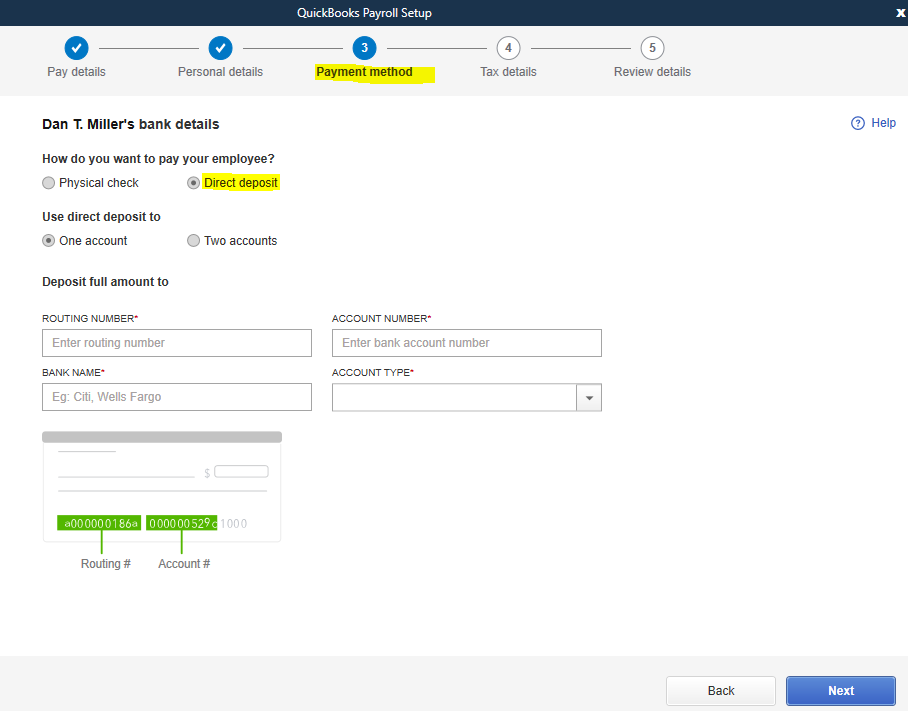
- Keep clicking Next until you reach the section labeled Set Up [Employee's Name] direct deposit information.
- In the Payment method section, choose Direct deposit. Then, determine the number of accounts you wish to utilize and input the employee's bank details accordingly.
- Finally, follow the instructions displayed on the screen to save the provided information.
After completing the necessary steps, you can now utilize direct deposit to compensate your employees. Feel free to check this article for more details: Set up your company payroll for direct deposit.
Please feel free to reach out if you have any further questions or concerns regarding the process. I want to ensure that we can resolve this matter satisfactorily. Take care and stay safe at all times!

