January 8, 2019
Solved

Social Security and Medicare Deductions

  • January 8, 2019
  • 6 replies
  • 0 views

I downloaded a required update Jan 3 and then created payroll. Social Security and Medicare deductions were double what they should have been on employee checks. How do I prevent this from happening again and correct this on checks that have already been cashed? QB shows employee and employer each at 6.2% for SS and Medicare at 1.45%.

Best answer by

Hi there, Melissa7,


I want to ensure your taxes are calculating correctly.


There are a few reasons why SS and Medicare taxes are calculating incorrectly. Consider the following:

  • QuickBooks is not updated or there is an internet interruption during the update.
  • Using the incorrect tax table version.
  • Employee's YTD is off.

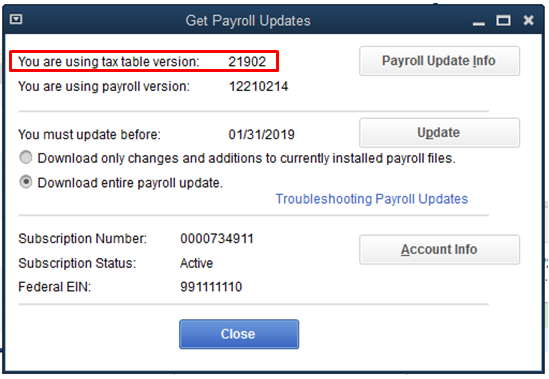
To isolate the problem, let's make sure you're able to download the latest tax table update version 21902. You can check that by following these steps:

  1. Go to the Employees tab.
  2. Select Get Payroll Updates.
  3. You'll see the tax table version beside the Payroll Update Info button. (Please see screenshot.)
 

If you're using the correct version, let's check if there are any discrepancies or zero deductions for the SS and MD amounts on the employee's paycheck. We can use the Payroll Detail Review report to verify the taxes withheld and the difference. Here's how:

  1. Go to the Reports menu.
  2. Select Employees & Payroll.
  3. Choose Payroll Detail Review.
  4. Click Customize Report tab (if you want to run a specific report).
  5. Choose the Display tab and select the date range from drop down list or fill in the From and To dates.
  6. In the Filters tab, choose Payroll Item from the Filter section. Select Multiple payroll items in the Payroll Item drop-down.(See screenshot.)
  7. Select Medicare Company, Medicare Employee, Social Security Company and Social Security Employee. (See screenshot.)
  8. Once done, click OK twice.

On the report, review if the checks have the correct deductions. You can get the correct calculation by multiplying the total wage base of each payroll items to its corresponding tax rate. If the figures are correct, then there is no action to be taken next.


However, if QuickBooks overwithheld the SS and MD taxes, there are 2 ways to remedy the situation. Here's how:

  • Option 1: Apply the taxes to your next paycheck. QuickBooks has an automatic calculation feature for rate-based taxes deducting overpaid taxes to your next payroll run.
  • Option 2: You can offset the overpayment by creating a liability adjustment. Here's an article with the complete steps on how to create an adjustment: Adjust payroll liabilities

That should get you on the right track, Melissa7. Please feel free to let me know if there's anything you need help with. I'll be glad to work with you again. Have a good one!


6 replies

January 8, 2019

That's correct.  The company and employee items are both 6.2% and for medicare both rates are 1.45%.

See  https://www.irs.gov/taxtopics/tc751


You should be familiar with these rates as well as the other information from the Circular E before attempting payroll on your own: https://www.irs.gov/publications/p15

Melissa7Author
January 8, 2019

I've been doing this for almost 20 years w/o issues but QB deducted the wrong amounts without me changing anything from one payroll to the next other than their required update.

January 8, 2019

RE: I've been doing this for almost 20 years w/o issues but QB deducted the wrong amounts.


Based on your description, the amounts are right.  What's wrong with them?

July 22, 2020

I am having a similar problem with an update downloaded today.  After the update a payroll was created and the Social Security and Medicare deductions were correct on the employer side but off on the employee side.  How can I fix the taxes?

July 22, 2020

Thanks for joining in on the thread, llcincar.


There's a possibility that these updates are incomplete. Hence, the calculations are off. It must have been blocked by your system firewall or security. I'd recommend changing these settings to suit QuickBooks. You can use this link for reference: Set up firewall and security settings for QuickBooks Desktop.


After that, we can update the following components again:

Then, we can delete and recreate the paycheck. This should recalculate the taxes correctly.


Let us know how this goes so we can further assist you. Have a great day!


September 10, 2020

Today is 09/10/2020. 


When we did the taxes this morning, it took no FICA taxes out. We did an update then it took double the FICA taxes out.


I have verified everything is correct with the payroll. Did a payroll check and the only discrepancy is from today's check.


I am a QB Pro Advisor and been using QB Payroll for 15 years. This is the first year we have had to update the payroll each week to make sure everything is correct. First it took out no taxes and now double.


Please fix this issue ASAP!!


Sandy Joscelyn

KlentB
September 11, 2020


Hi there, Pavati.


Generally, this situation happens when QuickBooks Desktop was unable to calculate your taxes on your previous payroll (first attempt). After the update has been applied, the program automatically corrects or calculates the taxes (including the taxes from your previous payroll) that's why the amount is doubled.


Since you've already made sure that everything is correct in your payroll and updated QuickBooks Desktop to the latest release, I encourage getting in touch with our technical supports. This way, we'll be able to pull up your account in a secure environment and then run a series of tests to rectify the underlying issue:


  1. Open QuickBooks.
  2. Go to Help, then select QuickBooks Desktop Help.
  3. Click Contact Us.
  4. Enter your concern, then select Continue.
  5. Choose Start messaging with a support expert.

You may check our support hours first to ensure that we address your concerns on time.


Additionally, here's an article that you can read to help track where your business stands in terms of employee expenses: Customize payroll and employee reports.


If there's anything else that I can help you with, please don't hesitate to insert a comment below.

January 5, 2021

Why do my reports show I paid the correct Social Security and Medicare but when I print the quarterly report it shows should have paid more Social Security and Medicare?

Kristine Mae
January 5, 2021

I'm here to help you fix it, Quarterly differences.


First, let's ensure both reports have the same dates and accounting method. It helps us sort out your concern.


Then, if everything is the same but showing a different amount, I'll share an article to fix this unexpected behavior: Troubleshoot PDF and Print problems with QuickBooks Desktop.


You can get back to this thread after trying the steps. We're just around to help you. Take care!

January 14, 2022

I am working on reconciling my W3 year end filings and one client was off-after looking through several reports and paychecks I have 2 employees that each paycheck (started Dec 31 2021) Medicare is being doubled on the employee side.  I have updated QB's I have updated payroll and it's still doing this.  What's the deal-none of the other employees are doing this.  Oh and I can not click on F1 for help-nothing come up.  Really when I need a live person to help fix this no one is in site.   What is Intuit doing? Oh and I also rebuilt the file-still doing this.


Any good help-please nothing but quality help is needed.

Jen_D
January 14, 2022

Thanks for joining this conversation, @kerryboersma.


I want to help you resolve this payroll concern you're having, before it gets reported to our Support Team. If you already followed the steps in the accepted solution post and still having the same problem, try this one last step. For this, we need to check if there is a duplicate Medicare Item in QuickBooks. Follow the steps below:


  1. Go to the Employees menu and choose Employee Center.
  2. Double-click the name of the employee with the double Medicare deduction.
  3. Go to Payroll Info then the Taxes button.
  4. Click the Other tab.
  5. Scroll-down on the Item Name section and see if there is a Medicare item there.
  6. If you have, click to highlight it and press Delete.
  7. Once done, click OK.


If there isn't nay duplicate item, we highly recommend contacting our Support Team to help check on this for you.


To get our support, follow these steps:


  1. On your QuickBooks company file, click the Help menu.
  2. Tap the QuickBooks Desktop Help option.
  3. Press Contact us on the pop-up box.
  4. Click on the Search for Something else button then type your concern in the Ask us anything box.
  5. Hit Search, then scroll down to get your contact options.


I'm also adding this article about our contact options and support availability for your reference: Contact QuickBooks Desktop support


I want to make sure this is taken care of and I'll be right here if you need any help with QuickBooks Desktop payroll.

October 20, 2022

Yep, I had Social Security Employee in the employees Payroll Info tab under Taxes... and it was calculating Social Security Employee TWICE on paychecks for an entire quarter for one employee. Thanks for the help, Jen_D!

December 8, 2022

I'm doing a bonus only payroll. I  have one person who now that I'm trying to run her, medicare and SS are zeroed out for both employee and employer.


I changed absolutely NOTHING on the employee's withholdings and all of that, it just disappeared.

December 8, 2022

I appreciate you for joining the thread and sharing your concerns, @keithCDC.


The first thing we can do is to ensure that QuickBooks Desktop is up-to-date to enable payroll to run the Medicare and SS of your employee. With this, you'll always have the latest features and fixes.


Then, update your tax table to have the current and accurate rates and calculations. I'll show you how:


  1. Choose Employees, then Get Payroll Updates.
  2. Check the Download Entire Update box.
  3. Select Download Latest Update. When the installation is finished, an information-based window appears.


From there, revert your paycheck if an error needs to be fixed. You can refer to this article for detailed steps: Save or revert pending payroll checks.


For future reference, you can pull up payroll reports to get helpful information about your employees. To view this, feel free to visit this article for guide: Create a payroll summary report in QuickBooks.


Keep me posted if you need further assistance with payroll. I'll ensure that you get back to business in no time. Have a great day!

December 8, 2022

I use QBO and the instructions you've provided me do not work for this. I had two people that were going through a different issue and this only happened to one of them so I don't believe your fix is helpful.