November 23, 2021
Solved

SSN Report

  • November 23, 2021
  • 2 replies
  • 0 views

How do I run a report that shows the social security numbers for all employees?

Best answer by JenoP

I'd be glad to help you get a report that you need, Elise.


You can run the Employee Contact List report. It has a column that shows the Social Security Number for all employees. Here's how:
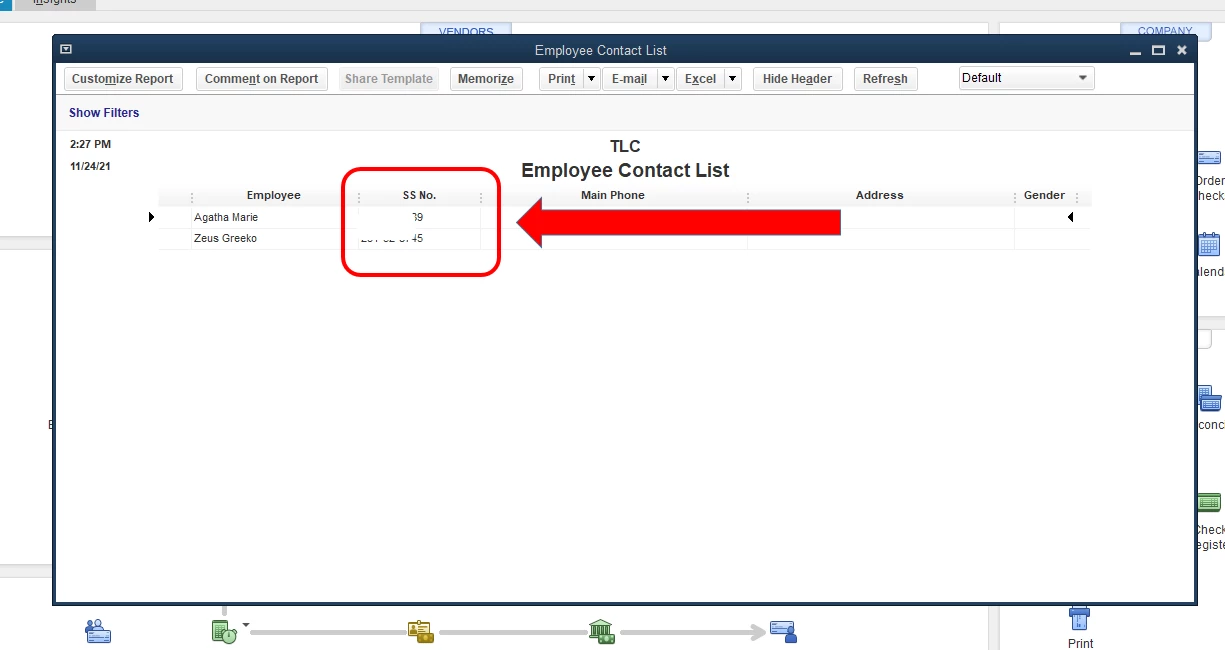
 

  1. Go to the Reports menu.
  2. Scroll-down to Employees and Payroll.
  3. Select Employee Contact List.


You can also save these guide articles and references with you in case you might need them in your future tasks:


Please know that we are always here if you need anything else. We'll make sure that all your concern are taken care of.

2 replies

JenoP
JenoPAnswer
November 23, 2021

I'd be glad to help you get a report that you need, Elise.


You can run the Employee Contact List report. It has a column that shows the Social Security Number for all employees. Here's how:


  1. Go to the Reports menu.
  2. Scroll-down to Employees and Payroll.
  3. Select Employee Contact List.


You can also save these guide articles and references with you in case you might need them in your future tasks:


Please know that we are always here if you need anything else. We'll make sure that all your concern are taken care of.

March 18, 2024

Is there a new way to do this?  This isn't working anymore.

March 18, 2024

Thank you for joining this thread, Rachel. I can assist with how to fix and run the report that contains SSNs for all employees in QuickBooks Desktop.
 

I appreciate you for all you've done on your end to pull up the report. However, you can still pull up the report by following the steps mentioned above by my colleague.


On the other hand, if the report is not working, have you encountered any errors?


If so, it would be great if you could provide us with a screenshot of the error you've encountered.


You can visit our article on fixing data damage on your QuickBooks Desktop if you still have errors running the report.


You can also check on this article to learn how to customize your reports: Customize reports in QuickBooks Desktop


Don't hesitate to comment if you still have concerns running the report. I'm always here to help.

July 31, 2024

Is there a way to get full SS #s?

I need to file MN UI report and need full SS#s...
