March 2, 2021
Solved

State pension set up in QB Desktop

  • March 2, 2021
  • 1 reply
  • 0 views

Does anyone know how a state pension 401(a) plan should be set up? Has the same tracking system as a 401k but it should not show on W2 at the end of the year. I have it as "Others" and marked Fed and State taxes, however it does not reduce the amount in box1 and it should.

Best answer by ReyJohn_D

You've come to the right place to get help with the 401 (a) plan set up, @mariceacut.


Right now, the tax tracking type for 401 (a) state pension isn't supported in QuickBooks Desktop (QBDT). Thus, it doesn't reduce the amount in box 1 of your W-2 form. The only plans available are stated in this article: Retirement benefits in QBDT.


Meanwhile, you can consult your accountant or tax advisor for the best advice on how to handle this. This way, you can keep your books correct always. If you don't have one, we'll help you look for an expert through our Find-an-Accountant tool.


Here's how:


  1. Go to this site: Find-a-ProAdvisor.
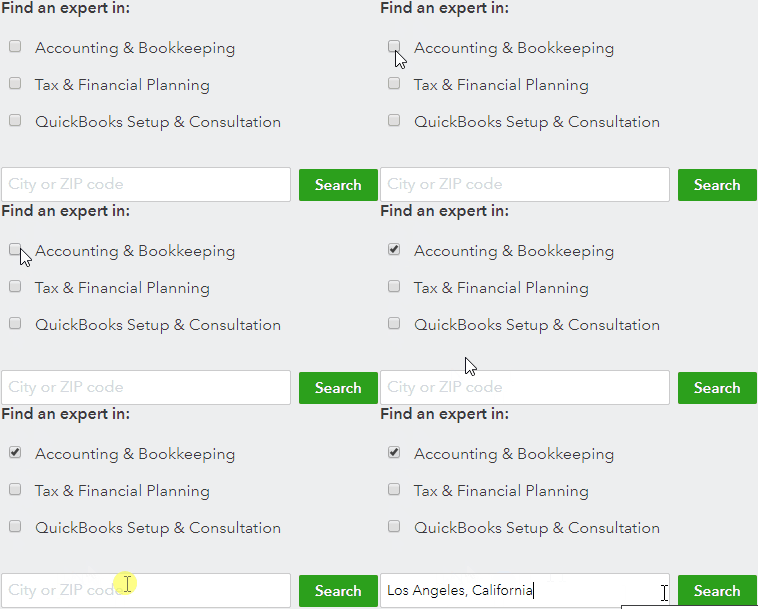
  2. In the Find an expert in section, select either the Accounting and Bookkeeping or Tax and Financial Planning option.
  3. Enter a City or ZIP code on the search field, and then click Search.
  4. Browse through the results and find one that works best for your business. You can click on each ProAdvisor's profile to learn more about them.
  5. When you're ready, you can fill out the Send a message form to get in touch with one of them.


Also, I'd encourage you to visit our Firm of the Future site to keep abreast with the recent happenings and product developments.


When you're ready, you can start filing your taxes to submit them on time and stay compliant.


I've got you covered if you have other payroll concerns in QuickBooks. I'm here to help you out.

1 reply

ReyJohn_DAnswer
March 2, 2021

You've come to the right place to get help with the 401 (a) plan set up, @mariceacut.


Right now, the tax tracking type for 401 (a) state pension isn't supported in QuickBooks Desktop (QBDT). Thus, it doesn't reduce the amount in box 1 of your W-2 form. The only plans available are stated in this article: Retirement benefits in QBDT.


Meanwhile, you can consult your accountant or tax advisor for the best advice on how to handle this. This way, you can keep your books correct always. If you don't have one, we'll help you look for an expert through our Find-an-Accountant tool.


Here's how:


  1. Go to this site: Find-a-ProAdvisor.
  2. In the Find an expert in section, select either the Accounting and Bookkeeping or Tax and Financial Planning option.
  3. Enter a City or ZIP code on the search field, and then click Search.
  4. Browse through the results and find one that works best for your business. You can click on each ProAdvisor's profile to learn more about them.
  5. When you're ready, you can fill out the Send a message form to get in touch with one of them.


Also, I'd encourage you to visit our Firm of the Future site to keep abreast with the recent happenings and product developments.


When you're ready, you can start filing your taxes to submit them on time and stay compliant.


I've got you covered if you have other payroll concerns in QuickBooks. I'm here to help you out.
